What should you look for when buying?
When practising on a virtual city circuit, the key factors are controllable braking feel, the right connections and a stable setup. Information from Fanatec, Thrustmaster, MOZA Racing and Heusinkveld shows that sensors, connection options and mounting requirements vary by model.
Position-sensing brake
A good fit if: you’re looking for a simple two-pedal set to start with or have limited mounting options.
Bear in mind: the standard Fanatec CSL Pedals set doesn’t include a load cell. According to Fanatec, standalone USB operation on a PC requires additional hardware.
Adjustable load-cell brake
A good fit if: you want your applied force to register as an input during repeated braking practice, and would like to adjust the resistance.
Bear in mind: check the connections and what’s included with the specific model. The sensor type alone doesn’t guarantee faster lap times.
Load-cell set for a fixed rig
A good fit if: you already have a fixed cockpit and want to fine-tune the pedal angle and resistance.
Bear in mind: Heusinkveld specifies a full-frame rig and Windows PC compatibility as requirements for the Sprint set.
| What you’re looking for |
What to check when buying |
Who is it important for? |
| Controllable braking |
Check the sensor type and adjustable resistance of the exact model. Don’t assume that the sensor load is the same as the actual force at the pedal. |
If you practise braking points repeatedly on the same virtual city circuit, you’ll want to reproduce your inputs consistently. Around 36% of consumers put braking control first. |
| Connections |
Check that the pedal model, cable, wheelbase, platform and game are compatible. For using T-LCM on a console, Thrustmaster specifies an RJ12 connection to a Thrustmaster wheelbase. |
If you want to keep using your existing wheel or console, the connection needs to suit your setup. Around 29% of consumers prioritise connection compatibility. |
| A stable setup |
Check the mounting points, surface and seat movement for the specific set. Heusinkveld specifies a full-frame rig for Sprint; Fanatec also lists bracing the CSL Pedals against a hard surface. |
If you don’t have a fixed rig yet, you’ll want to stop the pedals or seat from moving when you brake. Around 21% of consumers put mounting first. |
| What’s included and adjustability |
Check the exact set variant, which pedals are included and whether add-ons are compatible. According to the manufacturer, the MOZA SR-P Clutch isn’t interchangeable with SR-P-Lite add-ons. |
If you need a clutch or want to make adjustments later, you’ll want to know what’s included and which add-on is compatible. Around 14% of consumers prioritise what’s included and adjustability. |
Suitable products at Joybuy
The following products include racing wheel and pedal bundles, as well as a MOZA option for shoppers looking for an adjustable load-cell brake. Check each product to make sure the pedals and connections suit your setup.
 No image available
Logitech G923 SE racing wheel and pedal bundle, Black
An option if you’re looking for a wheel and pedals together; the product name lists PlayStation, Xbox, PC and Mac. This is a bundle, not a separate pedal set.
View at Joybuy
 No image available
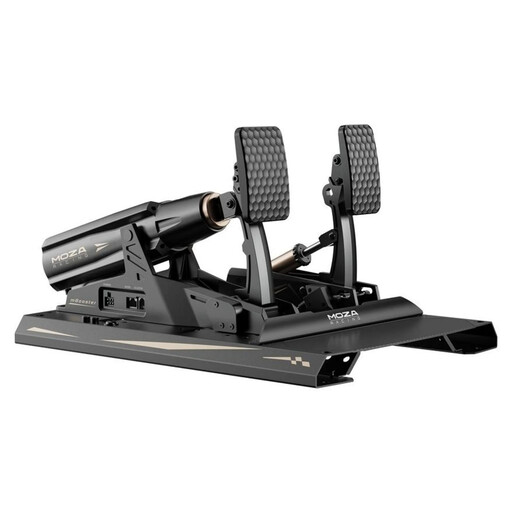
MOZA Racing RS082, Terrace, Black, Aluminium
An option for shoppers looking for an adjustable load-cell brake. The product information says it must be securely mounted to a rig before use; also check exactly what’s included and which connections your setup needs.
View at Joybuy
Frequently asked questions
Does using a single monitor affect which pedals I should buy?
No, the number of monitors alone doesn’t determine which pedal technology you need. If you use iRacing, the iRacing Support guide recommends measuring your eye distance and monitor width to calculate the display settings for a single monitor. This is a separate step from choosing your pedals.
How do I connect T-LCM pedals?
According to Thrustmaster, T-LCM pedals connect to a console via RJ12 to a Thrustmaster wheelbase. On a Windows PC, the manufacturer lists either RJ12 to the wheelbase or USB directly to the PC. Thrustmaster recommends connecting only one of these cables at a time and leaving the pedals unloaded when connected via USB.
What are your rights when shopping online in Germany?
For a distance purchase from a business seller, you generally have a 14-day right to cancel, starting from delivery; exceptions and return conditions apply. Separately, if goods are faulty, you have a statutory right to a minimum two-year guarantee from the seller. This information from the European Union concerns your statutory rights, not a voluntary manufacturer’s warranty.
How should I dispose of old electronic pedals?
The German Environment Agency explains that waste electrical and electronic equipment must be collected separately from unsorted household waste. Take your old pedals to an appropriate collection point rather than putting them in your household bin.


