What should you look for when buying?
Start by checking the pedals and mounting stability, then consider the type of feedback and platform compatibility. Set up multiple monitors separately through your PC and game.
| Buying criterion |
What to look for |
Who should consider it? |
| Pedal control |
Check the pedal position and mounting, and make sure a Load Cell brake is actually included. |
If I want to control the throttle and brake consistently on corner exits, I’ll check how the pedals can be adjusted and mounted. Around 33% of consumers put pedal control first. |
| Steering feedback and compatibility |
Check the drive type, exact model variant, and compatibility with your platform and game. |
If suitable steering responses matter more to me than a single torque figure, I’ll also check which games and platforms are supported. Around 27% of consumers prioritise steering feedback and compatibility. |
| Multi-monitor view |
Check that the game supports it, and take your viewing distance, monitor width and angles into account when setting it up. |
With three displays, I want to set up the field of view and seating position to suit me, whatever racing wheel I’m using. Around 20% of consumers prioritise the monitor view. |
| Mounting and what’s included |
Check whether a clamp is included, where the mounting points are, and whether there’s enough space for the pedals and monitors. |
If I’m starting at a desk or planning to add a rig later, I want to know what’s included in the set and how the base can be mounted. Around 20% of consumers prioritise mounting and what’s included. |
Racing wheels at Joybuy
The Joybuy products below include racing wheel sets for PC and a range of console platforms. For each model, check the exact platform compatibility, what’s included and whether the mounting options suit your set-up.
 No image available
Logitech G923 SE Racing Wheel + Pedals Bundle, PlayStation/Xbox/PC/Mac, Black
For practising corner exits, the product description says this set includes three pedals, with a progressive brake pedal.
The description lists Force Feedback, a 900° rotation angle and built-in desk clamps. Check that your desk can provide a secure mount.
View at Joybuy
 No image available
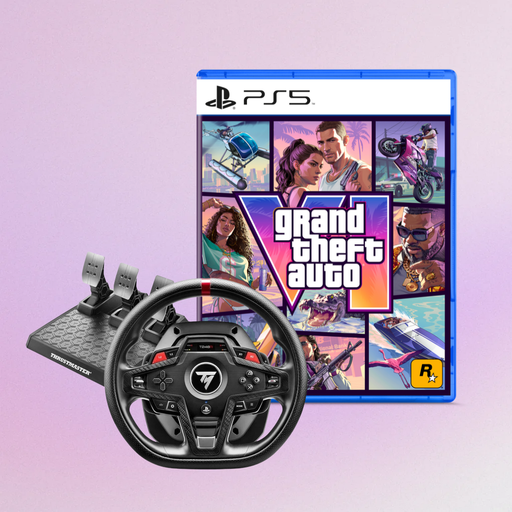
Thrustmaster T248R Racing Wheel, Black (PS5/PS4/PC) + Grand Theft Auto VI PS5 German Edition (USK), Code in Box, Vice City Pack Pre-order Bonus
This set may be worth considering if you’re looking for a racing wheel for one of the platforms listed in the product title.
The product title lists PS5, PS4 and PC, as well as the bundled Grand Theft Auto VI PS5 German Edition. Check the exact bundle version before buying.
View at Joybuy
 No image available
Thrustmaster T128-P Force Feedback Racing Wheel, Black (PC/PS4/PS5)
If you want to practise using the throttle and brake at your desk, check that the clamp fits your desktop.
The product description lists HYBRID DRIVE with a belt and gear mechanism, an adjustable rotation angle of 270° to 900°, and two magnetic pedals. The clamp is designed for desktops up to 5.5 cm thick.
View at Joybuy
 No image available
Thrustmaster T598-P Direct Axial Drive Force Feedback Racing Wheel (PS5/PS4/PC)
This set may suit you if you’re looking for Direct Axial Drive and a pedal set for a securely mounted set-up.
The product description lists a Raceline Pedals LTE set and recommends mounting the wheelbase and pedals to a sturdy structure.
View at Joybuy
Frequently asked questions
Can a racing wheel connect to three monitors by itself?
No. For iRacing, iRacing Support explains that displays are configured through your PC and graphics card, either as a window across three displays or as a combined display. Check the support offered by each of your other games separately.
How do I set up the view across three monitors in iRacing?
From your usual seating position, measure the distance to the centre display, the monitor widths with and without bezels, and the angles between the displays. Enter these measurements in iRacing’s monitor settings.
How can I tell whether the pedals and wheelbase are ready to use without buying extras?
Compare what’s included in the exact bundle version with your set-up. The documented MOZA R5 Racing Bundle includes the wheel, SR-P-Lite pedals and a desk clamp; a wheelbase sold separately is not the same bundle.
What are your rights in Germany if an online purchase is faulty or you want to cancel it?
The statutory rights you have if a product is faulty are separate from a voluntary guarantee. According to the Verbraucherzentrale, consumers generally have a 14-day right to cancel online consumer contracts. Exceptions may apply, and the terms of the specific contract should be checked.
What does the CE marking mean for sim racing hardware?
According to the European Commission, CE marking is required only for products covered by the relevant harmonised EU rules. It is the manufacturer’s declaration of conformity, not an independent performance test of the racing wheel. The rules that apply to a specific device depend on the product.


