Who this guide is for

Animators who alternate between sitting and standing

You need a screen position that can be adjusted to suit your working height. The German Federal Institute for Occupational Safety and Health describes the dynamic alternation between sitting and standing as sit-stand movement.

Animators working to strict colour sign-off requirements

If your project has a specified output format, check its colour gamut and the calibration options available to match it. ASUS and EIZO list relevant gamut and calibration features for certain models.

Animators working with large timelines

If you need to see the preview, timeline and tools at the same time, resolution, screen size and your animation software’s scaling are all important things to check. Manufacturers including BenQ, ASUS and EIZO list 27-inch, 3840 × 2160-pixel models.

What to consider when buying

What matters What to check before buying Who it matters most to
Screen positioning Check the adjustment range and tilt in both sitting and standing positions. If you plan to use a monitor arm, make sure it can be attached to your desk. If I switch between sitting and standing, I want to be able to position the screen comfortably in either position; around 28% of consumers put screen positioning first.
Colour reproduction Check the target colour gamut, available colour modes and calibration options for the specific model. If I sign off colours for a specified output format, the monitor needs to match that colour gamut and my calibration workflow; around 22% of consumers put colour decisions first.
Workspace Check the resolution and screen size of the exact model, as well as how clearly your software’s scaling displays on screen. If I want to arrange the preview, timeline and tools side by side, usable screen space matters most to me; around 22% of consumers prioritise this.
Computer connections Check the video signal, power delivery required and any hub features against the connections on your computer. If I want to connect my existing computer, the video, data and, if needed, power connections must be compatible with it; around 17% of consumers prioritise computer connectivity.
Features Check which features your workflow actually requires and whether you’ll need extra accessories for your preferred mounting option. If I want to keep my animation workflow as simple as possible, I don’t want features I won’t use; around 11% of consumers prioritise having the features they need.

Common monitor-buying misconceptions

  • ‘Animation mode’ automatically means colours are ready for sign-off

    BenQ lists an Animation mode as well as sRGB and Rec.709 specifications for the PD2705U. However, the mode alone doesn’t tell you whether colour reproduction will suit every output format or calibration workflow.

    First, decide on your target format and sign-off requirements. Then check the specific model’s colour modes and calibration features against them.

  • A stand and an arm are the same configuration

    BenQ describes the PD2705U as having a height-adjustable stand, while the separate PD2705UA model comes with an ErgoArm. Don’t assume that features listed for one model apply to the other.

    Compare the full model number and, before using an arm, check that it’s compatible with your desk.

  • A high refresh rate is no substitute for colour management

    Dell lists 120 Hz for the U2725QE, while EIZO describes the CG2700X as having an integrated self-calibration sensor. These are different features that meet different needs.

    Choose a refresh rate to suit your workflow, and check colour gamut and calibration separately.

Brands worth considering

BenQ

The DesignVue PD2705U and PD2705UA are worth considering for animation work, with different options for positioning the screen.

  • BenQ lists 4K, an Animation mode, 99 % sRGB, 99 % Rec.709 and a height-adjustable stand for the PD2705U.
  • The PD2705UA is a separate model with an ErgoArm. The arm specifications don’t apply to the PD2705U, and manufacturer specifications are no substitute for independent testing.

ASUS

The ProArt PA279CRV is worth considering for workflows that call for 4K, a documented wide colour gamut and USB-C.

  • ASUS lists 99 % Adobe RGB, 99 % DCI-P3, 96 W USB-C Power Delivery and 130 mm of height adjustment for the PA279CRV.
  • These manufacturer specifications don’t prove the colour accuracy of every individual unit. Check that the colour gamut and calibration workflow suit your output process.

EIZO

According to EIZO, the ColorEdge CG2700X is designed for professional photo, video and graphics workflows that require calibration.

  • EIZO specifies an integrated self-calibration sensor and several colour modes.
  • Whether these features are necessary for your animation workflow depends on your colour sign-off requirements and the calibration process you use.

Dell

The UltraSharp U2725QE is worth considering for workstations that need a computer hub as well as a good display.

  • Dell lists 4K, a Thunderbolt hub, height adjustment and 120 Hz for this model.
  • Hub features and refresh rate don’t guarantee that the colour gamut and calibration will suit every animation sign-off requirement. Check that the connections are compatible with your computer.

Joybuy monitors for animation workstations

This Joybuy selection includes 4K monitors for animation workstations. Screen space, height adjustment and connectivity vary by model.

MSI PRO MP273UPDE E6, 27-inch, 4K UHD

MSI PRO MP273UPDE E6, 27-inch, 4K UHD

For a sit-stand workstation where you need a height-adjustable stand and a 4K workspace.

Joybuy’s product details list a 27-inch screen, 3840 × 2160 pixels, an IPS panel, 10-bit colour depth and 110 mm of height adjustment. HDMI and DisplayPort are listed as connections.

View at Joybuy

INNOCN 40C1U, 40-inch, 5120 × 2160

INNOCN 40C1U, 40-inch, 5120 × 2160

For anyone who wants to arrange the preview, timeline and tools across a wide workspace.

Joybuy’s product details list a 40-inch screen, 5120 × 2160 pixels, an IPS panel, 100 Hz and 120 mm of height adjustment. USB-C with 65 W Power Delivery, HDMI and DisplayPort are also listed.

View at Joybuy

INNOCN CB27U1, 27-inch, 4K UHD

INNOCN CB27U1, 27-inch, 4K UHD

For a compact animation workstation where you need 4K resolution and an adjustable stand.

Joybuy’s product details list a 27-inch screen, 3840 × 2160 pixels, an IPS panel, 120 Hz and 150 mm of height adjustment. USB-C with 90 W Power Delivery is also listed.

View at Joybuy
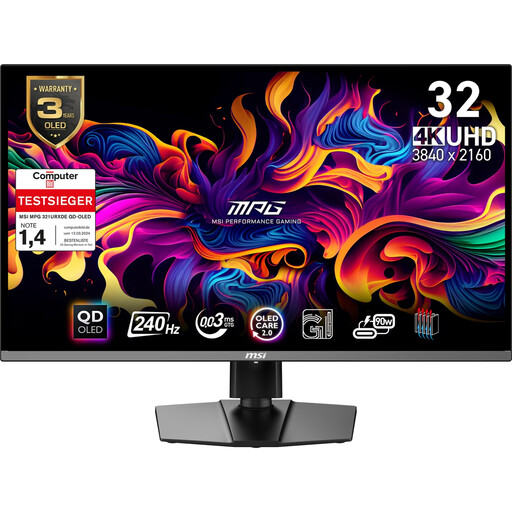
MSI MPG 321URX QD-OLED, 31.5-inch, 4K UHD

MSI MPG 321URX QD-OLED, 31.5-inch, 4K UHD

For an animation workstation where a larger 4K screen and a height-adjustable stand are important.

Joybuy’s product details list a 31.5-inch screen, 3840 × 2160 pixels, QD-OLED and 99 % DCI-P3. A height-adjustable stand is also listed.

View at Joybuy

ASUS ROG Swift OLED PG32UCDMR, 32-inch, 4K UHD

ASUS ROG Swift OLED PG32UCDMR, 32-inch, 4K UHD

For a large 4K workspace, with USB-C charging to your computer if you need it.

Joybuy’s product details list a 32-inch screen, 3840 × 2160 pixels, OLED, 99 % DCI-P3 and 10-bit colour depth. USB-C with 90 W Power Delivery and a height-adjustable stand are also listed.

View at Joybuy

Frequently asked questions

Do I need to stand at my desk all day to animate?

No. The German Federal Institute for Occupational Safety and Health describes sit-stand movement as alternating between standing and sitting, and notes that standing for long periods can be tiring. When choosing a monitor, check whether you can adjust the screen to suit your working positions.

Is Animation mode enough for colour sign-off?

Not necessarily. Check that the colour modes and calibration options on the specific model suit your target format and sign-off process. Animation mode alone won’t answer that question.

How do I clean a BenQ LCD monitor?

BenQ recommends unplugging the monitor before cleaning it, then using a slightly damp microfibre cloth and applying only light pressure. For other models, follow the manufacturer’s care instructions.

What should I know about returns and faults?

The German consumer advice centre explains that online purchases generally come with a 14-day right to cancel, and that you must notify the other party to the contract if you wish to cancel. Your statutory rights if goods are faulty are separate from any voluntary guarantee.

Do German rules for display screen equipment also apply to personal animation projects?

Not in every case. ASR A6 applies to display screen workstations within its defined scope and expressly excludes private use outside workplaces and teleworking arrangements. Whether a particular workstation is covered depends on how it is classified in practice.