First, choose a controller that works with your console or PC and the skateboarding game you want to play. Then check separately whether you’ll connect your headphones to the controller or directly to your gaming device. For games with dual-stick controls, two easy-to-reach analogue sticks are important too.
Who this controller-buying guide is for
Skateboard game players with a wired headset
If you want to hear game audio or chat through headphones connected to your controller, the socket, plug and connection to your gaming device all need to be compatible. Microsoft lists a 3.5 mm headset socket on the Xbox Wireless Controller. The supported audio route depends on the device and connection you’re using.
Players using dual-stick controls
In Session: Skate Sim, according to Xbox, each stick controls a foot. So look for two easy-to-reach analogue sticks, and make sure your game and platform support the controller.
PC players who like to game on the sofa
If you want to move freely while playing, you can connect your controller wirelessly and connect your headphones to your PC separately. Whether the controller’s headset socket works depends on the controller and how it’s connected.
What to look for in a controller for skateboarding games with headphones
Xbox with a headset connected to the controller
A good fit if: You play on Xbox and want to connect a compatible headset to the controller socket.
Worth considering: On PC, the audio route needs to work with your specific connection. The presence of a socket alone doesn’t guarantee audio will be transmitted over every type of connection.
PS5 or PC with DualSense
A good fit if: You already play on PS5, or want to use a DualSense with a compatible PC.
Worth considering: According to PlayStation, the DualSense headset socket requires a wired controller connection when used with a PC or Mac.
PC with headphones connected to the computer
A good fit if: Your headphones are already connected to your PC and you want to keep controller input and audio separate.
Worth considering: Check that the specific game supports your controller. A socket on the controller isn’t essential for this audio setup.
| Criterion |
What to check before buying |
Who it matters to |
| Headphone audio route |
Check that the plug, microphone requirements, platform and supported connection all work together. Sony requires a wired connection to use the DualSense headset socket with a PC or Mac. |
If you want to hear game audio or chat directly through your controller, you’ll need a compatible headset and connection. Around 36% of consumers put the headphone audio route first. |
| Platform and game |
Check the Xbox or PlayStation generation, your PC operating system and whether the specific game supports the controller. Easy Day Studios states that a controller is required to play Skater XL on PC. |
Check compatibility in advance to make sure your controller, device and skateboarding game work together. Around 29% of consumers prioritise this check. |
| Dual-stick controls |
Check how easy both analogue sticks are to reach and how they feel to use. Only consider extra buttons if you plan to use them. |
If a game uses both sticks to control your feet, two comfortable, easy-to-reach analogue sticks are essential. Around 21% of consumers focus on these controls. |
| Cable setup and freedom of movement |
Consider the distance to your gaming device, cable length and headphone connection together. A wireless controller connection doesn’t automatically mean wireless audio through the controller socket. |
If you want to play on the sofa without a controller cable, plan your connection to the gaming device and your audio setup separately. Around 14% of consumers prioritise freedom of movement. |
Common controller-buying misconceptions
-
Bluetooth controls don’t automatically mean Bluetooth audio through the controller
According to PlayStation, the DualSense headset socket only works with a wired controller connection on PC and Mac. On Xbox, too, the supported audio route depends on the device and connection.
Before you buy, decide separately how you’ll connect your controller and headphones to your gaming device.
Depending on your setup, you may need a different headphone connection or have to connect the controller via USB.
-
Two analogue sticks don’t guarantee that every game will support the controller
Game controls and compatibility between a controller, platform and title are separate considerations. Skater XL requires a controller on PC, but you’ll still need to check compatibility with your specific device.
Check both the platforms listed for the controller and whether the skateboarding game supports it.
-
A product title doesn’t always clearly identify the colour or variant
One DualSense product page is described as white, but its description refers to a “Sterling Silver finish”, which conflicts with the variant in the title.
If the details don’t match, check the full model name, colour and what’s included before placing your order.
Key controller brands at a glance
Xbox/Microsoft
Xbox controllers for Xbox consoles and Windows PCs. A relevant choice if you want to use the 3.5 mm headset socket.
- Microsoft lists wireless connections for compatible devices, as well as a socket for compatible headsets.
- On PC, the audio route needs to work with your specific controller connection.
PlayStation/Sony
The DualSense is particularly relevant if you play on PS5 or want to use it with a supported PC game.
- Sony lists USB and Bluetooth connections on PC. Available features may depend on the game.
- According to Sony, you need a wired controller connection to use the headset socket on a PC or Mac.
GameSir
The G7 SE is a wired option for Xbox and Windows, while the G7 Pro offers a different set of features.
- GameSir lists Hall Effect sticks, back buttons and a 3.5 mm socket for the G7 SE.
- The G7 SE connects via USB. These features don’t prove it performs better in skateboarding games.
8BitDo
The Ultimate Wired Controller for Xbox is a wired option for Xbox and Windows.
- 8BitDo lists back buttons, profiles and a CTIA-compatible audio socket.
- This model is wired and has a listed cable length of 2.5 m.
PowerA
The documented Enhanced Wired Controller for Xbox Series X|S is a wired alternative with a headset socket.
- PowerA lists two mappable extra buttons and a 3 m cable for this variant.
- These details don’t prove better control in skateboarding games or confirm that the variant is available in Germany.
Controller selection at Joybuy
This selection includes wired controllers for Xbox and Windows, including options for routing audio separately through your PC.
 No image available
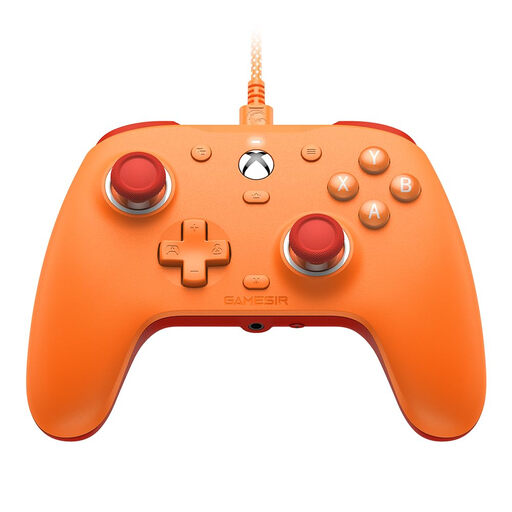
GameSir G7 SE (Orange)
A wired option if you’re looking for an Xbox or Windows controller with a headset socket.
For Xbox Series X|S, Xbox One and Windows 10/11; with Hall Effect sticks and a 3.5 mm audio socket. Wired connection: you’ll need to be seated within reach of your gaming device.
View at Joybuy
 No image available
GameSir G7 HE (Black)
A wired option for Xbox and Windows if you’re looking for a controller with Hall Effect sticks and a headphone socket.
For Xbox Series X|S, Xbox One and Windows 10/11; with a 3.5 mm audio socket. Connects via a 3 m USB-C cable.
View at Joybuy
 No image available
Razer Wolverine V3 Tournament Edition (White)
A wired option for Xbox and Windows if you’d prefer to connect your headphones directly to your PC.
USB controller for PC and Xbox; connects via a detachable 3 m USB-C cable.
View at Joybuy
Frequently asked questions
Does the DualSense headphone socket work over Bluetooth on PC?
No. PlayStation specifically states that a wired controller connection is required to use the DualSense headset socket on PC and Mac. If you want to play wirelessly, you can connect your headphones to your PC separately.
Do I need a controller to play Skater XL on PC?
Yes. Easy Day Studios’ PC game description says that Skater XL requires a controller and doesn’t support a keyboard and mouse. Also check that your specific controller works with your device.
What can I do if the GameSir G7 SE controls aren’t responding properly?
Follow the stick and trigger calibration or profile reset instructions in the GameSir G7 SE guide. Then test the controls again in the game.


