For skate. on PC, Electronic Arts lists Xbox One and Xbox Series X|S controllers, as well as the DualShock 4 and DualSense, as examples. This information relates to Early Access and dates from 12 September 2025. For Session: Skate Sim, you need a controller with two analogue sticks to control your feet. Then check that your chosen model’s connection works with your PC and that you have room for any cables or receiver.
Which controller is right for you?
PC players with a particular skateboarding game in mind
If your main priority is making sure a controller works with your chosen game, compare the game’s information with the model and connection you plan to use. Electronic Arts lists controllers for skate. on PC, while the information for Session: Skate Sim highlights control using two sticks.
Players who prefer stick controls
If you use both sticks to control your feet, as in Session: Skate Sim, consider the stick layout and whether the buttons are easy to reach. Extra buttons only matter if the game lets you assign the controls you want.
Players with a small desk
If desk space is limited, decide between a USB cable you can route neatly and a wireless connection your PC actually supports. Microsoft lists USB, Bluetooth or Xbox Wireless for Xbox controllers, depending on the model; not every version offers the same connections.
What should you look for when buying?
First, check that the specific game supports the controller. Then you can match the stick layout, connection and power source to your home-office setup.
| Priority |
What to check when buying |
Who is it important to? |
| Game compatibility |
Check the controller and platform information for the specific game against the model’s connection. |
If I want to play a particular skateboarding game, I want to check input support in advance. Around 36 % of consumers consider compatibility with the game and platform their top priority. |
| Feel and controls |
Check the stick layout and how easy the buttons are to reach; only plan for extra buttons if the game lets you assign them. |
If both sticks are important for control, I want to be able to reach them comfortably and use them independently. For around 29 % of consumers, stick controls come first. |
| Wired or wireless |
Check whether the model uses USB, Bluetooth or a receiver with your PC, and whether you have a suitable port available. |
If my desk is short on space, I want to route cables neatly or use a compatible wireless connection. Around 21 % of consumers prioritise how their controller connects at their desk. |
| Power source |
Check whether the exact version uses batteries or a rechargeable battery, and what’s included in the box. |
If I want to budget for future costs and charging, the power source matters more to me than extra features. Around 14 % of consumers put this first. |
Common misconceptions
-
‘PC-compatible’ doesn’t automatically mean ‘supported by the game’
A manufacturer’s platform information alone doesn’t tell you whether a particular skateboarding game supports the controller.
First, check the controller and input information for your specific game, then check the model’s connections.
-
‘Wireless’ doesn’t necessarily mean Bluetooth on a Windows PC
According to 8BitDo, the 8BitDo Ultimate 2C Wireless connects to Windows via 2.4 GHz or cable; Bluetooth is listed for Android.
Check the connection type for Windows using the full model name. A suitable USB port may be needed for a wireless receiver.
-
Extra features aren’t automatically available in every game
Sony says that haptic feedback on the DualSense requires a supported game and a USB connection when used on PC. Extra buttons also don’t remove the need to check which controls the game lets you assign.
Choose based on the controls you can use in your specific game, and check which connection is needed for individual features.
Brands to consider
Microsoft Xbox
Xbox controllers are worth considering if you play on PC and want to check a model listed by Electronic Arts for skate.
- Microsoft lists USB, Bluetooth or the Xbox Wireless Adapter for Windows, depending on the controller. The connections and power source vary by version.
- Being listed for skate. doesn’t automatically mean the controller is supported by every other skateboarding game.
Sony PlayStation
The DualShock 4 and DualSense are options if you prefer a PlayStation controller layout.
- Electronic Arts lists both controllers for skate. on PC. Sony lists USB and Bluetooth connections for the DualSense with supported Windows PCs.
- According to Sony, individual features depend on game support; haptic feedback on PC requires a USB connection.
GameSir
The GameSir G7 SE is a wired Windows and Xbox model with additional controls.
- GameSir lists Hall Effect sticks, analogue triggers, two assignable rear buttons and a USB-C wired connection for the G7 SE.
- These features don’t prove that every skateboarding game supports the model or its rear buttons.
8BitDo
The Ultimate 2C Wireless is a PC option for a desk where you’d rather not have a controller cable.
- 8BitDo lists a 2.4-GHz wireless connection or wired use for Windows; Bluetooth is listed for Android.
- You’ll need a suitable port on your PC for the 2.4-GHz receiver. The manufacturer’s battery-life figures are based on laboratory conditions.
Joybuy controllers for PC and your desk
The Joybuy models below include wired and wireless PC controllers, as well as an Xbox controller. Before buying, check that your chosen game supports the model and that its connection works with your setup.
 No image available
The G-Lab K-PAD-HELIUM-WL
For a Windows PC where you want to play wirelessly and have a USB port free for the receiver.
2.4-GHz connection with USB receiver; two programmable rear buttons; specified for Windows 10/11.
View at Joybuy
 No image available
EasySMX D10
A PC controller option if you want to check that the input types in the model name and its connection suit your game.
The product title lists Bluetooth, TMR joysticks, dual-mode triggers and mechanical buttons, as well as a 1000 Hz polling rate.
View at Joybuy
 No image available
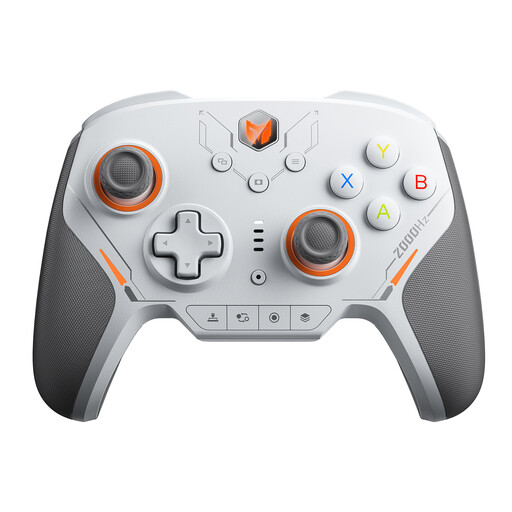
BIGBIG WON BLITZ2 Wireless Controller
For PC gaming if you want to check that the wireless connection and extra controls meet your game’s requirements.
The product title lists TMR joysticks, 16 mechanical micro-switch buttons and a 2000 Hz polling rate.
View at Joybuy
 No image available
Microsoft Xbox Series X/S Wireless Controller, Pulse Red
For a setup where you want to use an Xbox controller with your PC; Electronic Arts lists Xbox One and Xbox Series X|S controllers for skate. on PC.
The product title lists Xbox One, Xbox Series X|S and PC. Bluetooth and Xbox Wireless are listed in the product description. It requires two AA batteries, which are included according to the product description.
View at Joybuy
 No image available
GameSir G7 HE Wired Controller
For a setup where you can safely run a controller cable to your PC and have checked that your specific game supports the model.
Wired connection via USB-C; the product title lists a 3 m USB-C cable, Hall Effect sticks, Windows 10/11 and PC.
View at Joybuy
Frequently asked questions
Can I play skate. or Session: Skate Sim on PC without a controller?
For the Early Access version of skate., Electronic Arts stated on 12 September 2025 that keyboard and mouse aren’t supported and a controller is required. The game information for Session: Skate Sim also says that a controller is required. Check the latest information for skate. before buying.
Why might a DualSense feature not work on PC?
According to Sony, whether individual features are available depends on support from the game. Haptic feedback on PC requires a USB connection; pairing via Bluetooth alone won’t enable this feature.
Who is responsible for the legal guarantee if a controller is faulty?
For goods bought in the EU, the legal guarantee generally applies against the seller. EU consumer information states that you’re entitled to at least two years’ legal guarantee from the date you receive the goods. This is separate from any voluntary manufacturer’s warranty.
Can I put an old controller in the household bin in Germany?
No. Germany’s Federal Environment Agency advises that electrical appliances must not go in household waste, packaging waste, bulky waste or scrap metal. Instead, take your controller to an appropriate separate collection point for waste electrical equipment.


