PC skateboarding gamers
You’ll need a gamepad recognised by the specific PC game you play. A controller is required to play EA skate. on PC, as Electronic Arts explains.


Choose a controller that suits the specific game and platform you play on first. Then consider how easy the analogue sticks are to reach, the connection type and how it feels in your hands. A controller is required to play EA skate. on PC, but that doesn’t automatically mean every third-party model is supported. If daylight makes the game difficult to see, adjusting your screen position and reducing glare are more direct solutions than switching to a different gamepad.
You’ll need a gamepad recognised by the specific PC game you play. A controller is required to play EA skate. on PC, as Electronic Arts explains.
If you often use the sticks to perform tricks, think about how easy they are to reach and how they feel in your hands, as well as any adjustment options. Electronic Arts says skate. uses both analogue sticks for its controls.
If sunlight or reflections make it harder to see the screen, start by checking your playing area and screen position. The German Social Accident Insurance (DGUV) notes that direct sunlight can make a computer screen harder to read.
| What matters to you | What to check before buying | Who should consider it? |
|---|---|---|
| Game and platform compatibility | Check the specific game, platform and exact model name. Also make sure your device supports the connection method you plan to use. | If I want to be sure my game recognises the gamepad on my device, compatibility comes first. Around 36% of consumers would make it their top priority when buying. |
| Analogue sticks and trick controls | Compare the stick layout and how easy each stick is to reach. If needed, check whether the sensitivity can be adjusted. Hall Effect sticks alone don’t guarantee drift-free use or better control in a particular game. | If I use the analogue sticks to perform tricks, I want both to be comfortable to reach and easy to control. Around 29% of consumers would put stick control at the top of their list. |
| Comfort and freedom of movement | Check the grip and how easy the buttons are to reach. With a wired controller, the distance to the connection point matters; wireless use requires a connection method that works with both your device and controller. | If a comfortable grip, easy-to-reach buttons or freedom to move matter more to me than other features, I pay particular attention to how the controller feels to use. Around 21% of consumers would make this their main consideration. |
| Screen visibility in bright daylight | Check the screen where you actually play and see whether changing its position or reducing glare could improve visibility. Illuminated gamepad buttons won’t prevent reflections on the screen. | If I struggle to see what’s happening in a game in a bright room, I want to improve screen visibility first. For around 14% of consumers, screen visibility would be their main concern. |
A controller may connect to a PC or console, but that doesn’t mean it’s been confirmed to work with every skateboarding game. Electronic Arts gives examples of controllers for skate. on PC, but doesn’t offer blanket approval for all third-party models.
Before buying, check the platform, exact model name, connection type and whether your specific game supports it.
For the Stealth Pivot, Turtle Beach specifies wireless use on PC and a wired connection on Xbox. The connection therefore depends on the exact model and platform.
Check the connection details for your platform and exact model variant before choosing where to sit or how to connect it.
Depending on your device and connection, you may need a compatible receiver or a longer cable.
Direct sunlight and reflections can make the screen harder to read; a new controller won’t change that.
First, check the screen position and glare protection where you actually play.
DualSense for PS5 and supported PC games; Electronic Arts lists DualSense as an example of a controller for skate. on PC.
Xbox controllers for Xbox systems and PC; Electronic Arts lists Xbox One and Xbox Series controllers as examples for skate. on PC.
According to GameSir, the G7 SE is a wired model for Xbox One, Xbox Series X|S and Windows 10/11.
According to 8BitDo, the Ultimate Wired Controller for Xbox is a wired option for supported Xbox consoles and Windows.
According to Turtle Beach, the Stealth Pivot is aimed at players who switch between PC and Xbox and want extra controls.
The models below list PC, Xbox, PlayStation or Switch compatibility, depending on the variant. Also check whether your specific game supports the controller you’re considering.
 No image available
An option if you want to play wirelessly on PC and use extra rear buttons.
The product title lists 2.4 GHz wireless connectivity with a USB receiver and two programmable rear buttons.
 No image available
A wired option if you’re looking for a gamepad for PC or Xbox Series S/X with customisable controls.
Features listed include Hall Effect sticks, adjustable stick sensitivity, four rear paddles, six assignable buttons and a 3 m USB-C cable.
 No image available
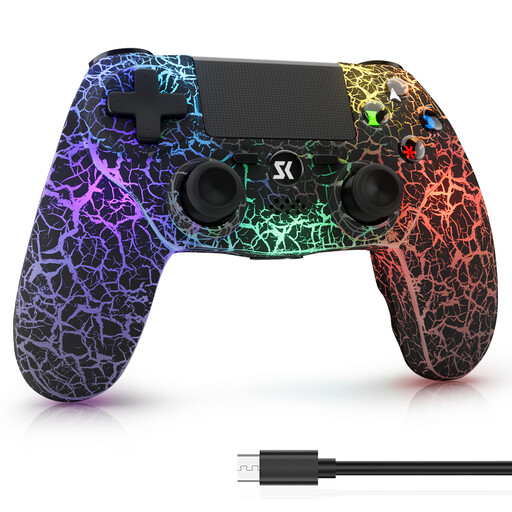
An option if you’re looking for a wireless controller for one of the listed PS4 or Windows PC setups.
The product name lists RGB lighting, dual vibration, 6-axis motion control and a 1000-mAh battery; this variant is black.
 No image available
An option if you’re looking for a controller with motion controls for one of the listed Switch or PC setups.
The model is listed with Bluetooth 4.0, a 6-axis gyroscope and up to 10 hours of play time.
 No image available
An option for PC gamers who want to compare Hall Effect sticks and programmable rear buttons.
The product title lists Hall Effect joysticks, 255-level Hall Effect triggers, programmable rear buttons, RGB lighting and USB-C. The button layout is modelled on PS5.
Yes. Electronic Arts says a controller is required to play skate. on PC and lists DualShock 4, DualSense, Xbox One and Xbox Series controllers as examples. This isn’t a complete list of approved third-party models.
It depends on the controller. Microsoft lists USB, Bluetooth or Xbox Wireless for Xbox Wireless Controllers; an adapter may be needed for the latter. Sony lists USB and Bluetooth for DualSense. Then check whether your specific game recognises the controller.
No, it won’t stop reflections on your screen. If daylight is making it hard to see, the most relevant things to check are the screen position, reflections and glare protection.
For eligible online purchases, you generally have a 14-day right to cancel, starting from delivery; exceptions and possible return costs should be taken into account. Your Europe, the European Union’s consumer portal, distinguishes this right from claims for faulty goods: goods of this kind are generally covered by a statutory guarantee of at least two years against the seller. This is separate from any additional manufacturer’s warranty.