Artists with a fixed filming desk
You want to show pages and small details in the same overhead view each time. Make sure the framing and focusing distance suit your book and the available mounting height.


For a fixed overhead view, a mirrorless camera with a carefully chosen lens makes sense if you want the flexibility to adjust framing and capture close-ups. A compact camera with a fixed zoom saves you having to choose a lens, but gives you less scope to adapt later. A gimbal camera is more worthwhile if you also want to shoot moving footage. None of these camera types automatically prevents flicker: Sony suggests 1/50 or 1/100 second as possible shutter speeds in areas with a 50 Hz mains supply, but the result also depends on the light and the settings available on the particular model.
You want to show pages and small details in the same overhead view each time. Make sure the framing and focusing distance suit your book and the available mounting height.
You film colourful artwork under lamps and want to control colour casts, visible bands and changes in brightness. A test recording under your lighting will show what the camera’s actual settings can do.
You show the book at your desk, talk about it and capture moving shots too. Consider whether audio and camera movement matter more to your videos than a consistently fixed overhead view.
A good fit if: you want to match the lens and framing to the book size, shooting distance and close-ups you have in mind.
Things to weigh up: The camera body alone doesn’t tell you what the complete set includes; check the supplied lens and compatibility.
A good fit if: you want to get started without choosing a separate lens and adjust the framing at your desk using the zoom.
Things to weigh up: You can’t replace the lens later with one that offers a different angle of view.
A good fit if: you want to capture moving walk-throughs or changing perspectives as well as views of the book.
Things to weigh up: A gimbal is no substitute for a secure overhead mount or checking the framing from your shooting distance.
| Priority | What to look for when buying | Who should pay particular attention? |
|---|---|---|
| Colour under artificial light | Check the white balance with a test recording of your actual book and lighting. | If you want the colours in your drawings to come through clearly, how they look under your lamp matters. Around 25% of consumers cite this as their main priority. |
| Flicker and banding | Check whether you can adjust the shutter speed in video mode, then make a test recording under your actual lamp. | If you want to avoid visible bands or changes in brightness, test the combination of light and camera. Around 25% of consumers say flicker control matters most to them. |
| Keeping the whole book and details in focus | Measure the book and available camera distance; use the actual lens to check the framing for a full page and small details. | If you want to show a full page and fine details from your planned overhead position, the distance, angle of view and focus all need to work together. Around 20% of consumers prioritise this. |
| Long reviews and clear audio | Check the power supply, storage media and microphone setup for the format you plan to record in. | For a continuous take with spoken commentary, recording conditions and clear audio are essential. Around 15% of consumers prioritise long reviews with sound. |
| Extra moving shots | Think about how often you’ll actually be filming on the move. Even for a fixed view of the book, a gimbal camera still needs suitable framing and a secure mount. | If you want to show your workspace or the book in motion as well as from above, being able to switch perspectives matters. Around 15% of consumers cite this as their main priority. |
High video resolution alone doesn’t tell you whether small drawings will look large and sharp enough from your mounting height.
First, test a full double-page spread from your planned filming position, then check the smallest details.
General advice on shutter speed doesn’t mean every camera model has a dedicated anti-flicker feature. The right setting also depends on the power supply and light source.
Check the video modes on the specific model and make a test recording under your lamp.
A camera body with an interchangeable lens needs a compatible lens; with a fixed lens, your framing is limited to what that lens can do.
Compare what’s actually included with the parts you need for your overhead view.
The EOS R50 V is an RF mirrorless camera designed with video in mind; the PowerShot V1 has a built-in fixed zoom lens.
The ZV-E10 II is a video-focused APS-C mirrorless camera with an E-mount, so you can choose your own lens and framing.
The Z 30 is a mirrorless camera for vlogs and reviews where longer recordings and spoken commentary matter.
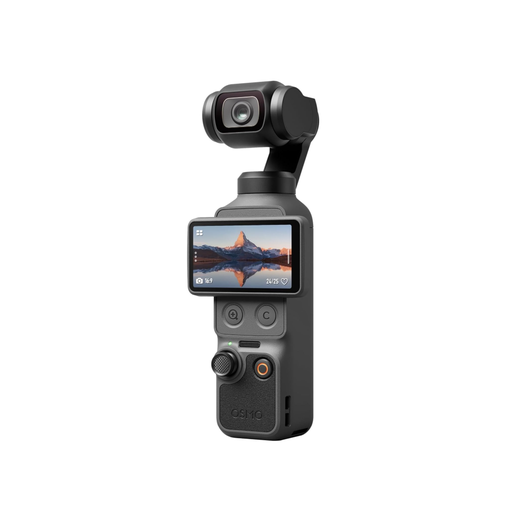
The Osmo Pocket 3 pairs a compact camera with a gimbal for extra moving shots.
The Lumix GH7 is an interchangeable-lens option for more involved video workflows.
This selection includes computer webcams, an interchangeable-lens camera, and compact and gimbal cameras. For each model, check that the angle of view, lens and mount suit your filming position.
 No image available
Listed as a webcam for PC or laptop; check whether you can set up the framing you want for an overhead view at your desk.
Listed in the product name: 4K video, 99° angle of view, microphone and privacy cover.
 No image available
Listed as an interchangeable-lens camera with a zoom lens; worth considering if you want to adjust the framing for your book and its details.
Listed in the product name: 16–50 mm power zoom, 4K video, autofocus with eye detection and tilting screen.
 No image available
This gimbal camera is better suited to a review with extra moving perspectives; check the framing and mount separately for a fixed view of the book.
Listed in the product name: 4K recording at 240 fps, 3-axis stabilisation, 2× lossless zoom, 107 GB of built-in storage and a rotating 2-inch screen.
 No image available
The product name describes a digital camera with 4K video; test it with your lighting and planned shooting distance to see whether the page and details fit the frame.
Listed in the product name: 64 MP, autofocus, 18× zoom and flash.
 No image available
Listed as a webcam for PC or Mac; check whether you can set up the workspace view you want at your desk.
Listed in the product name: 4K video, 1/2-inch sensor, auto-framing, HDR and microphone.
Film the same page of your book under your actual lighting and check the white balance against a neutral reference. Look for banding; Sony suggests 1/50 or 1/100 second as possible starting shutter speeds in areas with a 50 Hz mains supply. Whether these settings work also depends on the light and the settings available on the specific model.
Measure the width of the page and the possible distance between the camera and the book, then check the full framing with the lens you’ll actually use. The stated minimum focusing distance alone won’t tell you whether the whole double-page spread will fit in the frame.
Check which memory cards the manufacturer supports for your chosen format, and test a recording of the length you have in mind. Keep the lens and page clean, and check the mount before every recording. Stated recording times apply only under the manufacturer’s specified conditions.
No, there’s no blanket answer. The German Patent and Trade Mark Office explains that drawings may be protected by copyright if they are the result of an individual’s own intellectual creation, and making them publicly available is one of the rights of exploitation. If the work belongs to someone else, check that you have permission for the specific use before publishing it.