Listeners who want playback to stop automatically
You want to start your chosen audio source in the evening and stop playback after a set time. WiiM Home, Sonos and BluOS all document a sleep timer, although how you use it varies.


If you already have active speakers or a system with a suitable input, a separate network streamer could be a good addition. If you don’t already have audio equipment, a complete Wi-Fi speaker is the simpler place to start. WiiM points out that the Mini doesn’t include an amplifier. Also check that your chosen audio source works with the app and sleep timer, and that the network connection is strong enough where you plan to use it in the loft. Sleep sounds aren’t a proven sleep treatment: Apotheken Umschau describes the research as inconclusive and highlights particular risks for babies.
You want to start your chosen audio source in the evening and stop playback after a set time. WiiM Home, Sonos and BluOS all document a sleep timer, although how you use it varies.
You want to use your existing system or active speakers for network streaming, rather than adding another complete speaker. The audio connections need to match; a WiiM Mini doesn’t include an amplifier for passive speakers.
You want to check the connection where you’ll actually place the device and, if necessary, use a wired network connection. Bluesound lists Wi-Fi and Ethernet for the NODE NANO, but that doesn’t tell you how well Wi-Fi will reach your home.
A good fit if: You already own active speakers or an amplifier with a suitable input. The WiiM Mini and Bluesound NODE NANO have documented audio outputs, and both manufacturers also list a sleep timer.
Bear in mind: A separate streamer needs compatible audio equipment and extra cables. WiiM describes the Mini specifically as a streamer without an amplifier.
A good fit if: You don’t already have speakers and want a single device to set up. Sonos describes the Era 100 SL as a Wi-Fi speaker without built-in voice control, and documents a sleep timer.
Bear in mind: You’re choosing a speaker and playback system at the same time. Check that your preferred audio source and controls work in the relevant app.
| What matters | What to check before buying | Who is this important to? |
|---|---|---|
| Automatic shut-off | Check that your chosen audio source and sleep timer work with that exact device and app combination; an alarm timer isn’t automatically a sleep timer. | If I want playback to stop after a set time, a suitable shut-off option is essential. Around 36% of consumers put automatic shut-off first. |
| Existing audio equipment | Match the inputs on your active speakers or amplifier to the streamer’s outputs; passive speakers need a suitable amplifier. | If I want to keep using my existing speakers, I don’t want to buy a complete speaker unnecessarily. Around 29% of consumers prioritise continuing to use their audio equipment. |
| Connection and audio source | Check Wi-Fi where you plan to place the device. Only plan to use Ethernet if the specific device has an Ethernet port and you can connect it to your network. Also check that your preferred audio source is supported. | If I’m setting the device up in the loft, I want the connection and my preferred audio source to work there. Around 21% of consumers prioritise connectivity and choice of source. |
| Controls and microphones | Check the specific model for microphones, how to switch them off and whether you can control playback without using voice commands. | If I’m operating the device from beside my bed, I want to know whether the app or buttons are enough and whether I want microphones. Around 14% of consumers prioritise controls and the choice of whether to have a microphone. |
A separate streamer such as the WiiM Mini won’t amplify passive speakers. You’ll also need a suitable amplifier or receiver; active speakers need to have a compatible input.
Check your existing equipment and connections before you buy. If you don’t have compatible audio equipment, compare complete Wi-Fi speakers.
Depending on what you already own, you may need extra audio equipment or another pair of speakers.
Supported streaming methods don’t guarantee that every recording or app will work with the sleep timer you want to use.
Check your specific audio source with the app, device and shut-off option you plan to use.
Apotheken Umschau describes the research into its effects on sleep as inconclusive and highlights particular risks for babies.
Choose sounds and volume levels cautiously, based on what you find comfortable, and don’t assume a device feature has healing benefits.
The WiiM Mini is a separate network streamer for existing active speakers or an audio system. WiiM Home documents a sleep timer.
The Era 100 SL is a complete Wi-Fi speaker without built-in voice control. Sonos documents a sleep timer for playback through its system.
The NODE NANO is a separate player for an existing audio system. BluOS documents a sleep timer.
According to Denon, the Denon Home 150 NV is a complete Wi-Fi speaker without built-in microphones or voice assistants.
The speakers below offer different playback options, including Bluetooth, radio and audio inputs; Wi-Fi and Bluetooth are listed for the TCL model. Before buying, check that the audio source you want and the network features you need are supported by the specific device.
 No image available
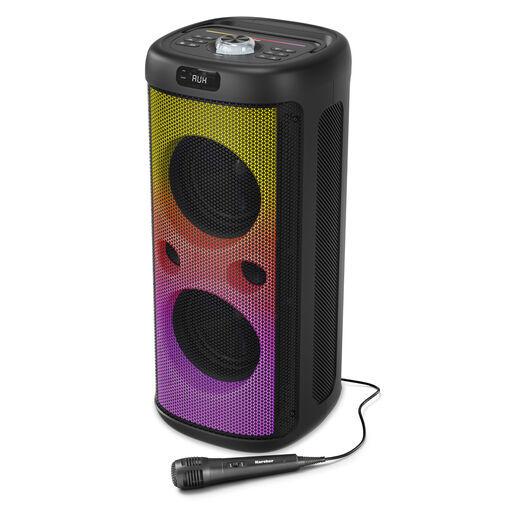
Could be a good fit if you’re looking for active speakers with several audio inputs and Bluetooth; Wi-Fi isn’t listed in the product title.
Bluetooth streaming; HDMI ARC, plus optical, USB, AUX and RCA inputs; dimmable LED display; remote control included, according to the product title.
 No image available
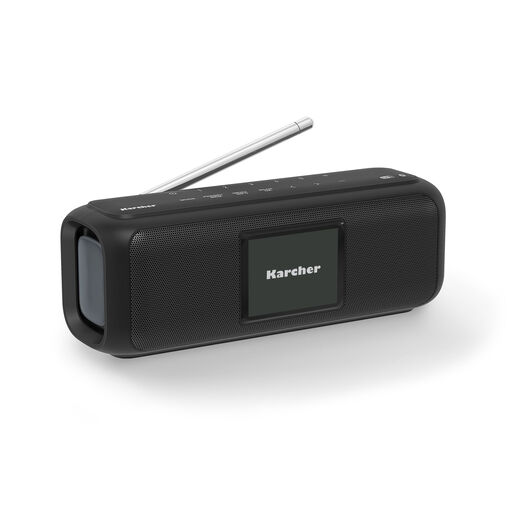
Could be worth considering if you’re looking for a portable speaker with Bluetooth and several listed playback options; Wi-Fi isn’t listed in the product title.
Bluetooth, radio, USB, MicroSD, AUX and aerial connection; microphone and light effects, according to the product title.
 No image available
Could be a good fit if you want a radio with DAB+ as well as Bluetooth; the product title doesn’t list network connectivity.
DAB+ and FM radio; Bluetooth; dimmable 2.4-inch colour display; up to 8 hours of playback, according to the product title; USB-C.
 No image available
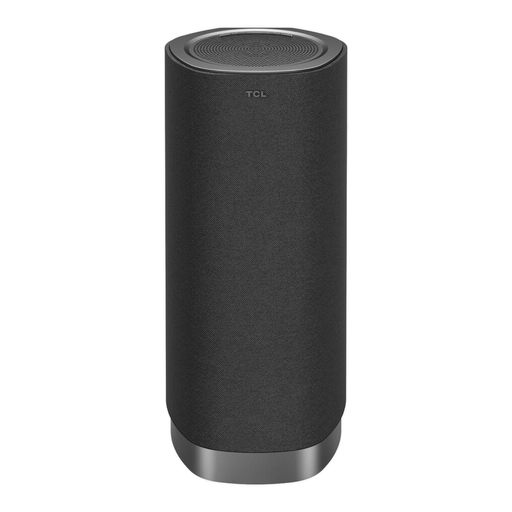
Could be worth considering if you’re looking for a soundbar with Wi-Fi and Bluetooth; check that it suits your loft space and the audio source you want to use.
Dolby Atmos FlexConnect; 170 W peak power; 1.1.1 channels; Bluetooth 5.3 and Wi-Fi, according to the product title.
Not without suitable amplification: WiiM describes the Mini specifically as a streamer without an amplifier. You’ll need a suitable amplifier or receiver for passive speakers; active speakers need an input that matches the streamer’s output.
WiiM Home, Sonos and BluOS all document a sleep timer. Bluesound Support describes timer settings of up to 90 minutes for BluOS. Check how it works in the app you intend to use; a standard alarm timer isn’t automatically a sleep timer.
First, check the connection where you plan to put the device and make sure it’s compatible with your chosen audio source. According to the WiiM Help Center, 2.4 GHz generally offers greater range, while 5 GHz typically has a shorter range; the actual connection depends on your router and home. If you have access to a network cable, Bluesound lists Ethernet as a connection on the NODE NANO.