If you already have active speakers or a system with a suitable input, a separate network streamer lets you keep using them for sleep sounds. If you don’t have suitable speakers, a Wi-Fi speaker is the more straightforward option. Before you buy, check that your chosen sound source works with the intended playback method and that a sleep timer is available for it. You’ll also need an amplifier for passive speakers.
Which option is right for you?
If you already have an audio system
If you want to play sleep sounds through active speakers or a hi-fi system, check that the player’s outputs match the inputs you already have. Passive speakers also need an amplifier. WiiM explains the differences between its Mini streamer and the WiiM Amp.
If you don’t have suitable speakers
If you don’t yet have a suitable audio system in your hobby room, consider an all-in-one Wi-Fi speaker. Check how to set up your chosen source and whether playback can be stopped with a sleep timer. Sonos documents a timer in its app.
If you prefer not to use voice control
If you don’t want to use voice commands, check the exact speaker model: Sonos says the Era 100 SL does not have built-in voice control. You can control playback using the app and the controls on the speaker.
What should you look for when buying?
First, check whether you already have a suitable audio system. Then look at the signal path from your sound source to the speaker, as well as how to use the timer.
| What you need |
What to check before buying |
Who should pay particular attention? |
| Stop playback at the right time |
Check that you can set the timer in the relevant app and that it works with your chosen sound source. |
If I want to avoid sleep sounds playing for longer than I’d like, a suitable sleep timer is important. Around 33 % of consumers rank this as their top priority. |
| Keep using your existing speakers |
Check whether you have active or passive speakers, which inputs they offer and whether you need an amplifier. |
If you want to add to your existing system rather than replace it, you’ll need to match the player, connection and, if necessary, amplifier. Around 27 % of consumers prioritise continuing to use their existing system. |
| Listen without adding a separate system |
Check the Wi-Fi speaker’s setup, supported playback sources and controls. |
If I don’t already have suitable speakers, I want to play sounds directly through a device in my hobby room. Around 27 % of consumers prefer an all-in-one device like this. |
| Control it without voice commands |
Check the exact model and whether the app or the controls on the device are enough for you. |
If you don’t want to use voice commands, choose a model without built-in voice control. Around 13 % of consumers make this a top priority. |
Common buying mistakes
-
Assuming a streamer is a complete speaker
The WiiM Mini sends an audio signal to other devices, but it doesn’t produce sound through its own speakers or amplify passive speakers.
Before choosing, map out the signal path from your sound source through the player and, if needed, an amplifier, to your speakers.
You’ll need to include active speakers or an amplifier and suitable speakers in your setup if you don’t already have them.
-
Assuming a sleep timer will work with any source
The timers described by the manufacturers are set in their respective apps. What matters is whether your chosen sound source plays through the relevant playback method.
For the exact model you’re considering, check which source you’ll use, which app controls it and how playback can be stopped.
-
Assuming every speaker in a range works the same way
The Sonos Era 100 SL differs from the Era 100 in several ways, including the lack of built-in voice control. Sonos lists an input adapter for a wired connection.
Check the full model name and find out which connections and controls the specific version offers.
If you need a wired input, remember to include the input adapter listed by Sonos.
-
Assuming multi-room compatibility based on the brand alone
Teufel says the MOTIV HOME cannot be integrated into an existing Teufel Streaming or Raumfeld multi-room system.
If you want to group speakers, check that the specific model is compatible with your existing system.
Brands to consider
WiiM
WiiM offers both a standalone Mini streamer and the WiiM Amp for passive speakers.
- WiiM says the Mini has an analogue output and an optical output. A sleep timer is available in the WiiM Home app.
- The Mini has no speakers of its own and doesn’t amplify passive speakers. The WiiM Amp is the model with an amplifier for passive speakers.
Sonos
Sonos offers Wi-Fi speakers such as the Era 100 SL, which doesn’t need a separate audio system for playback.
- Sonos documents a sleep timer in its app. You can also control the Era 100 SL on the speaker itself.
- The Era 100 SL has no built-in voice control. Sonos lists an input adapter for a wired connection.
Denon
The Denon Home 150 is a compact Wi-Fi speaker worth considering, particularly if you already have HEOS devices.
- Denon lists HEOS grouping, Wi-Fi, Bluetooth and three quick-select buttons for the Home 150.
- Denon says this model has built-in microphones. This doesn’t tell you whether every Denon model has them or whether a sleep timer is available.
Teufel
The MOTIV HOME is a portable Wi-Fi and Bluetooth speaker to consider if you want to move it around your hobby room.
- Teufel lists a built-in battery, AirPlay 2 and Google Cast.
- Teufel says the MOTIV HOME cannot be integrated into an existing Teufel Streaming or Raumfeld multi-room system.
Joybuy products
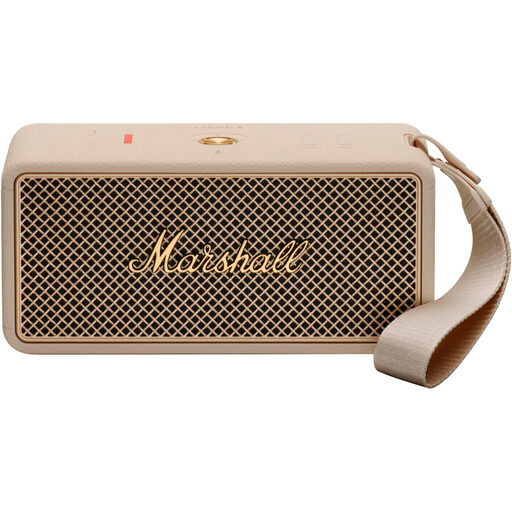
The product selection below includes a portable Bluetooth speaker for playing sounds from a paired source device. It is described as a Bluetooth speaker, not a standalone network streamer.
 No image available
Marshall Middleton II portable Bluetooth speaker, Cream
A good option if you want to play sleep sounds from a paired Bluetooth source device. The source device must be paired for this playback method.
View at Joybuy
Frequently asked questions
How can I stop sleep sounds from playing indefinitely?
Use a sleep timer that works with your chosen playback source. WiiM explains how to set the timer in the WiiM Home app, while Sonos documents it in the Sonos app. Before buying, check that your sound source works with the relevant playback method.
Can I connect passive speakers directly to a small network streamer?
Not directly to the WiiM Mini: WiiM describes it as a streamer without an amplifier and says you need an amplifier or receiver for passive speakers. The manufacturer says the WiiM Amp is designed to power passive speakers.
What do I need to set up a Sonos Era 100 SL?
Sonos says you’ll need a power supply, a smartphone or tablet connected to Wi-Fi, and the Sonos app to set up the Sonos Era 100 SL. Setup may differ for other models.
What should I consider when choosing a speaker with voice control?
Consider whether you want to use voice commands and what privacy choices come with them. The German Federal Office for Information Security points out that voice commands are often processed in the cloud rather than locally. If you don’t want built-in voice control, check the exact model, such as the Sonos Era 100 SL.


