What to consider when buying
First compare the space a keyboard takes up with the keys you actually use in your games. Then consider connectivity and extra features.
65% keyboard
A good fit if: you want to keep as much room as possible for your mouse and the specific layout covers your game commands.
Consider: Check which commands require an Fn combination and whether the variant has the key legends you want.
75% keyboard
A good fit if: you want a compact layout with a function row within easy reach.
Consider: Check the case dimensions and the layout and switch variant you’ve selected. If you’re using it wirelessly, remember to factor in charging.
TKL keyboard
A good fit if: you can do without a number pad but would rather not have the other keys packed so tightly together.
Consider: Compare its actual width with more compact models and the space your mouse needs.
Full-size keyboard
A good fit if: you use the number pad regularly and still have enough room on your desk for both keyboard and mouse.
Consider: The extra keys take up desk space, so measure your setup before you buy.
| Buying priority |
What to check |
Who it matters to |
| Desk space and room for your mouse |
Measure your desk width and mouse area, then compare them with the specific case dimensions. |
If I mostly play with a mouse, I need enough room to move it on a narrow desk. Around 31% of consumers put having enough mouse space first. |
| Game commands within easy reach |
Compare your commands with the key layout and check which functions require a key combination. |
If I use arrow, navigation or function keys often, I want to know which ones are within easy reach. Around 25% of consumers prioritise easy access to these keys. |
| Typing noise and feel |
Check the switch variant and, where possible, compare noise under similar conditions. |
If other people are within earshot, I want to take typing noise into account when choosing a keyboard. For around 19% of consumers, a quieter typing feel is the top priority. |
| Connectivity and cable management |
Check for USB, Bluetooth or 2.4 GHz support, as well as the cable or charging arrangements that suit you. |
If I want to avoid cables on a small desk or switch between devices, I look for the right connection options. Around 13% of consumers put connectivity flexibility first. |
| Extra features |
Consider lighting, macros or adjustable actuation only after size, key layout and connectivity. |
If I mainly play point-and-click adventures, I want to start by choosing the features I’ll actually use. Around 12% of consumers prioritise the right features. |
Joybuy product selection
This selection includes compact 65%, 75% and TKL keyboards. Check that the layout, key legends and connection type suit your desk and the game commands you actually use.
 No image available
Akko 3084B Plus, 75%, ISO-DE, Tri-Mode
The 75% layout and stated ISO-DE variant make this a good fit if you’re looking for a compact keyboard with German key legends.
Bluetooth, 2.4 GHz and USB-C; hot-swap and RGB are mentioned in the product name.
View at Joybuy
 No image available
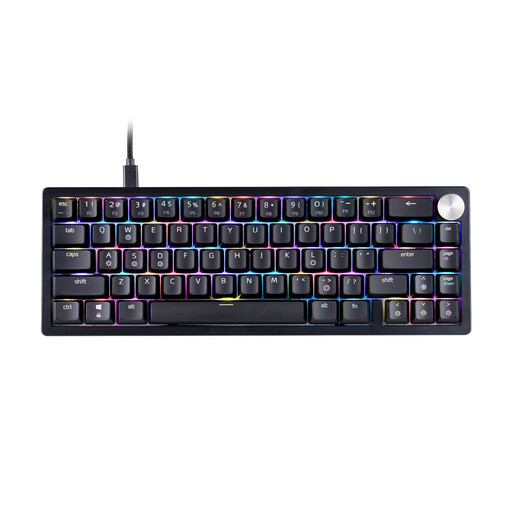
XPG SORCERER MINI, 65%, US layout
The 65% format is worth considering if you want to keep as much room as possible for your mouse.
The product is listed as having a US layout, so check that the key legends suit you before buying.
View at Joybuy
 No image available
CHERRY STREAM KEYBOARD TKL, US layout
The TKL layout is a good fit if you want to do without a number pad.
Wired USB keyboard with six multimedia hotkeys; English US layout with euro symbol.
View at Joybuy
 No image available
Ticktype EVO75, 75%, ISO-DE, Tri-Mode
The 75% format and ISO-DE layout specified in the product name make this a good fit if you want a compact layout with German key legends.
Bluetooth, 2.4 GHz and USB-C, as well as hot-swap, are listed in the product name.
View at Joybuy
 No image available
Redragon RS68, 65%, 68 keys, Blue
The 65% layout with 68 keys is an option if you want to make more room for your mouse on a small desk.
Bluetooth, 2.4 GHz and wired connectivity are listed. The Blue variant is described as noticeably clicky.
View at Joybuy
Frequently asked questions
Which keyboard size should I check first?
First, measure the space you have for your mouse and keyboard. Then, based on the commands you use in your games, check whether you need a function row within easy reach or can manage with a 65% layout.
What should I consider when connecting a wireless keyboard?
Check the connection types supported by the specific version and make sure they suit your computer and setup. For the K3 Max, Keychron lists USB, Bluetooth and 2.4 GHz wireless; follow the model’s instructions for connecting and charging it.
What should I do if the keys get dirty?
Follow the care instructions for your specific model. SteelSeries lists IP32 protection for the Apex 3 TKL; that doesn’t mean you can wash the keyboard down or submerge it.
What are my rights in Germany if I change my mind or find a fault?
The consumer advice centre says that consumers generally have 14 days to cancel online purchases, starting from the date the contract is made or the goods are received. If there’s a fault, statutory rights under the legal guarantee are different from a voluntary manufacturer’s warranty.
What should I do with my old keyboard?
An old keyboard is electrical waste and shouldn’t go in your household rubbish. Local collection points generally accept electrical waste free of charge. Retailers may also be required to take it back in certain circumstances, as explained by the Federal Environment Agency and the stiftung elektro-altgeräte register.


