What should you look for when buying?
First, work out how much desk space you need to keep free, then compare the layout with the commands you use most. After that, consider the key legends you want, typing noise and the right connection type.
When choosing a gaming keyboard for factory games on a small desk, the most important factor is what matters most to you personally.
| Priority |
What to check |
Who it matters most to |
| Desk space and room for your mouse |
Compare the keyboard’s dimensions and cable exit with the space available; percentage figures are no substitute for measurements. |
If I need room to move my mouse beside the keyboard, its footprint comes first. Around 31% of consumers put this at the top of their list. |
| Direct access to commands |
Try your most-used game commands on the specific layout; check the arrow and function keys, as well as possible secondary functions. |
If you want to avoid switching between key layers while building, look for commands you can access directly. Around 25% of consumers prioritise this. |
| Typing noise |
Check the switch variant and any damping for the exact model; treat manufacturers’ claims as product information, not independent noise measurements. |
If I share my space with others, I want the typing noise to be suitable for shared use. This is a key consideration for around 19% of consumers. |
| Key legends and layout |
Check the model number against the ISO-DE or QWERTZ variant you’re ordering; don’t rely on the language of the product page alone. |
Consumers who also write in German on the same keyboard pay particular attention to the physical key legends. This is the top buying priority for around 13%. |
| Cable and connectivity |
Check whether the specific model supports USB, Bluetooth and, where applicable, 2.4 GHz wireless, as well as whether you can use it while charging. |
If I want to avoid cables on my small desk, I also need to plan for charging and pairing. Around 12% of consumers prioritise cable management. |
Keyboards at Joybuy for small desks
This selection includes compact TKL, 65% and 75% keyboards to suit different needs for desk space, directly accessible keys and German key legends.
 No image available
Akko 5087S V1 TKL Wired Gaming Keyboard, Akko V3 Pro Cream Yellow Switches, ISO-DE QWERTZ, Black & Gold
A TKL option if you can do without a number pad and want a German key layout.
- Wired TKL layout
- ISO-DE QWERTZ
- Akko V3 Pro Cream Yellow switches
- Hot-swap switches and RGB lighting
View at Joybuy
 No image available
CHERRY MX-LP 2.1 Wireless Gaming Keyboard, 65 %, German QWERTZ, White
A compact option if you want to save desk space and choose between wireless and wired connections.
- 65% format and German QWERTZ
- Low-profile linear MX Speed switches
- Bluetooth, 2.4 GHz and USB-C
- N-key rollover and anti-ghosting are listed in the product description
View at Joybuy
 No image available
Ticktype EVO75 Custom Tri-Mode Wireless Mechanical Keyboard, ISO-DE
A 75% option if you want a compact layout with German key legends and function keys you can access directly.
- 75% layout and ISO-DE
- Hot-swap for 3- and 5-pin switches
- Bluetooth, 2.4 GHz and USB-C
- VIA compatibility is listed in the product description
View at Joybuy
 No image available
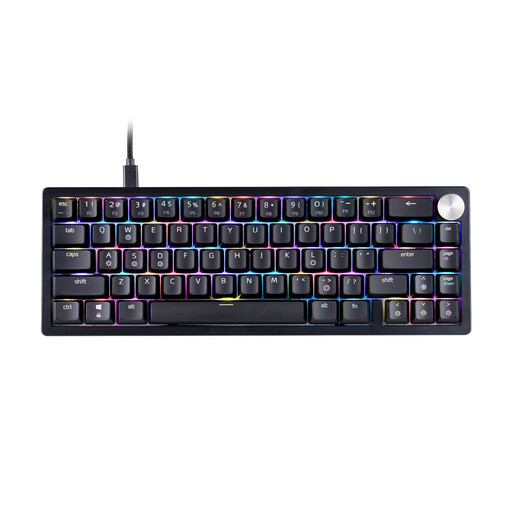
XPG SORCERER MINI 65% Mechanical Gaming Keyboard, US Layout, Black
The compact 65% format is an option if having more free space matters more to you than German key legends.
- 65% layout and US layout
- Mechanical gaming keyboard
- RGB lighting and USB-C cable
- The US QWERTY layout may differ from the German key legends you want.
View at Joybuy
 No image available
AJAZZ AK820 MAX 75% Wireless Mechanical Gaming Keyboard, US Layout QWERTY
A 75% option if you want direct access to the arrow and function keys and are happy with a US QWERTY layout.
- 75% layout with arrow and function keys
- Tri-mode connectivity and hot-swap
- 8000mAh battery and RGB lighting
- The US QWERTY layout may differ from the German key legends you want.
View at Joybuy
Frequently asked questions
Do I need a keyboard with extra macro keys for Factorio?
No, the documented quickbar doesn’t require extra macro keys. The Official Factorio Wiki explains customisable key bindings and shortcuts for quickbar slots. Check that your own key bindings are comfortable on the layout you choose; other factory games have their own controls.
How should I set up my keyboard for commands I use often when building?
Check the controls in the game you’re playing and assign frequently used actions to keys that are easy to reach. The Official Factorio Wiki explains how to change and reset key bindings, as well as how to use the quickbar.
Can I keep playing on a wireless keyboard while it’s charging?
That depends on the model. CHERRY specifically says you can do this with the MX 8.2 TKL Wireless; check separately for other keyboards.
What should I look for in a keyboard for the German market?
Check the layout variant you’re ordering and the required labels and accompanying information against the specific listing. The German Federal Network Agency includes CE marking, product identification and manufacturer details among the criteria it checks during market surveillance. For wireless models, you should also consider the radio equipment requirements that apply.
What are my rights if a product is faulty or I buy online?
If goods are faulty, you generally have a statutory right to a remedy from the seller for at least two years from the date you receive them; this is separate from any voluntary manufacturer’s guarantee. Online purchases from businesses generally come with a 14-day right to cancel, subject to legal exceptions. Your Europe and the Council of the European Union explain these rules for their respective areas of application.


