Who should consider these options?

Gamers short on mouse space

If your desk is small, you’ll need room for a mouse and cables as well as your laptop. Compare the overall dimensions and leave the air vents unobstructed. Depending on the configuration, MSI lists the Cyborg-14-A13V series as measuring 314.7 × 233.5 × 18.6–22.3 mm; these dimensions don’t necessarily apply to other models.

Players of demanding management games

Choose your specs based on the games and settings you actually plan to use, rather than relying on the ‘gaming’ label alone. Ubisoft and Paradox Interactive list different requirements for Anno 117: Pax Romana and Cities: Skylines II.

Players without an extra monitor

If you want maps, figures and menus to be easy to read on the built-in display, weigh up the larger screen against the extra desk space it needs. Screen size alone doesn’t guarantee good readability at every scaling setting.

What should you look for when buying?

Compact laptop with a 14- to 14.5-inch screen

A good fit if: You need to keep space free for a mouse and cables beside the laptop, and its smaller screen is big enough for your games and settings.

The trade-off: There’s less built-in screen space for menus and maps. A compact size doesn’t guarantee adequate gaming performance or quiet operation.

Laptop with a 15.6-inch display

A good fit if: You prefer to view maps and panels on the built-in screen, and you’ve measured enough desk space for the laptop, mouse and ventilation clearance.

The trade-off: The larger laptop takes up more room, so check its overall dimensions rather than just the screen size.

Buying priority What to look for Who might value this most?
Desk space and placement Measure the usable desk area and compare it with the width and depth of the specific model. Leave room for your mouse and cables, and keep the air vents clear. If my desk is small, I need room beside my laptop for a mouse and cables, and the air vents must stay clear. Around 29% of consumers rank desk space as their top buying priority.
Gaming performance to suit your needs Check the requirements for your game, resolution and settings, as well as the CPU, RAM, graphics and available SSD storage in the exact configuration. Don’t compare laptop and desktop GPUs by name alone. If I want to play specific management games with the settings I prefer, the exact configuration needs to meet their requirements. Around 29% of consumers put suitability for their games first.
Readability without an extra monitor Compare the display size and resolution with the laptop’s overall dimensions. If possible, assess text and the user interface at your intended scaling setting and viewing distance. If I want to read maps and menus on my laptop screen, having a clear view matters more to me than keeping as much desk space free as possible. Around 24% of consumers prioritise readability on the built-in display.
Overall cost and specifications Compare full model numbers, operating systems, RAM, SSDs and what’s included. Factor in any extras you’ll need, rather than comparing offers by GPU name alone. If I’m looking for a laptop that’s ready to use, its specifications and any extras I might need matter as much as the purchase price. Around 18% of consumers say overall cost is their top buying priority.

Common buying mistakes

  • Assuming laptop GPUs match desktop GPUs with the same model number

    Suitability depends on the specific laptop GPU and the game you want to play. Ubisoft notes that laptop graphics cards for Anno 117 need to deliver performance comparable to the minimum requirements. Paradox Interactive lists its own PC configurations for Cities: Skylines II.

    Check the exact laptop model and reliable requirements for your game, resolution and preferred settings.

  • Comparing screen size instead of the space it needs

    Even a compact laptop needs room on your desk. Placing it incorrectly can also block the air vents. HP warns that fabric surfaces can restrict or completely block airflow.

    Compare the laptop’s overall dimensions with your desk space, and leave room for your mouse and cables while keeping the air vents clear. Place the laptop on a firm, level surface.

  • Assuming similarly named configurations are identical

    HP offers OMEN Transcend 14 variants with different operating systems. You can’t automatically apply the specifications of one variant to another with a similar name.

    Check the full model number and the operating system listed for the specific offer. A FreeDOS variant may mean you’ll need to buy an operating system separately.

Key brands at a glance

HP

The OMEN Transcend 14 range includes compact configurations. Don’t assume specifications for one variant apply to similarly named models.

  • HP lists the model 14-fb1775ng with a 14-inch display, Windows 11 Home, 32 GB RAM and a 1 TB SSD.
  • A different, similarly named variant is available with FreeDOS. The manufacturer’s specifications aren’t independent performance tests.

Acer

The Predator Helios Neo 14 PHN14-51 is a compact configuration with a 14.5-inch display.

  • For reference NH.QRPEG.004, Acer lists 32 GB RAM, a 1 TB SSD and an RTX 4060 with 8 GB of graphics memory, as well as a German keyboard layout.
  • These specifications apply to this reference only and don’t prove the gaming performance of other configurations.

MSI

The Cyborg-14-A13V series is a compact option for which MSI lists dimensions and ports.

  • For the A13VF configuration, MSI lists up to 45 W maximum graphics power, including Dynamic Boost, and two RAM slots for the series.
  • Series specifications are no substitute for checking the exact retail model, and they aren’t an independent performance comparison.

Lenovo

The LOQ 15IRX10, item number 83JE00PFGE, is an alternative with a 15.6-inch display.

  • Lenovo lists 16 GB RAM, a 512 GB SSD, Windows 11 Home and an RTX 5070 Laptop GPU for this variant.
  • The screen size alone doesn’t guarantee better readability at every scaling setting or suitability for a particular game.

ASUS

The ROG Zephyrus G14 GA403 range offers various 14-inch configurations as compact alternatives to compare.

  • Model codes distinguish between configurations and help you check the specifications you need.
  • Availability information for an individual GA403 variant doesn’t necessarily apply to the whole range.

Joybuy products for small desks

This selection includes compact 14.5-inch laptops as well as 15.6-inch models with larger built-in screens. Compare each model’s specifications with the games you play, and check that there’s enough room for your mouse and clear air vents.

Acer Nitro V14 AI gaming laptop

Acer Nitro V14 AI, 14.5 inches

The compact 14.5-inch format is worth considering if you have little desk space to spare.

WUXGA (1920 × 1200), 120 Hz, RTX 5050 with 8 GB GDDR7, AMD Ryzen AI 7 350, 16 GB DDR5, 1 TB SSD, Windows 11 Pro. English international keyboard.

View at Joybuy

MSI Thin 15 B13UC-3475NN

MSI Thin 15 B13UC-3475NN

The 15.6-inch display gives you more built-in screen space, but needs more desk room than a 14- to 14.5-inch model.

15.6 inches, Full HD, 144 Hz, Intel Core i5-13420H, RTX 3050, 16 GB RAM, 512 GB SSD.

According to the product listing, no operating system is pre-installed.

View at Joybuy
MSI Katana A15 AI B8VG-459

MSI Katana A15 AI B8VG-459

This 15.6-inch model is worth considering if you have room for a larger built-in screen.

15.6-inch touchscreen, AMD Ryzen 9 8945HS, RTX 4070, 16 GB RAM, 1 TB SSD, Windows 11 Home.

View at Joybuy
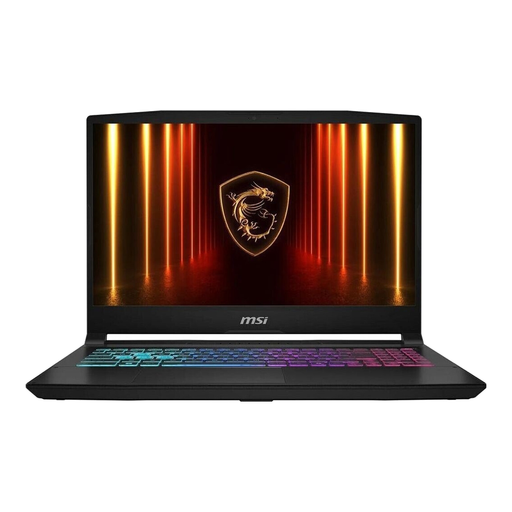
MSI Katana 15 HX B14WFK-487

MSI Katana 15 HX B14WFK-487

The 15.6-inch display is an option if you have enough desk space for the larger chassis.

15.6 inches, Intel Core i7-14650HX, RTX 5060, 16 GB RAM, 512 GB SSD, Windows 11.

View at Joybuy
MSI Cyborg 15 A13VE-1005

MSI Cyborg 15 A13VE-1005

The 15.6-inch format is a better fit if you want a larger built-in screen and have enough desk space for it.

15.6 inches, Full HD, 144 Hz, Intel Core i5-13420H, RTX 4050, 16 GB DDR5, 512 GB SSD.

View at Joybuy

Frequently asked questions

Is 16 GB RAM enough for my management games?

It depends on the game and your settings. For Anno 117: Pax Romana, Ubisoft lists 16 GB RAM in dual-channel mode for 1080p at low settings, and 32 GB for a 2K scenario at very high settings. Paradox Interactive recommends 16 GB RAM for Cities: Skylines II. These specifications aren’t a blanket guarantee for every game or laptop configuration.

How should I set up a laptop on a small desk?

Place the laptop on a firm, level surface and keep the air vents clear. HP warns that fabric surfaces can restrict or block airflow; the exact position of the vents depends on the model.

What should I know about fan noise and maintenance?

Dust around the air vents can affect airflow and may lead to more fan activity. Follow the instructions for your exact model when cleaning it or, if necessary, updating the BIOS. A quiet mode is only available if the laptop supports it.

What are my rights when buying a new laptop online?

For a qualifying online purchase from a trader, you generally have a 14-day right to cancel from the date of delivery; exceptions and possible return costs may apply. The European Union states that faulty goods are covered by a legal guarantee of at least two years from receipt. Any additional manufacturer’s warranty is separate.