Choose the form factor based on whether you have room for a separate monitor on your small desk: a mini PC also needs a monitor and peripherals, a laptop comes with its own screen, and a tower is an option if you can place it away from your desk. For Victoria 3 on Windows, Paradox Interactive recommends 16 GB RAM and a GeForce GTX 1660 with 6 GB, so check the full specifications for every game you want to play rather than relying on the device category alone.
Which option suits you?
Gamers with limited desk space
If you want your monitor and mouse to stay on the desk, consider the space needed for the whole setup. A mini PC requires a separate monitor, while a laptop has a screen built in. GEEKOM and HP offer specific examples of these form factors.
Victoria 3 players
Choose a PC based on the requirements of the specific game, not just the label “political simulation”. Paradox Interactive lists its own minimum and recommended specifications for Victoria 3.
Gamers who play several PC games
If you also play other games alongside political simulations and have somewhere to put a PC away from your desk, a tower could be worth considering. Lenovo lists specific specifications for the Legion Tower 5i 90XE000PGE.
What to look for when buying
Mini PC
A good fit if: You already have a suitable monitor and want the computer to take up as little desk space as possible.
Keep in mind: The monitor and peripherals are still extra parts of the setup. Integrated graphics are not automatically equivalent to a recommended dedicated graphics card.
Gaming laptop
A good fit if: There’s no room for a separate monitor or you want to put the computer away after gaming.
Keep in mind: You’re limited to the laptop’s screen size, and you’ll also need space for a mouse and power supply.
Tower away from your desk
A good fit if: You have a suitable spot next to or under your desk and want to play other games too.
Keep in mind: A tower needs extra space. Make sure the location works for its connections, cable routing and airflow.
For Victoria 3 on Windows, Paradox Interactive recommends 16 GB RAM and a GeForce GTX 1660 with 6 GB. The publisher also specifies AVX support for the processor, among other requirements. These specifications apply to this game and don’t replace checking the requirements for any other titles you want to play.
| Buying consideration |
What to check |
Who it matters most to |
| Space and screen |
Plan for the monitor, mouse, connections and cables as well as the computer; a laptop has a built-in screen. |
If I need to fit a monitor, mouse and notes on the same small desk, the whole setup matters to me, not just the computer case. Around 36% of consumers put available space at the top of their list of buying considerations. |
| Game requirements |
Compare the specific processor, including AVX support, the memory and the exact graphics model with the requirements for every game you want to play. |
If I mainly want to play Victoria 3, I check the exact specifications against the publisher’s requirements rather than relying on the “gaming PC” label. Around 29% of consumers prioritise the requirements of the simulations they actually play. |
| Complete specifications |
Check whether the operating system, RAM, SSD and screen are included; a barebones system may require you to supply some components. |
If I want to use the computer as soon as I unpack it, I need to know which parts are included and which are missing. Around 21% of consumers put a complete setup first. |
| Placement and ventilation |
Consider where the computer will go and how the cables will run, and keep the vents clear as instructed by the manufacturer. |
If the computer is going right next to me or in a compartment, I plan for its location and airflow rather than assuming it will make a particular amount of noise. Around 14% of consumers pay particular attention to placement and potential noise. |
Common buying pitfalls
-
Assuming all political simulations need the same type of hardware
Requirements vary from game to game. Paradox Interactive lists minimum and recommended specifications for Victoria 3; the genre label alone won’t tell you whether a particular device is suitable.
Decide which games you want to play before choosing a PC, then compare their requirements with the full specifications.
-
Mistaking a barebones system for a ready-to-play PC
A mini PC explicitly sold as a barebones system may not include RAM, an SSD or an operating system.
Check what’s included and work out which components and setup steps you’ll still need for your chosen setup.
-
Confusing a small computer case with a compact overall setup
A mini PC still needs space for a separate monitor and peripherals, whereas a laptop comes with its own screen.
Measure the available space and consider the monitor, mouse, cables and computer location together.
Brands and model ranges to consider
GEEKOM
The GEEKOM A8 is an example of a mini PC for a setup with an existing monitor. The following specifications come from GEEKOM Germany.
- GEEKOM lists a case volume of 0.47 litres for the A8, along with a Ryzen 7 8745HS, Radeon 780M and a base configuration with 16 GB RAM and a 1 TB SSD.
- These manufacturer specifications don’t demonstrate any particular performance in Victoria 3; check the configuration against the requirements of your games.
HP
The HP Victus 15-fa2770ng is an example of a laptop with a built-in screen. These specifications apply to this exact configuration.
- HP lists a 15.6-inch screen, Windows 11 Home, 16 GB RAM, a 512 GB SSD and a GeForce RTX 5060 for this model.
- These model specifications don’t indicate measured gaming performance or a particular noise level.
Lenovo
The Legion Tower 5i, product number 90XE000PGE, is an example of a tower that needs a separate place to sit.
- Lenovo lists 32 GB RAM, a 1 TB SSD and a GeForce RTX 4060 Ti for this configuration.
- These specifications don’t prove that every political simulation needs this hardware or that the tower will fit on a small desk.
MSI
The MPG Trident AS 14th range includes more compact gaming desktops that sit between mini PCs and traditional towers. The specifications listed are for different model codes.
- MSI lists 32 GB RAM and an RTX 4070 SUPER for model 14NUE7-684AT, and 16 GB RAM and an RTX 4060 Ti for model 14NUD7-688AT.
- Don’t assume the two model codes have identical specifications; check the exact version before buying.
Gaming laptops at Joybuy
The following Joybuy products are gaming laptops with built-in screens, suitable for a setup without a separate monitor.
 No image available
HP OMEN 17-db1071ng, 17.3-inch
The built-in screen makes this a good option for a laptop setup without a separate monitor. Its 16 GB RAM matches the memory capacity recommended by Paradox Interactive for Victoria 3, but that alone doesn’t establish whether the full configuration is suitable.
The product name lists a Full HD display with a 144 Hz refresh rate, AMD Ryzen AI 7, 16 GB RAM, a 1 TB SSD, Windows 11 and USB-C Power Delivery.
Joybuy
 No image available
THUNDEROBOT Radiant S16, Ryzen 7 7745HX
The built-in 16-inch screen suits a setup without a separate monitor. The product description recommends using the laptop on a hard, flat surface with its vents unobstructed.
Listed specifications include a QHD+ display with a 240 Hz refresh rate, AMD Ryzen 7 7745HX, 16 GB DDR5 RAM, a 1 TB SSD and NVIDIA GeForce RTX 5060.
Joybuy
 No image available
ASUS ROG Strix G17, Ryzen 9 7940HX
The built-in 17.3-inch screen allows for a laptop setup without a separate monitor. To ensure adequate airflow, the product description recommends placing it on a flat surface with the vents unobstructed.
The product name lists a Full HD display with a 144 Hz refresh rate, AMD Ryzen 9 7940HX, GeForce RTX 4060 with 8 GB, 16 GB RAM, a 1 TB SSD and Windows 11.
Joybuy
 No image available
MSI VenturePro A16 AI+ A3HWEG-003, Solid Gray
The built-in 16-inch screen suits a setup without a separate monitor. For demanding use, keep the vents clear and use the original power supply.
The product name lists AMD Ryzen AI 7 350, 16 GB RAM, a 1 TB SSD and GeForce RTX 5050.
Joybuy
 No image available
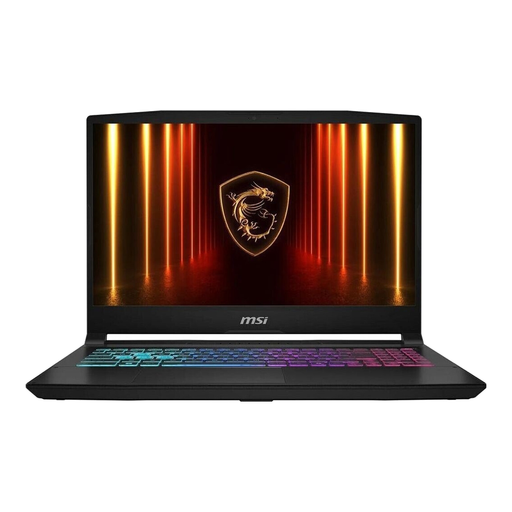
MSI Katana 15 HX B14WFK487, 15.6-inch
The built-in 15.6-inch screen may mean you don’t need a separate monitor on your desk. For longer gaming sessions, the product description recommends using the laptop on a hard, flat surface with its vents unobstructed.
The product name lists Intel Core i7, 16 GB RAM, a 512 GB SSD, RTX 5060 DDR5 and Windows 11.
Joybuy
Frequently asked questions
Will any mini PC run Victoria 3?
No. Case size alone doesn’t tell you whether a computer is suitable for gaming. For Victoria 3 on Windows, Paradox Interactive recommends 16 GB RAM and a GeForce GTX 1660 with 6 GB; AVX support is also relevant for the processor. Compare the full configuration with the game’s requirements.
What should I consider when setting up a PC in a small space?
Make room for the screen, peripherals and cables, and follow the setup instructions for the specific device. One mini PC listing on Joybuy explicitly says to keep the vents clear and use a suitable power supply; this doesn’t establish a general minimum clearance for all PCs.
What are my rights if a PC bought online is faulty?
When you buy from a business seller in the EU, you’re generally entitled to a legal guarantee of at least two years from receipt of the goods; an additional manufacturer’s warranty doesn’t replace this. The EU’s Your Europe information also says that ordinary online purchases generally come with a 14-day right to cancel, starting from delivery. Be sure to check any exceptions and potential return costs.


