Which keyboard suits which needs

Editing text at a small desk

If you edit paragraphs and need space beside your keyboard for a mouse or papers, think about how many navigation keys you want readily available. RTINGS describes TKL models as narrower than keyboards with a number pad; even smaller formats may omit more keys.

For quieter typing

If you edit text in a shared or noise-sensitive space, pay attention to the specific mechanism and switch type rather than relying on the keyboard’s size alone. The typing feel you prefer is ultimately a personal choice.

For working across multiple devices

If you sometimes continue editing on a laptop or tablet, check that the keyboard supports your devices, how switching works and whether its physical key layout suits the way you type.

What to consider when buying

Wired TKL keyboard

A good fit if: you usually type at one computer, don’t need a number pad and want to keep the familiar main key area.

The trade-off: it takes up more desk space than a very compact format, and the cable needs to suit your connection and desk setup.

Compact, low-profile Bluetooth keyboard

A good fit if: desk space is especially limited or you regularly switch between compatible devices.

The trade-off: editing keys may be arranged differently or accessible only via key combinations. Bluetooth and power requirements also need to suit your device and routine.

Compact mechanical keyboard

A good fit if: a particular typing feel and a customisable key layout matter to you.

The trade-off: the switch type and typing noise should suit your workspace; also check the layout on offer.

Criteria What to check before buying Who it matters to
Desk space and navigation Measure the available space and check the key layout for the arrow keys, Delete, Home and End. If I need room on a small desk for a mouse or papers, I still want easy access to the keys I use for frequent edits. Around 36% of consumers put space and navigation first.
Typing feel and noise Compare the specific low-profile scissor mechanism or mechanical switch type; don’t judge noise by the keyboard’s design alone. If I type in a shared space, a comfortable feel and noise levels suited to the room matter to me. Around 29% of consumers prioritise typing feel and quiet operation.
Connectivity and power Check the cable connection or Bluetooth compatibility, power requirements and what’s included with the version you choose. If I want to type at a fixed desk with as little fuss as possible, I want to avoid unnecessary charging or battery changes. Around 21% of consumers focus on ease of use and ongoing upkeep.
Switching between devices and layout Check which devices are supported and make sure the physical key layout specified for the keyboard suits your needs. If I edit text on several devices, I need a convenient way to switch and a layout that lets me type the characters I’m used to. Around 14% of consumers prioritise device switching and layout.

Common buying pitfalls

  • Assuming “compact” means editing keys are easy to reach

    Very small layouts may limit the function keys, arrow keys or other navigation keys. This can take some getting used to if you make frequent edits.

    Before choosing, check the key layout against the editing commands you regularly use, rather than relying on the format name alone.

    Keys in different positions or combined with other functions may take extra time to get used to.

  • Assuming a German-language product page means a QWERTZ layout

    A Joybuy listing for the CHERRY KW 7100 MINI BT explicitly identifies the version on offer as having a US international QWERTY layout.

    Read the layout details for the specific version and compare the characters and key positions with the way you type.

  • Choosing connectivity features you don’t need

    Wired TKL keyboards and wireless keyboards for multiple devices address different connectivity needs. Extra wireless features won’t necessarily be useful if you only type at one fixed computer.

    Decide whether you switch between devices, then check the connection, power requirements and what’s included with the version you choose.

    Depending on the model, everyday use may involve changing batteries, charging or managing a required receiver or adapter.

Brands to consider

CHERRY

The models mentioned range from a wired TKL keyboard to compact mini models.

  • According to CHERRY, the STREAM KEYBOARD TKL keeps the main key area but leaves out the number pad; the KW 7100 MINI BT and KW 9200 MINI are compact alternatives.
  • The models differ in their connectivity and features. Check the layout for the specific product listing.

Logitech

The MX Keys Mini and Pebble Keys 2 K380s are compact wireless ranges.

  • Logitech describes the MX Keys Mini as compact and backlit. For the Pebble Keys 2, the manufacturer lists low-profile keys and switching between three devices.
  • The manufacturer’s information does not confirm that both ranges have the same key layout or independently verify typing comfort.

Keychron

The K3 Max is a compact mechanical alternative for anyone who wants to customise the switches and key layout.

  • The manufacturer lists DE-ISO versions, as well as Bluetooth, wireless receiver and wired connectivity.
  • Specifications depend on the switch and layout version you choose, so check the exact model.

Joybuy products

The selection includes compact Bluetooth keyboards, compact mechanical models and a wired TKL keyboard. For each listing, pay particular attention to the key layout specified.

Inateck KB01003G compact Bluetooth keyboard with QWERTZ layout

Inateck KB01003G Bluetooth keyboard, QWERTZ

A compact Bluetooth option if you’re looking for a QWERTZ layout and the ability to switch between devices.

The product name lists Bluetooth connections to three devices and an ultra-slim design.

View at Joybuy

CHERRY MX-LP 2.1 Wireless, compact mechanical keyboard with German QWERTZ layout

CHERRY MX-LP 2.1 Wireless, 65%, German QWERTZ

A compact mechanical option if you’re looking for a German QWERTZ layout and several connection options.

The product name lists low-profile MX Speed switches, 2.4 GHz wireless, Bluetooth and USB-C.

View at Joybuy

Ticktype EVO75 mechanical keyboard with ISO-DE layout

Ticktype EVO75, ISO-DE layout

A compact mechanical model for you if you’re looking for a specified ISO-DE layout and a choice of connection options.

The product name lists Bluetooth, 2.4 GHz, USB-C and hot-swappable switches.

View at Joybuy

CHERRY STREAM KEYBOARD TKL with English US layout and euro symbol

CHERRY STREAM KEYBOARD TKL, USB, US layout

A wired TKL option for a fixed workstation if you can do without a number pad.

The product name lists USB, CHERRY SX scissor mechanism and an English US layout with a euro symbol. This is not a German QWERTZ layout.

View at Joybuy
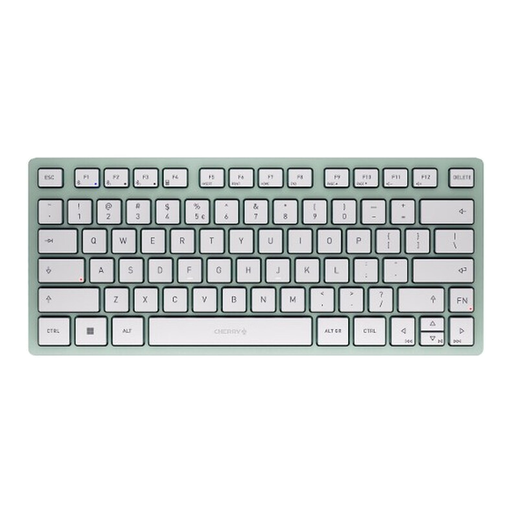
CHERRY KW 7100 MINI Bluetooth keyboard with US layout

CHERRY KW 7100 MINI, Bluetooth, US layout

A compact Bluetooth option if you want to switch between several devices.

The product name lists connections to three devices and a US layout; check that this physical layout suits your needs.

View at Joybuy

Frequently asked questions

Is a TKL or an even smaller format better for editing text?

If you use the arrow keys and other navigation keys directly and often, a TKL keyboard can be a good starting point: the CHERRY STREAM KEYBOARD TKL keeps the main key area and leaves out the number pad. If you don’t have enough desk space for one, check the key layout of a smaller model rather than relying on its percentage size alone.

What should I check before connecting a keyboard to a laptop or tablet?

Check that the devices and connections supported by the keyboard suit your needs. CHERRY lists Bluetooth, a wireless receiver and wired connectivity for the KW 9200 MINI; you can’t assume other mini keyboards offer the same range of connections.

What ongoing upkeep might a wireless keyboard require?

Check whether the version you choose needs batteries or charging, and whether it requires a receiver. Which of these factors matters will depend on the specific model and your connectivity needs.

What are your rights when buying online, and where should an old keyboard go?

For a standard online consumer purchase, you generally have the right to cancel your order. According to the Federal Ministry of Justice, the cancellation period is usually 14 days, although statutory exceptions and the start of the period should be taken into account. Your statutory rights when goods are faulty are separate from any voluntary guarantee; the Verbraucherzentrale explains the difference. The Federal Environment Agency advises that old electrical appliances must not be put in household waste.