For writing a chapter of your novel at a small desk, a 75% model is a natural place to start if you often use function keys directly. If making room for your manuscript and mouse matters more, consider a 65% model and the key combinations you’ll need to use. Keychron describes the K3 Max as a low-profile 75% model, while CHERRY lists 68 keys for the MX-LP 2.1 Compact Wireless. Also choose the specific German layout and switch variant to suit your writing habits and noise levels: “mechanical” alone doesn’t tell you how a keyboard will feel or sound at your desk.
Who each form factor suits
Writers with limited desk space
If you need room beside your keyboard for a manuscript or mouse, a compact 65% or 75% form factor may be worth considering. CHERRY describes the MX-LP 2.1 Compact Wireless as a 68-key model, while Keychron lists the K3 Max as a 75% keyboard.
Writers in shared spaces
If you write longer passages within earshot of other people, consider the specific switch variant. Logitech lists Tactile Quiet, Clicky and Linear options for the MX Mechanical Mini.
Writers who revise frequently
For navigating and editing, it matters which keys are within easy reach and whether you can customise the layout. Keychron lists QMK/VIA support for the K3 Max and V1; check the layout of the specific version you’re considering.
What to look for when buying
| What to consider |
What to check when buying |
Who it matters most to |
| Desk space and room for a mouse or notes |
Compare the dimensions of the specific version with your available space, allowing room for your manuscript and mouse. |
If I need my mouse and notes beside the keyboard while I write, every centimetre counts. Around 36% of consumers put space requirements first. |
| Typing feel and noise |
Check the exact switch variant and, if possible, try typing or listening in a similar environment. |
If I write within earshot of others, I want to get a feel for how the specific version types and sounds. Around 29% of consumers prioritise switch feel or noise. |
| Editing keys within easy reach |
Compare the layout of the specific German version with the navigation and function keys you use most often. |
If I often navigate through text while editing, I want important keys to be easy to reach. Around 21% of consumers prioritise editing keys that are immediately accessible. |
| Customisation and connectivity |
Check the connection options you want, device compatibility and, for hot-swappable models, compatibility with the specific switches. |
If I want to customise key assignments or choose between connection options, I check these features on the exact model. Around 14% of consumers put customisation or connectivity first. |
Avoiding buying pitfalls
-
Assuming “compact” means editing keys are immediately accessible
A 65% model, such as the MX-LP 2.1, which CHERRY describes as having 68 keys, involves a different trade-off from a 75% layout. With fewer keys available directly, you may need to use key combinations for frequently used commands.
Check the layout of the specific version and compare it with the commands you often use when writing and editing.
Unfamiliar key combinations can take extra time to get used to when editing.
-
Assuming “mechanical” means a particular typing sound
Logitech lists several switch variants for the MX Mechanical Mini. Tactile Quiet is the manufacturer’s description, not a measurement of noise levels across your entire workspace.
Check which switch variant you’re actually choosing and, if possible, assess how it sounds in your writing environment.
-
Assuming a barebone kit is a ready-to-use keyboard
A barebone DIY kit is not the same as a fully assembled keyboard. With a kit, you’ll need to check which components are required for the specific version.
Check what’s included before choosing a model, and distinguish a kit from a fully assembled version.
A barebone kit may require switches and keycaps, which you’ll need to check and buy separately.
Relevant brands at a glance
Keychron
The K3 Max and V1 ranges offer compact 75% options. The K3 Max is a low-profile model, while the V1 is a separate range.
- Keychron lists several connection options and QMK/VIA support for the K3 Max; a DE-ISO version is available.
- For a hot-swappable version, check separately whether it supports low-profile switches. Features of the K3 Max don’t automatically apply to the V1.
Logitech
The MX Mechanical Mini is a compact mechanical keyboard available with a choice of switch variants.
- Logitech lists Tactile Quiet, Clicky and Linear variants.
- Manufacturer claims about typing feel and ergonomics are not independent evidence of health benefits or measured noise levels at your desk.
CHERRY
The MX-LP 2.1 Compact Wireless is a 65% mechanical option for writers considering a compact form factor.
- CHERRY describes the model as having 68 keys and three connection modes.
- Check which function keys and editing commands are immediately accessible, and how to use the less frequently needed features.
MonsGeek
The M1 V5 VIA is a 75% option for writers looking for a customisable mechanical keyboard.
- The manufacturer lists an aluminium case, VIA support and a design that can be opened with minimal tools.
- A fully assembled keyboard is not the same as a separately sold barebone DIY kit. If you’re buying the kit, check which additional components you’ll need.
Joybuy products
The Joybuy products below include compact mechanical keyboards with different layouts. Compare the specific layout and space requirements with your writing habits.
 No image available
Akko 3084B Plus Tri-Mode, V3 Pro Cream Blue, 75% ISO-DE, black and gold
A compact option if you’re looking for a 75% layout with ISO-DE keys and several connection options.
75%; ISO-DE; V3 Pro Cream Blue switch; Bluetooth, 2.4 GHz and USB-C; hot-swappable; RGB.
View at Joybuy
 No image available
NAXSIR Mini Mechanical Keyboard, 61 keys
The mini form factor may be a good fit if desk space is particularly limited. Check the layout for the commands you use most often when editing.
61 keys; 12 RGB lighting effects.
View at Joybuy
 No image available
Ticktype EVO75, ISO-DE, Creamy Rye switches
A compact option if you’re considering an ISO-DE version with customisable features.
ISO-DE; aluminium; hot-swappable; Leaf Spring Mount; VIA-compatible; Quick-Disassembly; Creamy Rye switches.
View at Joybuy
 No image available
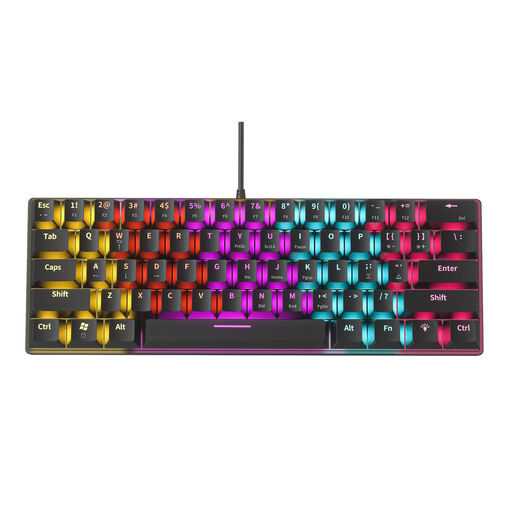
Redragon RS68, 65%, 68 keys, blue switches
The 65% form factor is an option if desk space is your priority. Check in advance how to use the editing commands you rely on most.
65%; 68 keys; hot-swappable; Bluetooth, 2.4 GHz and wired; detachable wrist rest.
View at Joybuy
 No image available
Akko 3084B Plus Tri-Mode, V3 Pro Cream Yellow, 75% ISO-DE, black and gold
A compact option if you’re considering a 75% layout with ISO-DE keys and a different switch variant.
75%; ISO-DE; V3 Pro Cream Yellow switch; Bluetooth, 2.4 GHz and USB-C; hot-swappable; RGB.
View at Joybuy
Frequently asked questions
How do I choose between 65% and 75%?
If desk space is your priority, consider a 65% model and the key combinations you’ll need to use. If you often use function keys directly, start with 75%. Compare the actual dimensions and layout of the specific version, not just the percentage.
How do I find the right switch variant for writing?
Choose according to the typing feel you want and the noise levels in your environment, rather than the word “mechanical” alone. Logitech lists Tactile Quiet, Clicky and Linear options for the MX Mechanical Mini; Tactile Quiet is not a measurement of noise levels at your desk.
What should I look for in a German keyboard layout?
Check that the specific version is explicitly offered with the German layout you want, such as ISO-DE. Also compare the layout with the special characters and editing commands you use when writing.
Can I customise the key layout to suit how I write?
That depends on the specific model and the configurations it supports. Keychron lists QMK/VIA support for the K3 Max; before buying, check that the features work with your device and the layout you want.


