Who are the different form factors suited to?

Writers who already have a monitor

If you want to write newsletter copy in a small space and keep using a screen you already own, a mini PC is worth considering. Check that it has the ports you need and supports your software. Lenovo Germany, GEEKOM Germany and MSI provide details of relevant mini PC configurations and product ranges.

Newsletter designers

For working with text, images and columns, and checking finished editions, choosing the right layout software is essential. LibreOffice describes features in Writer such as columns, frames and graphics. You should also check the requirements of the application you actually use.

People setting up a new workspace

If you need a screen as well as a computer, consider an all-in-one with an integrated display. With other form factors, you’ll choose the monitor separately. HP Store Germany describes an all-in-one model with an integrated screen.

What should you consider when buying?

Mini PC with a separate monitor

A good fit if: you already have a compatible monitor, or want to choose the computer and screen separately.

Keep in mind: you’ll need to plan for a monitor, input devices and cables. A small case doesn’t necessarily mean quiet operation or the right ports.

All-in-one PC

A good fit if: you need a new screen and have room on your desk for one device that combines the computer and display.

Keep in mind: the screen size and stand are determined by the available desk space, and you can’t choose the display independently of the computer.

Separate compact desktop

A good fit if: you have room for a larger case and ports or model-specific upgrade options are important to you.

Keep in mind: the case and monitor need desk space together. Check the features and upgrade options of the specific configuration.

Buying criteria What should you look for? Who should pay particular attention?
Desk space and screen Measure the space needed for the computer, monitor and stand, as well as cable routes. If you’re considering a mini PC, check whether a mounting bracket is suitable. If you want to keep as much clear space as possible on a small desk, consider the complete setup. This is the top priority for around 33 % of consumers.
Layout and software Check the requirements of the application and file formats you use against the operating system, memory and storage of the specific configuration. If you design newsletters with text, images or columns, first make sure you have the right software. Layout and software are the top priority for around 27 % of consumers.
Complete workspace Check what’s included with the exact configuration, and make sure your existing devices and monitor inputs match the PC’s outputs. If you need a display or input devices as well as the computer, what you already own is key. A complete setup is the top priority for around 20 % of consumers.
File backups Decide in advance how you’ll regularly back up your work files to a separate storage device or with a suitable backup solution. If you want to keep previous and current newsletter editions, plan for a separate backup. File backups are the top priority for around 20 % of consumers.

Which buying and planning mistakes should you avoid?

  • Comparing only the mini PC case with the all-in-one

    The usable desk space also needs to accommodate the screen, stand, cables and other devices. A mini PC on its own doesn’t make a complete writing setup.

    Plan where all the components will go on your desk and check what’s included with the specific configuration. With a mini PC, you may also need to allow for a monitor, input devices, cables or a suitable mounting bracket.

  • Assuming every configuration in a product range is the same

    Operating systems, storage and ports can vary between configurations. A product family name alone won’t tell you whether the version on offer is compatible with your software and devices.

    Check the full model number and the details of the configuration actually being sold.

  • Treating the internal SSD as a backup

    An internal SSD isn’t a separate copy of your newsletter files. If it fails, it can’t serve as an independent backup on its own.

    Set up regular backups on a separate storage device or with a suitable backup solution. Germany’s Federal Office for Information Security recommends both options.

  • Planning to use an older Windows 10 PC without checking its update options

    According to Microsoft, standard support for Windows 10 ended on 14 October 2025. If a device runs this operating system, you’ll need to check how it will continue to receive updates.

    If you’re buying a second-hand device, check which operating system it supports, whether it’s eligible for an upgrade and what updates are actually available.

Which brands are worth considering?

Lenovo

The ThinkCentre neo 50q Gen 5 Tiny is an example of a compact Windows PC with a separately chosen monitor.

  • For the 13B9009EEZ configuration, Lenovo Germany lists Windows 11 Pro, 16 GB RAM and a 512-GB SSD.
  • According to the manufacturer, the monitor, keyboard and mouse are sold separately for this configuration.

HP

The OmniStudio 24 and OmniDesk M03 offer different desk setups: an all-in-one and a separate desktop PC.

  • For the OmniStudio 24-cv0752ng, HP Store Germany lists an integrated 23.8-inch FHD screen, 16 GB RAM and a 512-GB SSD.
  • These details apply to the configuration named and shouldn’t be assumed to cover the whole product range.

GEEKOM

The A5 Pro 2026 Edition is an example of a mini PC for a workspace with an existing or separately chosen monitor.

  • For the Ryzen 5 7530U configuration, GEEKOM lists 16 GB RAM and a 1-TB SSD.
  • Check that the retailer’s configuration matches the model you want.

MSI

The Cubi NUC 1M family is an example of a mini PC, while the PRO DP80 A14G is a larger compact desktop.

  • For the Cubi NUC 1M family, MSI lists a VESA mounting option and several display outputs.
  • PRO DP80 A14G configurations differ in areas including the operating system and storage. Manufacturer specifications aren’t independent measurements of noise or performance.

Apple

The Mac mini is a compact option with a separately chosen monitor, provided your newsletter software is compatible with macOS.

  • Apple Germany lists support for external displays across current Mac mini configurations.
  • You’ll need to check separately that your existing Windows-specific applications and connections are compatible.

Joybuy products for your newsletter workspace

The following Joybuy products are mini PCs for a workspace with a separately connected monitor.

ACEMAGIC AK1PLUS mini PC

ACEMAGIC AK1PLUS mini PC, Intel Celeron N5095, 16 GB LPDDR4X, 256 GB M.2 2280 SATA SSD

The mini PC form factor suits a workspace with separately connected devices. You’ll need to allow for a monitor, keyboard and mouse.

This configuration is listed with Windows 11 Pro, HDMI 2.0 and Wi-Fi 5. Check that its ports are compatible with your monitor and existing peripherals.

View at Joybuy
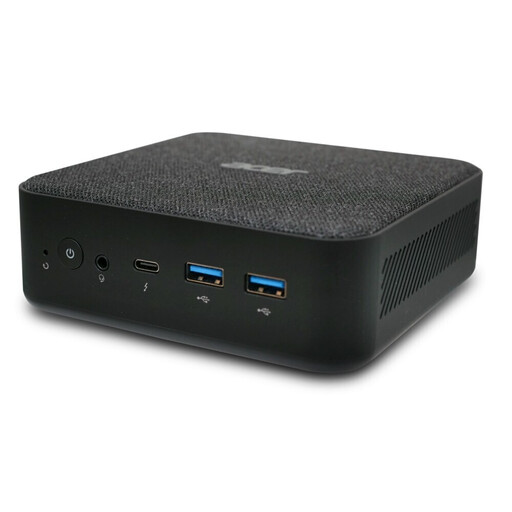
ACER Revo RB102 mini PC

ACER Revo RB102 mini PC, Core Ultra 5 125U, 16 GB, 512 GB SSD, Windows 11 Pro

The mini PC form factor suits a workspace with a separately connected monitor. Remember to allow for the input devices you need, too.

This configuration is listed with a Core Ultra 5 125U, 16 GB RAM, a 512-GB SSD and Windows 11 Pro. Check that it connects to your specific monitor.

View at Joybuy

Frequently asked questions

Can I design a newsletter using a word processor?

Yes, depending on the layout you want and the method you use. LibreOffice lists features in Writer such as columns, frames and graphics. You should also check what your application requires for publishing or printing.

What should I check when connecting a monitor I already own?

Compare the monitor’s input with the outputs on the specific PC configuration, and allow for the right cables and a suitable place to put it. MSI lists HDMI and Thunderbolt, as well as a VESA mounting option, for the Cubi NUC 1M family. This doesn’t confirm compatibility with your monitor.

How do I back up finished newsletter editions?

Back up your work files regularly, in addition to keeping them on the internal storage. Germany’s Federal Office for Information Security recommends using backup software or regularly saving your own files to an external storage device.

What rights apply when buying a PC online as a private consumer in Germany?

Consumers have statutory warranty rights against the seller; these are separate from any voluntary manufacturer’s guarantee. Online purchases generally come with a right to cancel, usually within 14 days of receiving the goods. Exceptions and the specific terms of the contract should be taken into account.

Can I put an old PC in my household rubbish?

No. Germany’s Federal Environment Agency advises that old electrical equipment should be disposed of separately, for example at a recycling centre or through suitable take-back points at retailers.