If you already take notes on a computer, a compact pen tablet gives you extra writing space without taking up much room; your writing appears on the computer screen. A pen display may suit you if you want to write directly beneath the tip of the pen, while a standalone paper tablet is designed for taking notes without a connected computer. Compare the overall dimensions with the usable writing area, as well as the connections, accessories and any subscription features.
Who writes in a small space?
Note-takers short on space
If you already have a computer screen, you can add a separate writing surface. Compare the overall dimensions with the active area, and allow room for your hand and cables. Wacom lists the One by Wacom Small as measuring 210 × 146 mm overall, with an active area of 152 × 95 mm.
Writers who want to write directly on screen
If you want to see your strokes where the pen tip touches the screen, a pen display may be a good fit. Make sure you have room for the display and cables, and check how it connects to your computer. XPPen describes the Artist 10 (2nd Generation) as a pen display with a 10.1-inch screen.
Note-takers without a computer
If you don’t want to connect a computer while writing, you could consider a standalone paper tablet. Check that its writing area and the features you want suit your workflow without a subscription. reMarkable includes unlimited cloud storage, plus the ability to capture and edit notes in mobile and desktop apps, with its Connect subscription.
What should you consider when choosing?
Compact pen tablet without a display
A good choice if: You have a computer screen and want to keep the extra space it takes up to a minimum.
The trade-off: You write on the tablet but see your writing on the computer screen; the active area is smaller than the overall dimensions.
Pen display
A good choice if: You want to look directly at the note on screen as you write.
The trade-off: A pen display isn’t a standalone device; it connects to a computer. Depending on the connection, you may need extra cables or a power supply.
Standalone paper tablet
A good choice if: You don’t want a computer connected while you write.
The trade-off: Check that the smaller writing area suits you, and find out which synchronisation and editing features are available without a subscription.
First, decide whether you want to connect a computer. Then you can compare the writing area, space requirements and features you need more easily.
| Priority |
What to check before buying |
Who is this most important to? |
| Desk space and writing area |
Compare the overall dimensions and active area separately, and consider the size of your usual notes. |
If your small desk also needs to accommodate your hand and other work essentials, both measurements matter. Around 36% of consumers prioritise desk space and usable writing area. |
| Writing directly beneath the pen tip |
Consider whether looking over at your computer screen works for you, and check the available display connections. |
If you want to see your writing directly on the input device, you should also plan how it will connect. Around 29% of consumers prioritise seeing their writing directly. |
| Taking notes without a computer |
Check the difference between a standalone device and a connected input device; look at the display size and features available without a subscription. |
If you don’t want a computer connected while you write, the type of device and the writing view it offers are key. Around 21% of consumers make independence from a computer their main priority. |
| Connections and ongoing costs |
Check what’s included and the connections available on the specific model, as well as which features you want without a subscription. |
If you want to use the connections you already have and understand any ongoing costs, check the cables and features in advance. Around 14% of consumers prioritise connections, accessories and potential ongoing costs. |
Common buying misconceptions
-
Assuming the overall dimensions are the same as the writing area
A tablet’s overall dimensions don’t tell you how much space you’ll actually have to write on. For the One by Wacom Small, Wacom lists overall dimensions of 210 × 146 mm and an active area of 152 × 95 mm.
Compare both measurements for the specific model, and allow extra room for your hand and cables.
-
Assuming a pen display is a standalone tablet
XPPen’s instructions say that the Artist 10 (2nd Generation) connects to a computer. Depending on the connection, you may need additional cables or a power supply.
If you want to write without a computer, choose a standalone device. Otherwise, check the connection requirements and what’s included before buying.
-
Assuming synchronisation and app editing will always be free
reMarkable includes unlimited cloud storage, plus the ability to capture and edit notes in mobile and desktop apps, with its Connect subscription.
Before buying, check which features you need and which are available without a subscription.
-
Assuming a discontinued model is a regular new product
reMarkable describes the reMarkable 2 as discontinued. Information about this model may not apply to other devices.
Check the full model name, condition and included pen in the specific listing.
Key brands and device types
Wacom
The One by Wacom Small CTL-472 is a compact pen tablet for taking notes on a computer. Wacom lists overall dimensions of 210 × 146 mm and an active area of 152 × 95 mm.
- Wacom says a battery-free pen is included.
- The device needs to be connected to a computer. The German manufacturer’s shop page marks the CTL-472-N version as unavailable; this doesn’t tell you about availability from other retailers or of other versions.
Huion
The Inspiroy 2 S H641P is a small pen tablet with a scroller and six shortcut keys.
- Huion lists a battery-free PW110 pen and an active area of 6.3 × 3.9 inches.
- Before buying, check that the device works with your intended connection and system. The pressure sensitivity specifications don’t demonstrate a particular advantage for everyday note-taking.
XPPen
The Deco mini7 V2 is a compact pen tablet, while the Artist 10 (2nd Generation) is a pen display.
- XPPen lists the Deco mini7 V2 as measuring 260.2 × 162.2 mm overall, with an active area of 177.8 × 111.1 mm. According to XPPen, the Artist 10 has a 10.1-inch display.
- According to its instructions, the Artist 10 connects to a computer. The accessories you need depend on the model and connection method.
GAOMON
The S620 is a small pen tablet for taking notes on a computer.
- GAOMON lists an active area of 165.1 × 101.6 mm and overall dimensions of 211 × 174 mm in PC mode.
- The manufacturer gives different active-area measurements for PC and phone modes. Check which mode works with your device.
reMarkable
The Paper Pro Move is a standalone paper tablet for handwritten notes without a connected computer.
- reMarkable lists a 7.3-inch colour display and an included Marker.
- According to reMarkable, unlimited cloud storage and the ability to capture and edit notes in mobile and desktop apps are included with the Connect subscription. The manufacturer describes the reMarkable 2 as discontinued.
Joybuy products for handwritten notes
The following Joybuy products include LCD writing tablets and an E Ink note-taking tablet for handwriting.
 No image available
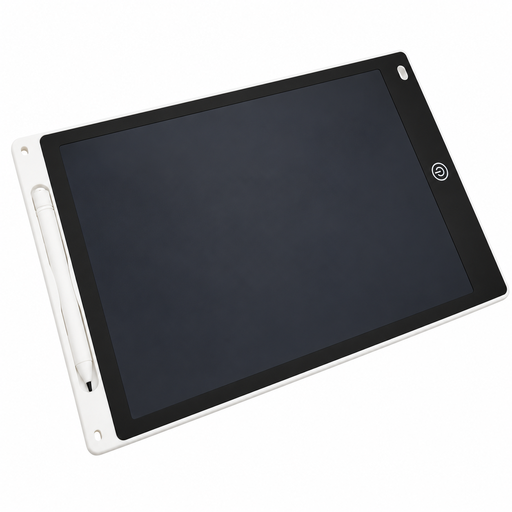
12-inch LCD drawing tablet with pen and erase function
Could be suitable for quick handwritten input on an extra writing surface.
The product description mentions a button cell. Keep the battery and battery compartment out of children’s reach, and leave handling to adults.
View at Joybuy
 No image available
iFLYTEK AINOTE 2, 10.65-inch E Ink note-taking tablet with protective case
An E Ink note-taking tablet with a pen could be an option for digital handwritten notes.
Check that the display size and included protective case suit your space and writing workflow.
View at Joybuy
 No image available
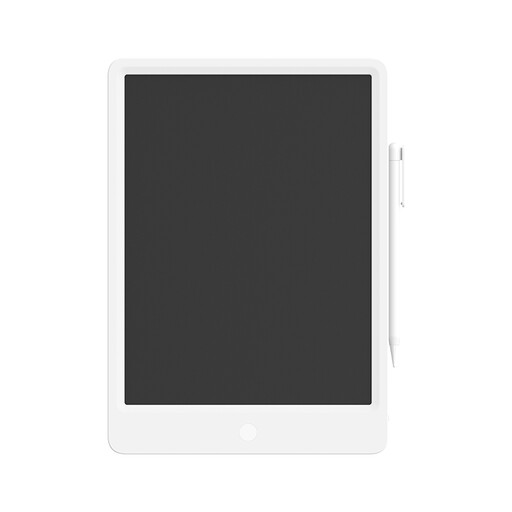
Xiaomi LCD writing tablet, 13.5 inches, with pen
The reusable LCD writing surface could be a handy way to write without paper.
The product description mentions a button cell. Keep it out of children’s reach.
View at Joybuy
Frequently asked questions
Can I take notes with a pen tablet without a computer?
A conventional pen tablet such as the One by Wacom Small is designed to be used with a connected computer; Wacom describes it as connecting via USB. If you want to write without a computer, a standalone paper tablet may be a better option.
What should I check before connecting a pen display?
Check that your computer’s connections match the instructions for the specific model and what’s included in the box. XPPen describes the Artist 10 (2nd Generation) as connecting to a computer; depending on the connection, you may need extra cables or a power adapter.
How can I estimate potential ongoing costs before buying?
Check which cables you’ll need and, for standalone devices, which features are available without a subscription. reMarkable includes unlimited cloud storage and the ability to capture and edit notes in mobile and desktop apps with Connect. Check the current terms before deciding whether to subscribe.
What rights apply when buying online in Germany?
For a distance contract with a consumer, § 312g BGB generally provides a right of withdrawal; § 355 BGB specifies a period of 14 days. Statutory exceptions and when the period begins depend on the circumstances of the case. For faulty goods, statutory consumer rights should be distinguished from a voluntary guarantee.


