If a Switch game supports individual Joy-Con controllers, a pair can take up little desk space when two people play; for the Switch 2, you can use Joy-Con 2. For games that need analogue sticks or other inputs, a separate gamepad may be a better fit, but you’ll need one per player when playing with a group. Before choosing, check your console, the game’s controller setup and the inputs it requires.
Which controllers suit which players?
Switch gaming with friends around a small table
If you want to play locally with at least one other person, check whether the specific game supports individual Joy-Con controllers. Nintendo describes using one Joy-Con per person in tabletop mode for supported games.
Fans of simple 2D party games
If your game only needs digital inputs, a very small gamepad can save space. According to 8BitDo, the 8BitDo Micro measures 72 × 40,7 × 14,1 mm; it does not have motion controls.
Players who need a range of inputs
If you also want to play games that use analogue sticks or motion controls, check which features each game requires. The 8BitDo Lite 2 has sticks; features vary between other controller models.
What to consider when buying
First, work out how many people will be playing at once and which controller setup the game supports. Then compare the available desk space with the inputs you need and the charging options you have.
| What matters |
What to check before buying |
Who it matters to |
| Enough controllers |
Check whether the specific game supports individual Joy-Con controllers for different players, then count how many controllers you need. Nintendo describes this setup in tabletop mode for supported games. |
When we play as a pair or in a larger group, I want to know whether each device can be used as a separate controller. Around 36% of consumers focus on how many input devices they need. |
| Space and ease of use |
Compare the controller’s dimensions with the space available; if you’re using motion controls, also allow room for everyone to move. |
At a small desk, I want space for the controllers, console and hands without feeling cramped while playing. Around 29% of consumers prioritise the space they need. |
| The right inputs |
Check which console you have and which controls the game needs, such as analogue sticks or motion controls. A general Bluetooth specification doesn’t confirm that a particular game supports every input. |
If a game needs sticks or motion controls, I don’t want to miss out on an essential input just to get a particularly small controller. Around 21% of consumers prioritise the features they need for their games. |
| Charging and accessories |
Check which charging options you already have and what accessories you need. Original Joy-Con controllers can’t be attached to or charged directly on the Switch 2. |
Before a gaming session, I want to know whether I can charge the controllers with the equipment I already have. Around 14% of consumers make power and charging their main concern. |
Common buying mistakes
-
Planning to use Joy-Con 2 with the original Switch
Nintendo says Joy-Con 2 are designed only for the Switch 2. The model name alone isn’t a reliable way to check compatibility.
Before buying, check which Switch generation you have and which console the controller pair is designed for.
-
Choosing only by size
A very small gamepad may not have inputs required by a particular game. According to the manufacturer, the 8BitDo Micro doesn’t have motion controls, while the Lite 2 has analogue sticks.
First compare the game’s controls with the features of the specific controller model, then decide how small you want it to be.
If a required input is missing, you may need another controller for those games.
-
Buying extra controllers without considering charging
Original Joy-Con controllers can’t be attached to or charged directly on a Switch 2. Nintendo says you’ll need an original Switch or suitable accessories to charge them.
Before buying, check how you’ll charge all your controllers between gaming sessions.
You may need a separate, compatible charging option to use original Joy-Con with the Switch 2.
Key brands at a glance
Nintendo
Joy-Con and Joy-Con 2 are worth considering when a compatible game lets two people share a pair of controllers.
- Nintendo describes using individual Joy-Con controllers in tabletop mode for supported games.
- According to Nintendo, Joy-Con 2 are designed for the Switch 2. Original Joy-Con can only be used wirelessly with the Switch 2 and need a suitable charging option.
8BitDo
The Micro and Lite 2 offer different compact designs: one is particularly small, while the other has analogue sticks.
- 8BitDo lists the Micro’s dimensions as 72 × 40,7 × 14,1 mm and the Lite 2’s as 120 × 65,95 × 35,45 mm; the Lite 2 has sticks.
- The Micro doesn’t have motion controls. Check platform compatibility and the features you need for the specific model and game.
PowerA
The rechargeable Enhanced Wireless Controller is a full-size alternative for Switch players who want a separate wireless controller for each person.
- PowerA lists motion controls and programmable buttons for this model.
- According to PowerA, it doesn’t have HD Rumble, IR or amiibo NFC. The stated battery life of up to 30 hours depends on how it’s used and is based on the manufacturer’s figures.
Joybuy products for party games on a small desk
This Joybuy selection includes pairs of Joy-Con for compatible local multiplayer sessions, as well as individual gamepads for players whose games support them.
 No image available
Nintendo Switch 2 Joy-Con 2 pair (blue/light yellow)
The set includes one left and one right Joy-Con 2, which can be used individually for two-player local gaming in compatible games.
Designed for Nintendo Switch 2 only; not for use with the original Switch.
Whether both Joy-Con work as individual controllers depends on the game.
View at Joybuy
 No image available
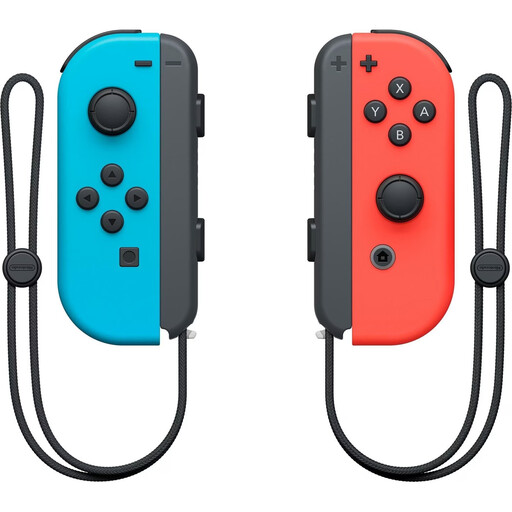
Nintendo Switch Joy-Con controller pair (neon red/neon blue)
In supported games, the pair can be used for local two-player gaming, with one Joy-Con per person.
Whether the controllers can be shared between two people depends on the game.
View at Joybuy
 No image available
EasySMX D10 gamepad
As an individual gamepad, it may suit one player if the specific game supports the controller.
The product name lists support for PC, Switch, Android and iOS, as well as a TMR joystick, dual-mode triggers, mechanical buttons and a 1000 Hz polling rate.
View at Joybuy
 No image available
BEITONG PanGu Modular Wireless Gaming Controller
This is a single controller for one player; you’ll need additional controllers for other players.
The product name lists PC, Nintendo Switch and Switch 2 as compatible platforms, along with interchangeable joysticks, buttons and directional pads.
View at Joybuy
 No image available
BEITONG KP70 Elite Wireless Gaming Controller
This individual gamepad may suit a gaming session if the game supports the listed platforms and inputs.
The product name lists PC, Nintendo Switch and Switch 2 as compatible platforms, along with adjustable joysticks and six programmable buttons.
View at Joybuy
Frequently asked questions
Can everyone use a Joy-Con when playing Switch games around a table?
Yes, if the specific game supports this multiplayer mode. Nintendo describes using one Joy-Con per person in tabletop mode; place the console on a stable surface.
Can I buy Joy-Con 2 for my original Nintendo Switch?
No. Nintendo says Joy-Con 2 can only be used with the Switch 2. Original Joy-Con can be used wirelessly with the Switch 2, but can’t be attached to or charged directly on it.
What should I prepare before playing a game with motion controls?
Check the game’s controls and make sure everyone has enough room to move. Nintendo recommends attaching wrist straps when using original Joy-Con individually as wireless controllers.
What should I look for in a wireless controller to check product safety?
The Federal Network Agency lists CE marking, product identification, manufacturer details, instructions in German and a declaration of conformity among the points it checks during market surveillance. These checks by the authority don’t confirm that an individual controller complies with the requirements.
Who is responsible for statutory claims if a controller is faulty?
For a consumer purchase from a business seller, statutory rights relating to faults are generally claims against the seller. Your Europe explains that the statutory minimum period is two years; a voluntary manufacturer’s guarantee doesn’t replace these rights.


