First, measure the available desk space, including the depth of the monitor stand, and take your viewing distance into account. A Full HD monitor around 24 inches is the more space-saving option; a 27-inch QHD model is worth considering if your desk and PC can handle the larger, sharper display. For smooth stages, also check the refresh rate actually available at your chosen resolution through the connection you plan to use.
Which monitor option is right for you?
Rally drivers short on desk space
If you need to leave room for your controls as well as the monitor and its stand, the actual dimensions of the screen and stand matter more than the diagonal measurement alone. TÜV SÜD recommends Full HD for monitors up to around 24 inches and for small desks.
Drivers who prioritise smooth motion
If you’re practising fast sections, consider the stated refresh rate alongside your PC’s performance, the resolution and the HDMI or DisplayPort input you’ll be using.
Drivers looking for a sharper picture
If you have room on your desk for a larger screen, a 27-inch QHD monitor could be a good fit. The key question is whether your PC can reach the desired frame rate at 2560 × 1440.
What should you look for when buying?
| Buying criterion |
What to check |
Who it matters most to |
| Space required |
Compare the available desk width and depth with the dimensions of the monitor and stand. Remember to allow room for your controls, too. |
If my desk has little free space, I want to know the footprint of the whole setup, not just the screen size. Around 36% of consumers put available space first. |
| Motion performance |
Check the refresh rate available at your chosen resolution through the connection you’ll actually use. Also consider the frame rate your PC can achieve in-game. |
If I’m driving fast sections, I want to know whether my PC and connection can deliver the frame rate I want. Around 29% of consumers prioritise smooth motion. |
| Picture sharpness |
Weigh up Full HD at around 24 inches and QHD at 27 inches, taking viewing distance, desk space and PC performance into account. TÜV SÜD considers Full HD suitable for small desks when used with monitors up to around 24 inches. |
If I want to see more detail on a larger screen, I also need to allow for the space it takes up and the PC performance required. Around 21% of consumers prioritise picture sharpness. |
| Device connections |
Check that your PC’s outputs match the monitor’s inputs. For the exact model, confirm which resolution and refresh rate are supported through the input you plan to use. |
If my PC only has certain outputs, I want to be sure the monitor and connection are compatible. Around 14% of consumers prioritise device compatibility. |
Which buying decisions could go wrong?
-
Comparing only the screen size with the available space
Even if the picture is sharp enough, a 27-inch screen could take up too much room on your desk.
Before buying, compare the dimensions of the specific model and its stand with the free space on your desk.
If the stand takes up too much room, you may need to buy a suitable monitor mount separately.
-
Assuming the highest refresh rate is available through every connection
The available refresh rate can vary depending on the connection. ASUS and Dell list different HDMI and DisplayPort refresh rates for the specific models covered here.
Check the resolution and refresh rate supported through your chosen input, along with your PC’s output.
Depending on your device connections, you may need a suitable cable or to use another available port.
-
Confusing a guarantee with your statutory rights
Your statutory rights against the seller and a voluntary guarantee are two different things. The Verbraucherzentrale explains the distinction.
Before buying, make a note of who the seller is and check the terms of any guarantee on offer.
Key brands at a glance
ASUS
The TUF Gaming VG249QM1A is a compact 23.8-inch Full HD option.
- ASUS lists refresh rates of up to 270 Hz through DisplayPort and up to 240 Hz through HDMI for this model.
- This model’s stand isn’t height-adjustable. The refresh rates listed don’t apply to every ASUS monitor.
LG
The UltraGear 27GS75QX-B is a 27-inch QHD option.
- LG lists an IPS panel, 2560 × 1440 resolution and 180 Hz for this model, with 200 Hz available in overclocking mode.
- Make sure the larger screen and its stand will fit your desk and suit your viewing distance.
Philips
The Evnia 3000 24M2N3200A/00 is a 23.8-inch Full HD option.
- Philips lists a Fast IPS panel and 180 Hz for this model.
- Manufacturer claims about precision or lag aren’t independent tests of how well a monitor performs with rally games.
Dell
The G2725D shows why the connection you use matters with a 27-inch QHD monitor.
- Dell lists refresh rates of up to 180 Hz at QHD through DisplayPort.
- For this model, Dell lists refresh rates of up to 144 Hz at QHD through HDMI.
Joybuy monitors for rally training at a small desk
This selection includes compact 24-inch Full HD models and larger 27-inch QHD options. Compare the dimensions, connection and resolution with your desk and PC.
 No image available
KOORUI MB24V29FS4, 24-inch Full HD, IPS monitor
Its 24-inch Full HD display makes this a good fit for a compact monitor setup on a small desk.
IPS; 1920 × 1080; 120 Hz; HDMI and VGA; 100 × 100 mm VESA mount; tilt-adjustable.
View at Joybuy
 No image available
KTC H24B9S, 24-inch Full HD gaming monitor
Its 24-inch Full HD display makes this a compact option. Check that the frame rate suits your PC and connection.
IPS; 1920 × 1080; 144 Hz; Adaptive Sync; HDMI and DisplayPort.
View at Joybuy
 No image available
ASUS Eye Care VY249HF-W, 24-inch Full HD monitor
Its 24-inch Full HD display is a space-saving option, provided it suits your desk space and viewing distance.
IPS; 1920 × 1080; 100 Hz; Adaptive-Sync; HDMI; VESA 100 × 100.
View at Joybuy
 No image available
INNOCN 2751S PLUS, 27-inch QHD Mini LED monitor
A 27-inch QHD display is worth considering if your desk has the space and your PC has the processing power for it.
2560 × 1440; IPS; 275 Hz; HDMI 2.1 and DisplayPort 1.4; built-in speakers; height-adjustable.
The listed FreeSync ranges vary between HDMI and DisplayPort.
View at Joybuy
 No image available
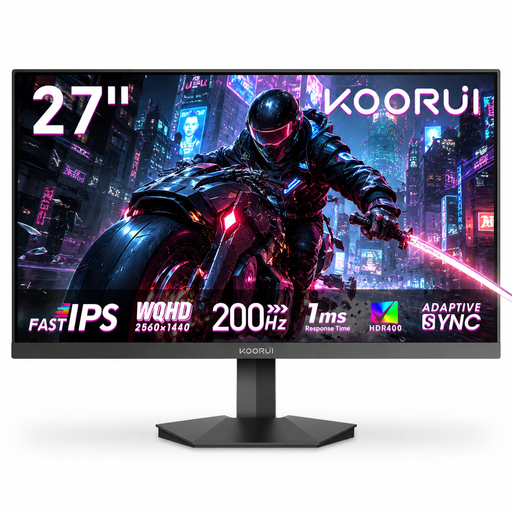
KOORUI G2721P, 27-inch QHD gaming monitor
This 27-inch QHD monitor is a good fit if you have room for the larger screen and your PC can deliver the frame rate you want.
2560 × 1440; Fast IPS; 200 Hz; Adaptive Sync; DisplayPort 1.4; VESA 75 × 75.
The product description states that the stand isn’t height-adjustable.
View at Joybuy
Frequently asked questions
Is a high Hz figure on the box enough for smooth rally training?
No. The stated refresh rate alone isn’t enough to help you choose. Check the frame rate your PC can achieve in-game, and which resolution and refresh rate combination the input you’re using supports. For example, Dell lists refresh rates of up to 180 Hz at QHD through DisplayPort and up to 144 Hz through HDMI for the G2725D.
What should I measure before setting up or mounting the monitor?
Measure the available width and depth of your desk, then compare them with the dimensions of the specific model and its stand. If you’re considering an alternative mount, check how it attaches and whether your desk can support it. A VESA specification alone won’t answer that question.
What energy label applies to monitors in Germany?
The EU energy label applies to this product category, with a scale from A to G, as explained by the European Commission. Compare the information for the specific model and take your usage time and electricity tariff into account, too.


