For scientific charts on a small desk, a compact QHD monitor is an obvious choice if fine labels matter and the screen and stand fit the space you’ve measured. A 16:10 model with a resolution of 1920 × 1200 pixels could be a better fit if extra vertical workspace is more important; it has fewer pixels than the QHD examples mentioned here. Before choosing, measure the available width and depth, then check that the resolution, colour features and ports suit your workflow.
Which monitor features suit different users?
Detailed work on a small desk
If you work with fine lines and small labels but have limited desk space, 23.8-inch QHD models such as the Dell P2425DE or Lenovo ThinkVision P24q-30 could be a good fit. Dell and Lenovo both list a resolution of 2560 × 1440 pixels for these models. Even so, check that the stand and viewing distance work for your desk.
Colour-critical charts
If colours distinguish categories or data series, colour modes and calibration documentation are worth considering. BenQ lists a factory calibration report for the PD2506Q, while Lenovo lists a calibration report for the ThinkVision P24q-30. Both details come from the respective manufacturers.
Using a laptop with limited space for cables
If you regularly connect and disconnect your laptop, USB-C docking can help keep cables together on your desk – but only if your laptop and monitor support compatible video output and power delivery. BenQ lists 65 W for the PD2506Q, while EIZO specifies up to 70 W at the EV2495’s USB-C upstream port. Dell, by contrast, describes the P2425’s USB-C port as a data port with up to 15 W.
What should you look for when buying?
| Buying priority |
What to check before buying |
Who it matters most to |
| Detail and desk space |
Measure your desk’s width and depth, including the stand. Dell and Lenovo each list a 23.8-inch screen and 2560 × 1440 pixels for the P2425DE and ThinkVision P24q-30, respectively. |
If I need fine lines and labels but have little space, the stand must fit within the usable desk area. For around 36% of consumers, detailed work in a limited space is likely to be their top buying priority. |
| Chart colours |
Decide on your colour target and software, then check the specific model for colour modes and calibration documentation. BenQ lists both for the PD2506Q, while Lenovo lists a calibration report for the ThinkVision P24q-30. |
If colours distinguish data series or categories, I want to be able to check how well they match my output target. For around 28% of consumers, reliable, consistent colours are likely to be their main buying priority. |
| Laptop connection |
Check your laptop’s video output, the direction of the connection and the monitor port’s charging power. BenQ lists USB-C with DisplayPort Alt Mode and 65 W for the PD2506Q; EIZO lists up to 70 W at the EV2495’s USB-C upstream port. |
If I connect my laptop regularly, I want to know whether one connection will transmit a picture and provide enough power. For around 18% of consumers, a suitable laptop connection is likely to be their top priority. |
| Vertical workspace |
Use your own software to weigh extra height against higher detail resolution. EIZO lists 1920 × 1200 pixels in a 16:10 format for the EV2495, as does Dell for the P2425. |
If I need to see both my chart and toolbars at once, extra height may matter more to me than a higher pixel density. For around 18% of consumers, vertical workspace is likely to be their main buying priority. |
Monitor buying pitfalls for chart work
-
Assuming USB-C means laptop docking
A USB-C port alone doesn’t mean the monitor can receive a picture from your laptop or charge it sufficiently. Dell lists the P2425’s USB-C port as a data downstream port with up to 15 W, not as a laptop video input.
Check the official port list for the complete model code, including video input, connection direction and charging power.
-
Looking only at screen size
On a small desk, the depth of the stand matters too. BenQ lists an overall depth of 256.9 mm for the PD2506Q with its stand.
Measure the usable depth of your desk, allowing room for your keyboard and work materials, and compare it with the dimensions of the specific version.
-
Treating 16:10 and QHD as equivalent specifications
The EIZO and Dell 16:10 examples listed here offer 1920 × 1200 pixels; the Dell and Lenovo QHD examples offer 2560 × 1440 pixels. Aspect ratio and pixel count describe different features.
Check in your charting software whether more vertical space or higher detail resolution matters most to you.
Notable brands and model ranges
Dell
The P2425DE is a 23.8-inch QHD model with a USB-C hub; the P2425 is a differently equipped 16:10 model.
- Dell lists a resolution of 2560 × 1440 pixels and 90 W power delivery over USB-C for the P2425DE.
- For the P2425, Dell describes the USB-C port as a data downstream port with up to 15 W. Don’t assume the model names mean the same thing.
Lenovo
The ThinkVision P24q-30 is a compact QHD option with a calibration report listed by the manufacturer.
- Lenovo lists a 23.8-inch screen, 2560 × 1440 pixels, HDMI, DisplayPort and a USB hub.
- Check the port list for the specific version if you need USB-C laptop docking.
BenQ
The PD2506Q is a 25-inch model for workflows where colour modes and connectivity matter.
- BenQ lists a factory calibration report, along with USB-C with DisplayPort Alt Mode and 65 W.
- The listed depth with the stand is 256.9 mm; measure the available space on your desk.
EIZO
The FlexScan EV2495 is a 24.1-inch 16:10 alternative with USB-C docking.
- EIZO lists a resolution of 1920 × 1200 pixels and up to 70 W at the USB-C upstream port.
- Its resolution is lower than that of the QHD models mentioned here; whether that matters for your charts depends on your working view.
Philips
The 24E1N1300A/00 is a 23.8-inch Full HD option.
- Philips lists a resolution of 1920 × 1080 pixels and USB-C power delivery for compatible devices.
- For highly detailed charts, compare the Full HD resolution with the QHD options listed here.
Joybuy monitors for chart work
This Joybuy selection includes QHD monitors for detailed views, as well as larger models where you’ll need to weigh up resolution, screen size and the space they take up.
 No image available
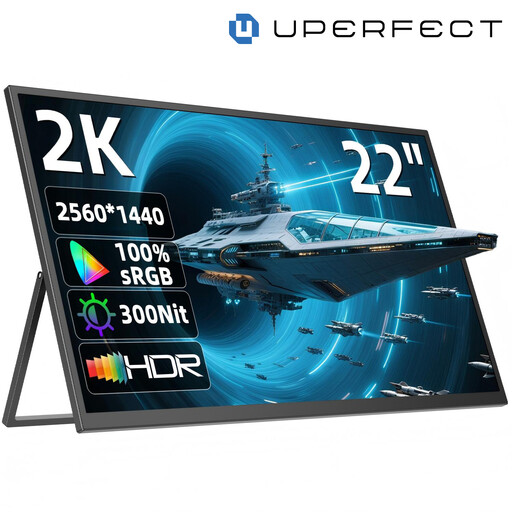
UPERFECT 22" 2K Portable Monitor, 2560 × 1440, IPS
A compact option if you need a portable view of your charts on a desk with limited space.
22 inches; 2560 × 1440 pixels; IPS; stand adjusts through 180°; USB-C and Mini-HDMI.
View at Joybuy
 No image available
TCL 27P2A Pro 27" Mini-LED-Monitor
Its QHD resolution is specified for detailed views; check that the 27-inch screen fits your available space.
2560 × 1440 pixels; HFS (IPS); 320 Hz; VESA DisplayHDR 600.
View at Joybuy
 No image available
Samsung ViewFinity S7 S70H 27" 4K UHD IPS Monitor
A 4K option for detailed views, provided the screen and stand fit on your desk.
27 inches; 4K UHD; IPS.
View at Joybuy
 No image available
INNOCN 2751S PLUS 27" Mini LED QHD Monitor
A QHD view for charts, with sRGB and Adobe RGB specifications; make sure the 27-inch size suits your workspace.
2560 × 1440 pixels; IPS; 275 Hz; 99% Adobe RGB and 99% sRGB according to the product listing; height-adjustable stand.
View at Joybuy
 No image available
KTC H27D9 27" QHD IPS Monitor
The QHD specification suits a detailed working view; make sure you have enough space for the 27-inch display.
2560 × 1440 pixels; IPS; 120 Hz; 123% sRGB according to the product listing; VESA mounting compatibility.
View at Joybuy
Frequently asked questions
Do I need the largest possible monitor for fine chart lines?
No. What matters is the usable desk space and how clearly you can read your actual chart view. Dell and Lenovo both list QHD resolution of 2560 × 1440 pixels for their 23.8-inch P2425DE and ThinkVision P24q-30 models. Consider the resolution and your chosen scaling separately.
Can any USB-C cable connect my laptop to the monitor for both picture and power?
No. Check the video output of your laptop’s port, the function of the monitor port and the charging power you need. Dell describes the P2425’s USB-C port as a data downstream port with up to 15 W; BenQ lists DisplayPort Alt Mode, data and 65 W for the PD2506Q.
What should I bear in mind when setting up the monitor?
Allow space for the stand, keyboard and work materials, and check that the screen is readable from your usual sitting position. The ASR A6 from the Federal Institute for Occupational Safety and Health and the Committee for Workplaces sets out requirements within its scope; it does not apply universally to every home desk. For cleaning, follow the instructions for the model you buy.
What rights apply when you buy a monitor online?
For online purchases by consumers, there is generally a 14-day right to cancel, starting when the goods are received, subject to statutory exceptions. The Verbraucherzentrale explains this period in an article dated 13 August 2026. If a new product is faulty, you can generally assert your statutory consumer rights against the seller within two years of delivery or receipt; these rights are separate from a voluntary guarantee.


