Teachers with a small work table
You want to show paint pots and hand movements from a steady overhead view. Check that the filming area still fits in shot when you move your hands; IPEVO states a maximum area of 34.2 × 25.5 cm for the V4K PRO.


For an overhead view on your computer, a document camera is an obvious choice. A tilting webcam is a good fit if you want to switch between your own view and a tabletop demonstration. A camera that records independently offers a different way to film, but for an overhead view you’ll need to position it securely and appropriately. Check the framing and colours under your actual lighting, using a test recording – resolution or automatic white balance alone can’t guarantee true-to-life results.
You want to show paint pots and hand movements from a steady overhead view. Check that the filming area still fits in shot when you move your hands; IPEVO states a maximum area of 34.2 × 25.5 cm for the V4K PRO.
You explain the mixing process live or record it on your computer. Check that the USB video connection is suitable and that the camera can tilt to show the tabletop; Logitech describes this option in the MX Brio’s Show Mode.
You want to film without relying on a computer and choose the framing or colour settings yourself. You’ll also need to plan a secure camera position and suitable lighting; with an interchangeable-lens camera such as Canon’s EOS R50, the framing depends on the lens you use.
Don’t choose on resolution alone: the image area, recording method and consistent lighting all need to suit your table setup.
| What you need | What to check before buying | Who should prioritise it? |
|---|---|---|
| Colours that are easy to tell apart | Check the white balance and exposure using a colour swatch under your intended lighting. Canon explains that manual white balance can be adjusted for different lighting conditions. | I want to see how a colour changes at each step, without changes in lighting settings making it harder to compare. Around 29% of consumers prioritise colour reproduction. |
| Table area, hands and focus | Measure the area you need, including your hand movements, then test the framing and focus at the planned camera height. IPEVO states a maximum filming area of 34.2 × 25.5 cm for the V4K PRO. | I want the pots and my hands to be fully visible on my small table, while keeping the mixture clear enough to see. Around 29% of consumers prioritise framing and focus. |
| Recording and connection method | Decide whether you’ll record on a computer or need another video connection. Check USB-UVC, HDMI and the connections on the receiving device. IPEVO lists USB-UVC for the V4K PRO, while ELMO lists HDMI and USB for the MX-P3. | I want to connect the camera and recording device without incompatible connections, and know in advance where the file will be saved. Around 24% of consumers prioritise a straightforward recording setup. |
| Clear audio and a smooth recording | Make a short test recording with your voice and hand movements, then check the sound, power supply and available storage. ELMO lists a microphone and an SD card slot for recording with the MX-P3. | I want my voice to remain clear while I explain the mixing process, and the recording not to end unexpectedly. Around 18% of consumers prioritise sound and a smooth recording process. |
High resolution describes the level of detail, not how colours will look under your lighting.
Film colour swatches in your intended setup and check the available white balance settings before relying on how the image looks.
A stated maximum filming area doesn’t tell you whether every hand movement will stay in shot in your actual setup.
Allow for the largest area you need, including your hands, and test focus and shadows at the planned camera height.
Depending on your table setup, you may need a suitable extra mount or a different camera position.
USB and HDMI describe video connections; whether and how a lesson video is saved depends on the rest of your recording setup.
Plan the complete process, from the camera to the saved file, and check every component.
Depending on the signal path, you may also need a suitable recording device or a computer.
Document cameras for overhead views connected to a computer; the V4K PRO is one example of this type of setup.
Document cameras with different video connection options; ELMO lists HDMI and USB for the MX-P3.
Webcams for demonstrations on a computer; Logitech describes a Show Mode for the MX Brio that tilts the camera downwards.
Compact cameras with a fixed lens, including the ZV-1 II, for a recording setup that doesn’t rely on a constant USB video connection to a computer.
Interchangeable-lens cameras such as the EOS R50, for setups where you can choose the lens and camera position to suit your needs.
This selection includes webcams for tabletop demonstrations connected to a computer, as well as video cameras for recording independently. For each model, check that the framing, camera position and recording method suit your table.
 No image available
For a tabletop demonstration connected to a computer, the product description says the mount can tilt and swivel; make sure it’s securely attached.
99° field of view; autofocus; built-in microphone; mount with 180° tilt and 360° rotation.
 No image available
For demonstrations on a PC, the product description lists USB connections and two microphones; test the framing from your planned camera position.
75° viewing angle; PDAF autofocus; two microphones; USB-A and USB-C.
 No image available
USB-UVC and a tabletop tripod are listed for recording on a computer via USB. Check whether the adjustable position gives you the view you need over your mixing area.
78° viewing angle; autofocus; adjustable stand up to 18.5 cm; tabletop tripod.
 No image available
For recording video independently, the product description lists D-Log M and 10-bit colour depth as options for adjusting the image later. You’ll need a suitable, secure camera position for an overhead view.
1-inch CMOS sensor; 4K/120fps; rotating touchscreen; 3-axis stabilisation; fast focus.
 No image available
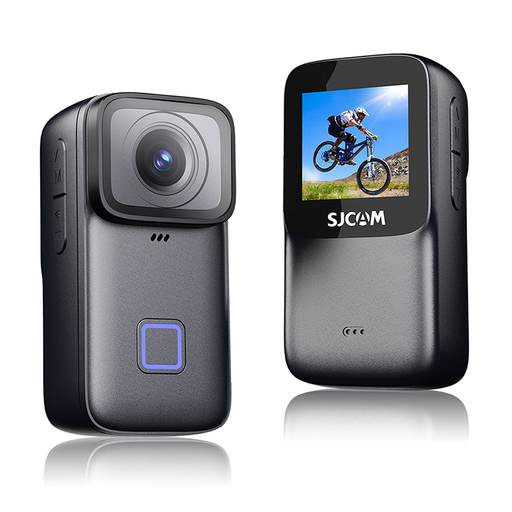
For colour swatches, the product description lists white balance presets and exposure compensation. Make a test recording to see how colours look under your lighting.
135° wide-angle lens; white balance presets; exposure compensation; microSD support.
Keep the lighting as consistent as possible while recording and check the white balance with a test recording. Canon explains that manual white balance can reproduce colours more accurately under different lighting conditions, but this doesn’t guarantee colour accuracy throughout the entire viewing process.
For the USB-UVC connection described by IPEVO for the V4K PRO, you’ll need a compatible device with a USB port and a suitable application. ELMO also lists HDMI for the MX-P3; check that the connections match your display and recording device.
Use the consumer advice service’s returns checker to understand how returns, repairs, guarantees and your statutory rights apply to your specific situation.
You can’t answer this based on the camera purchase alone. The Federal Commissioner for Data Protection and Freedom of Information notes that processing personal data requires a legal basis under Article 6 of the GDPR; consent is one possible legal basis. Check the specific circumstances before recording and publishing.
The Federal Network Agency lists CE marking and accompanying documentation as points retailers must check. This doesn’t indicate anything about the device’s image quality.