
Lieferung heute & morgen

Qualitätsgarantie

Willkommens-Angebote freischalten: KOSTENLOSE Lieferung | Bis zu 80 % RABATT | Kostenlose 30-Tage-JoyPlus-Testphase
App herunterladen
A smart garden irrigation controller can manage fixed watering schedules, cater to multiple planting zones and simplify operation via an app. However, not every device suits every outdoor tap or garden size. If you only focus on terms like “intelligent”, “water-saving” or “weather-adaptive”, you can easily overlook technical limitations.
Many Wi-Fi watering timers only work with a 2.4 GHz network. A modern 5 GHz Wi-Fi connection alone won’t be sufficient. Before buying, check whether your router supports both frequency bands and whether a strong enough signal reaches your outdoor area.
Bluetooth can make setup easier, but it doesn’t automatically replace a Wi-Fi connection for remote access. What’s more, the stated range is usually measured under ideal, open-air conditions. Walls, metal casings and greater distances can significantly weaken the signal.
“Weather-dependent” can mean different things. Some devices rely on a weather forecast in the app and offer a manual rain delay. Others have an integrated rain sensor that can stop watering as soon as it detects rainfall.
If you’re planning an automatic garden watering system for your lawn and flower beds, you should check specifically whether a physical sensor is present or whether only weather data is processed. Both solutions can behave differently, for example during local rain showers or when the forecast is inaccurate.
An irrigation controller can manage schedules more precisely, but it won’t prevent leaky hose connections, unsuitable sprinklers or excessive water pressure. For water-efficient lawn watering, water volume, spray pattern, run time and soil type all need to work together.
With systems that cover multiple areas, you should also check whether separate water zones are actually being controlled, or whether only multiple schedules can be set for a single valve.
A common connection is G3/4 BSP. An included G1/2 adapter can make installation easier on standard household taps. Even so, check the thread before ordering. The permitted water pressure is also important: for the WOOX R2603 and R2604, an operating range of 0.03 to 0.9 MPa is specified.
The installation situation also deserves attention. A device measuring 175 × 78 × 43.6 mm needs enough space between the tap, hose and wall. A rotatable design can make alignment easier, but it doesn’t replace a stress-free installation.
The IP65 rating on the WOOX models indicates protection against dust and water jets. This doesn’t mean the watering timer can be permanently submerged. Seals must be fitted correctly, battery compartments must stay closed, and connections should be dry before installation.
A UV-resistant ABS and PC housing is practical for outdoor use. However, for winter, you should still follow the manufacturer’s instructions. Frost can cause damage to water inside the valve or pipes.
A smart watering timer that runs on batteries is flexible to install, but you’ll need to check the charge level regularly. According to product specifications, the WOOX devices are powered by four AA alkaline batteries; with around ten switching operations per day, the battery life can be up to two years.
A local schedule memory is also useful. For the WOOX R2603 and R2604, saved schedules can continue to run even if the Wi-Fi connection is temporarily interrupted, according to the product description. However, remote control, watering logs and weather functions still require the app connection.
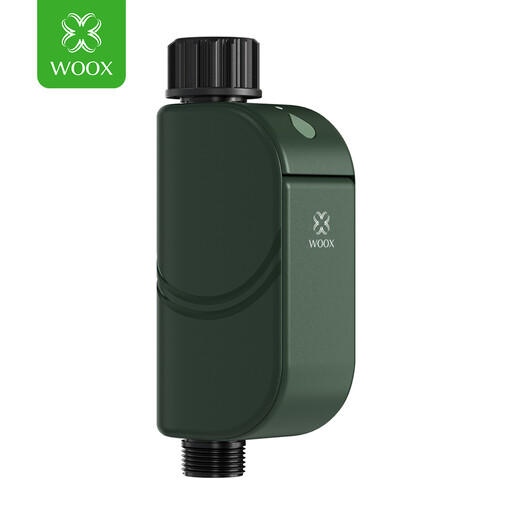
Why this product fits the profile: The direct 2.4 GHz Wi-Fi connection without an additional hub makes it easy to get started with app-controlled watering. A G3/4 connection and G1/2 adapter are included.
The app offers schedules, a rain delay and offline schedules. This means basic control is maintained even if the Wi-Fi connection drops temporarily.
IP65 housing, BLE 5.4, up to 20 watering schedules and support for Alexa and Google Assistant, according to product specifications.
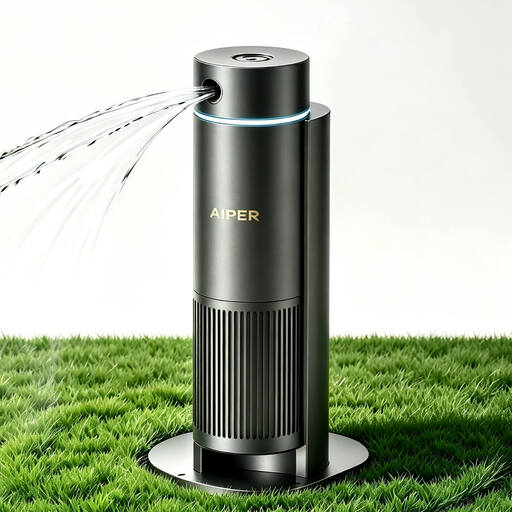
Why this product fits the profile: This combined system is aimed at garden owners who want to integrate control, sprinklers and a valve in one solution. Operation is via the Aiper app for iOS and Android.
The product description mentions integrated weather adaptation and a rain sensor. However, you should still check the water connections, pressure range and frost protection before installation.
Up to ten individual watering maps and, according to the manufacturer, up to 40 per cent lower water consumption thanks to zone-based control.
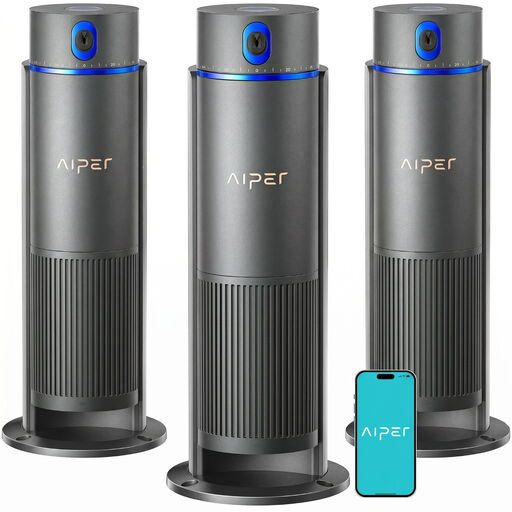
Why this product fits the profile: This bundle could be ideal for larger lawns, separate flower beds or multiple watering zones. The product specification states it is suitable for lawns up to 440 m².
Dividing the area into up to ten watering maps caters for different planting zones better than a single schedule for the whole area.
Wi-Fi and Bluetooth connection, app control, intelligent scheduling and an integrated rain sensor, according to the product description.
We’ve put together a full, regularly updated list of products that fully meet these strict selection criteria and the safety regulations in force in the EU.
That depends on the model. For the WOOX R2603 and R2604, saved schedules are executed locally if the Wi-Fi connection is temporarily lost, according to product specifications. Remote access, weather data and app logs may be limited during this time.
For the WOOX R2603 and R2604, a battery life of up to two years is stated for around ten operations per day using four AA alkaline batteries. Actual values depend on factors such as the wireless connection, temperature, switching frequency and battery type.
Voice control is handy for manually starting or stopping watering. For reliable automatic garden watering, fixed schedules, a rain delay and correctly set zones remain more important. Check compatibility with your own Alexa or Google Assistant account before buying.