
Lieferung heute & morgen

Qualitätsgarantie

Willkommens-Angebote freischalten: KOSTENLOSE Lieferung | Bis zu 80 % RABATT | Kostenlose 30-Tage-JoyPlus-Testphase
App herunterladen
By Joybuy Product Recommendation Officer, August 29, 2026
Smart glasses with a display promise to project relevant information directly into your field of view, freeing you from glancing at a smartphone or laptop. For professionals who frequently give presentations or participate in international meetings, this can be a game-changer. However, the market is flooded with devices whose advertised features often fail to meet the demands of the modern workplace. Many models turn out to be impractical, unreliable, or socially awkward.
This guide will help you identify the crucial features and avoid common buyer's remorse. We focus on the objective criteria that make a pair of smart glasses a truly useful tool for professional use.
Before making a decision, you should be aware of the three most common problems that can render smart glasses useless in a professional environment:
To avoid these pitfalls, you should base your selection on three objective parameters. These define whether a pair of smart glasses will genuinely be useful in your daily work.
The type of display is critical. Micro-LED technology offers a distinct advantage here, enabling bright, clear projections that are visible only to the wearer. The display should present information discreetly without obstructing your field of view or being visible to outsiders. Look for specifications that guarantee a private, clear display that is easily readable even in daylight.
Lightweight smart glasses are essential for all-day use. Models weighing under 50 grams are the benchmark. High-quality materials like titanium or magnesium alloys for the frame and temples not only contribute to weight reduction but also ensure durability and a high level of comfort, comparable to that of conventional premium eyewear.
Instead of being dazzled by a long list of features, focus on the tools that will actually streamline your workday.
Here are three models tailored to different professional needs that specifically avoid the pitfalls mentioned.
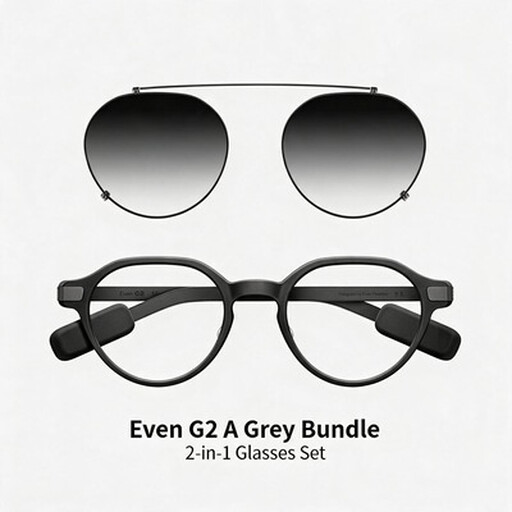
Why This Fits Their Persona: Ideal for professionals seeking technological assistance that seamlessly integrates into their daily life. The design is indistinguishable from high-end eyewear, ensuring maximum social acceptance in any business environment.
The Even G2 is intentionally designed without a camera to eliminate privacy concerns from the outset. At just 36 grams, it is extremely lightweight and built for all-day wear.
Features an integrated teleprompter for presentations, real-time translation, and a battery life of up to two days with normal use, according to the manufacturer.
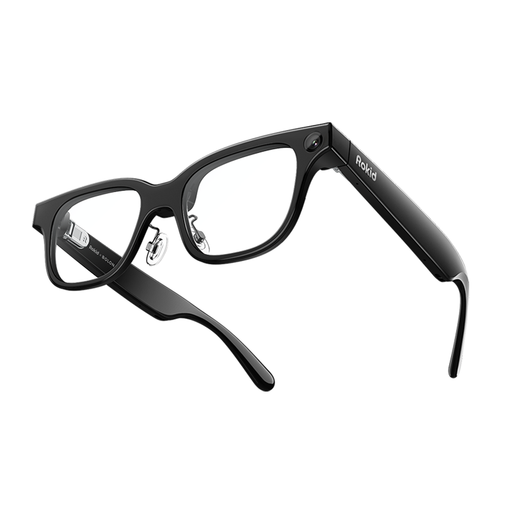
Why This Fits Their Persona: Perfect for tech-savvy users who want to leverage the latest AI developments to boost productivity. The glasses serve as an interface to powerful language models for meeting notes and information retrieval.
Weighing only 49 grams, the glasses remain comfortable even during extended use. The features are clearly focused on productive AI applications rather than distracting AR games.
According to the manufacturer, this is one of the first AI glasses with support for ChatGPT and Gemini. It also offers real-time translation and navigation functions.

Why This Fits Their Persona: Suitable for users who not only give presentations on the go but also want to review documents or consume media on a large, private screen. Ideal for frequent travellers on trains or planes.
Although heavier at 76 grams and featuring a more conspicuous design, it justifies this with a clear benefit: simulating a massive screen. The plug-and-play connectivity via USB-C avoids complex setup processes.
Projects a virtual 201-inch display, according to the manufacturer. The 120 Hz refresh rate ensures smooth visuals, which is especially beneficial when working with complex content or watching videos.
We have curated a comprehensive selection of devices that are suitable for professional use based on objective criteria. Discover more models that meet our standards for design, functionality, and privacy.
Teleprompter glasses are fed text from an app on your smartphone or computer. This script is then projected onto the display inside the glasses. You can typically control the scrolling speed via voice command or a small, discreet remote. This allows you to speak freely during a presentation without losing your train of thought.
Yes, for two reasons. First, the absence of a camera eliminates any risk of conversations or confidential documents being recorded without consent. This builds trust with clients and colleagues. Second, it allows you to bypass complex legal grey areas related to privacy (like GDPR) that can arise when using cameras in public or business spaces.
That depends on the model. Some smart glasses, like the Even G2, are designed so that an optician can fit prescription lenses directly into the frame. Other models offer special inserts for prescription lenses that are attached behind the main lenses. Before purchasing, be sure to check the product description for terms like "prescription-compatible" or the availability of prescription inserts.