
Lieferung heute & morgen

Qualitätsgarantie

Willkommens-Angebote freischalten: KOSTENLOSE Lieferung | Bis zu 80 % RABATT | Kostenlose 30-Tage-JoyPlus-Testphase
App herunterladen
Integrating home automation into your living space aims to simplify the control of home technology, enhance comfort, and optimise energy consumption. The core components of such a system are networked actuators, like switches and sockets, which allow you to operate appliances and lighting centrally or remotely. Selecting the right smart home devices depends on your specific requirements for functionality, installation, and compatibility.
Your decision for a specific product should be based on an analysis of its technical parameters. The following criteria are relevant for making an informed choice:
The type of wireless connection determines how the device functions and the infrastructure it requires.
For users who want voice control, compatibility with popular ecosystems is crucial. Check if the products are certified as an Alexa accessory or Google Home accessory. This ensures seamless integration and control via voice commands.
Pay attention to the maximum switching capacity (in watts) and the rated current (in amperes) to prevent overload. Products sold in the EU market must bear the CE marking. The material used, often polycarbonate (PC), should have flame-retardant properties.
Based on the criteria above, we have compiled a selection of devices that cover different home automation use cases.
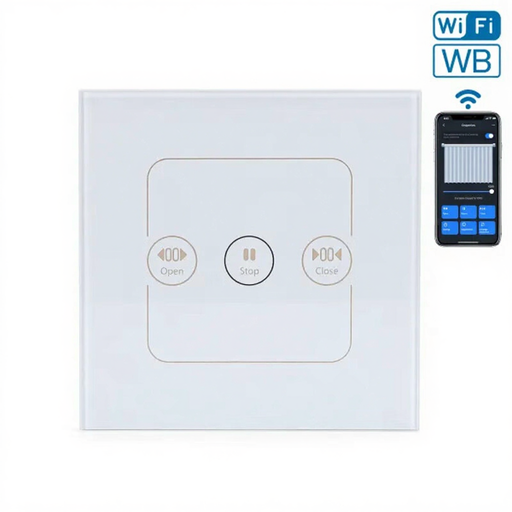
Why we recommend this product: This in-wall switch is specifically designed to control motorized shutters, blinds, or curtains. It combines direct operation via a glass touch surface with remote control capabilities through Wi-Fi and Bluetooth. Compatibility with standard European in-wall boxes simplifies integration.
Pros:
Who it's for: Home and apartment owners who want to integrate and automate their existing electric shutters or blinds into their smart home.
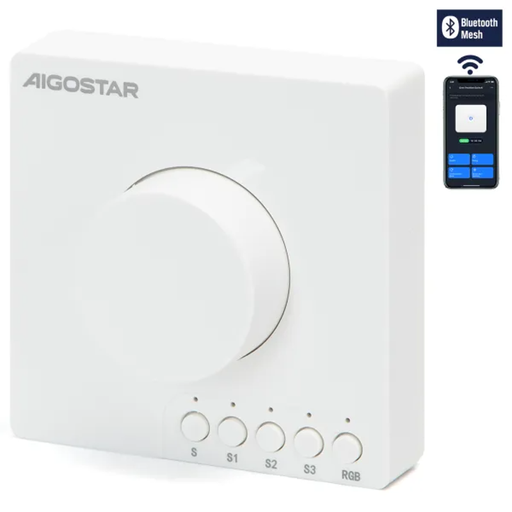
Why we recommend this product: This model combines the functionality of a smart switch with a physical rotary knob for precise brightness control. Its use of Bluetooth Mesh technology allows you to control multiple lights in a group without needing a hub and without straining your Wi-Fi network.
Pros:
Who it's for: Users who want smooth dimming functionality and appreciate the tactile control of a classic dimmer, but don't want to give up smart features.
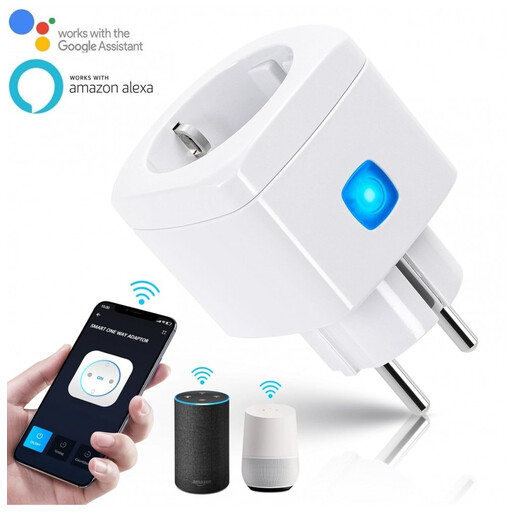
Why we recommend this product: The smart plug is the easiest way to make conventional appliances like lamps, fans, or coffee machines remotely controllable. With a maximum power rating of 2300 W (10 A), it is suitable for a wide variety of household devices. Setup is done directly over your Wi-Fi network.
Pros:
Who it's for: Beginners in home automation and renters looking for a flexible, non-invasive solution to intelligently control individual devices.
The products featured here cover key application areas. However, the market offers a multitude of other specialized solutions. For different form factors, power requirements, or specific protocols, you can find a wider selection in our Euro Plugs category.
1. How does a smart plug work? A smart plug contains a Wi-Fi or Bluetooth module and a relay. After connecting to your home network, the relay can be switched on or off via a smartphone app or a voice command. This interrupts or establishes the power supply to the connected appliance, which is equivalent to manually switching it on and off.
2. Do I always need a central control unit (hub) for a smart home? No, not necessarily. Many modern smart home devices, especially those based on Wi-Fi or Bluetooth, connect directly to your router or smartphone. A separate hub is not required. However, systems that rely on wireless standards like Zigbee or Z-Wave do need such a hub to act as an intermediary.
3. Can I really save energy with smart home devices? Yes, you can reduce energy consumption through targeted control. With schedules, you can ensure that devices are only powered when they are needed. The ability to turn off appliances remotely prevents unnecessary standby power consumption from consumer electronics or chargers.