
Lieferung heute & morgen

Qualitätsgarantie

Willkommens-Angebote freischalten: KOSTENLOSE Lieferung | Bis zu 80 % RABATT | Kostenlose 30-Tage-JoyPlus-Testphase
App herunterladen
A smart plug with energy monitoring connects conventional household appliances to your smart home. Using an app, you can switch lamps, fans, dehumidifiers or coffee machines on and off, automate schedules and, in some cases, control them by voice. At the same time, a power-monitoring plug shows how much electricity a connected device is currently consuming.
However, the range of features alone should not determine your purchase. Compatibility, load limits, installation location and the type of consumption data provided are all crucial. Checking these points before buying helps you avoid unsuitable products and choose the right Wi-Fi plug or Zigbee solution.
Many models advertise 16 A and 3680 W. At 230 V, this is the calculated maximum total load. However, the specification does not replace checking the connected appliance. Fan heaters, larger heating devices, heat pumps, motors or industrial machinery can generate high inrush currents and are not suitable for many smart plugs.
Also consider whether the load is continuous or only temporary. The technical specifications of the product and the household appliance must be compatible. Smart plugs should not be connected in a chain.
An IP44 outdoor smart plug is protected against solid foreign objects and water splashes from certain directions. However, IP44 does not mean that the device can remain submerged or exposed to heavy rain without protection. Plug connections should be kept dry, secured against strain and installed under cover wherever possible.
Models rated IP20 or IP00 are intended exclusively for dry indoor spaces. This applies to most compact Wi-Fi plugs and Zigbee smart plugs in the selection below.
A device may display current power, voltage, amperage and cumulative consumption. Cost calculations, on the other hand, are based on the electricity tariff stored in the relevant system. If the tariff changes, the value must be updated. The data is useful for guidance and comparing your own consumption, but it is not automatically a calibrated billing measurement.
A Wi-Fi smart plug usually works with an existing 2.4 GHz Wi-Fi network. Many models do not support 5 GHz networks. During setup, your smartphone therefore often needs to be connected to the 2.4 GHz band. On some devices, Bluetooth can simplify pairing in the Smart Life app.
A Zigbee smart plug, by contrast, requires a compatible hub or coordinator. This could be a system based on Home Assistant, Zigbee2MQTT, ZHA, Hubitat or SmartThings, for example. One advantage is that automations within the local Zigbee network can continue running if the internet connection fails. The trade-off is a more involved setup than with a Wi-Fi plug that does not require a hub.
Compare the specifications for rated current, operating voltage and maximum power. For example, an Eightree model is specified at 220–240 V, 16 A and 3680 W. According to its product data, the Tapo P110 is limited to 10 A or 2300 W. The Tapo P115 is specified at 3680 W. These values apply to the specific model and should not be generalised.
Also check whether the plug has a physical button, countdown function, recurring schedules or an away mode. For lamps, a simple timer plug is often sufficient. If you need to control several devices, a power strip with individually switchable outlets may be more practical.
Depending on the model, app control may be provided through Smart Life, Tuya, Tapo or the relevant smart-home platform. Look for explicit support for Alexa, Google Home, SmartThings or Home Assistant. “Voice control available” is only useful if your existing system is actually supported.
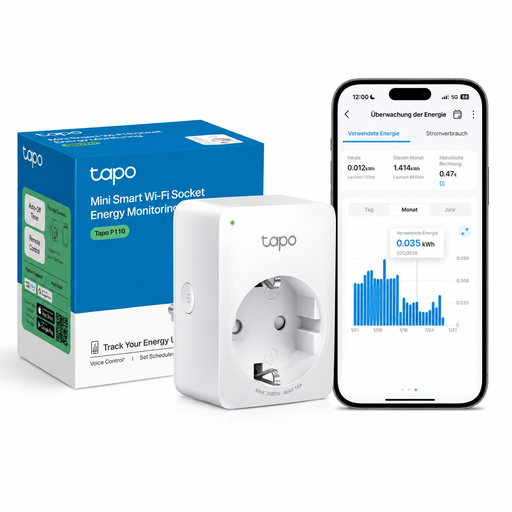
Why it fits: An easy entry point for app control, timers and energy monitoring without an additional bridge. The model operates via 2.4 GHz Wi-Fi and supports Alexa and Google Assistant.
The stated limit of 10 A or 2300 W clearly defines the operating range and reduces the risk of assuming that a higher load is automatically supported.
Energy monitoring, schedules, countdown, away mode, a compact housing and no hub required.
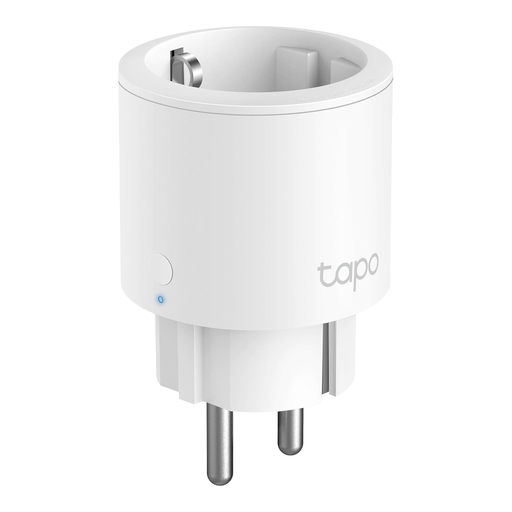
Why it fits: For households that want to bring energy data, remote control and schedules together in the Tapo app. According to the product description, the model supports Alexa and Google Assistant.
The compact design and clearly specified app features make planning easier without relying on uncertain platform compatibility.
Real-time and historical consumption data, remote access, schedules, away mode and 2.4 GHz Wi-Fi.
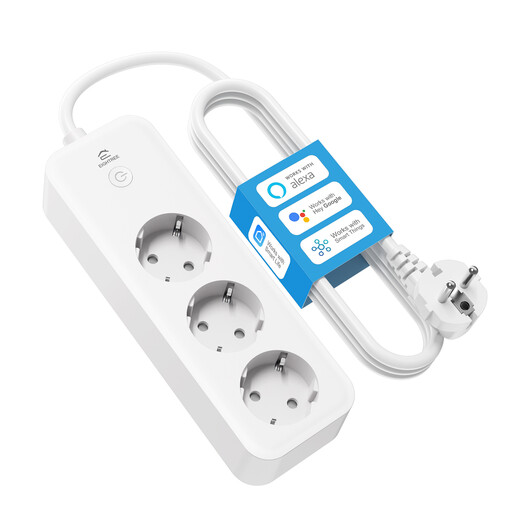
Why it fits: This power strip is ideal for a desk, entertainment area or home office when three connected devices need to be switched independently.
According to the product data, the three outlets can be controlled separately. The overall limit nevertheless remains 16 A or 3680 W.
Individual switching, energy-consumption charts, a 1.5 m cable and app control via Smart Life.
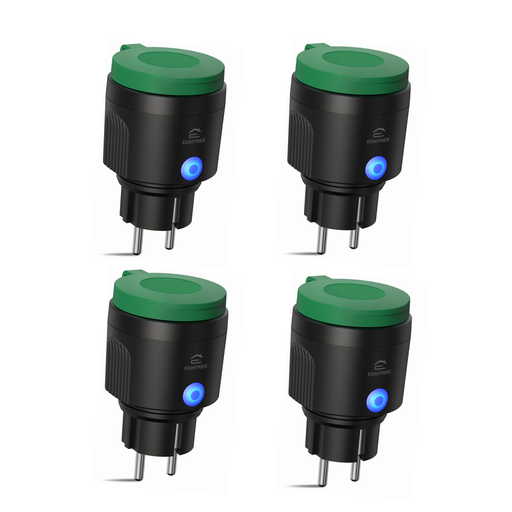
Why it fits: The IP44 version is designed for garden lighting, balconies and patios. If you want to integrate Home Assistant locally, choose the separate Eightree Zigbee Smart Plug with hub support instead.
The IP44 protection rating is explicitly stated. For indoor use with Home Assistant, however, an IP20 Zigbee model is required, as the outdoor and Zigbee versions are not interchangeable.
IP44 protection, energy monitoring, timers and support for Alexa, Google Home and SmartThings. The Zigbee alternative offers compatibility with Zigbee2MQTT, ZHA and Home Assistant.
Explore the complete selection to find products with energy monitoring, app control, scheduling features and a range of smart-home interfaces.
Many models in this category support 2.4 GHz Wi-Fi only. Before setup, check your router settings and, if necessary, connect your smartphone specifically to the 2.4 GHz network. Using the same Wi-Fi name for both frequency bands can make pairing more difficult.
After setup, the app displays current power, voltage and amperage, as well as daily, monthly or annual figures, depending on the model. To estimate costs, enter your electricity price per kilowatt-hour. The display provides technical consumption data; it is not a calibrated billing measurement.
Service life depends on switching cycles, load, ambient temperature and installation. Operate the device within its specified power limit, keep it away from moisture and avoid high inrush currents. Safety and firmware specifications—such as manufacturer-stated OTA support—should be checked in the product data before purchase.