
Lieferung heute & morgen

Qualitätsgarantie
App herunterladen
Kategorien
A Wi-Fi socket, also known as a smart plug, is an adapter that fits between a standard electrical outlet and an appliance. Its core function is to connect the plugged-in device to a local Wi-Fi network. This enables remote control, automation, and, in many cases, energy consumption monitoring via a smartphone app or voice command. The technology is designed to enhance efficiency, convenience, and control over household electrical appliances.
Choosing the right smart plug depends on objective technical parameters. The following criteria are essential for making an informed decision.
The maximum electrical load a smart plug can safely handle is specified in amperes (A) and watts (W). A common European standard is a rating of 16A with a maximum power output of 3680W, which is sufficient for high-consumption appliances like space heaters, electric kettles, or washing machines. Look for safety certifications like CE and RoHS that confirm compliance with European safety and environmental standards. The housing should be constructed from flame-retardant materials (such as V0-grade PC).
Most Wi-Fi plugs operate on the 2.4 GHz frequency band. This band provides a longer range than the 5 GHz band and is perfectly adequate for the data transfer needs of a smart plug. A critical factor is compatibility with your existing smart home ecosystem. Verify that the plug supports voice assistants like Amazon Alexa or Google Assistant for hands-free control. Integration is usually handled via the manufacturer's proprietary app or a universal platform such as "Smart Life" or "Tuya".
The utility of a Wi-Fi plug is defined by its software features:
The physical dimensions are relevant when placing multiple smart plugs next to each other in a power strip or a dual wall outlet. Compact, round, or square form factors are designed to avoid obstructing adjacent sockets. If you need more outlets at a single location, a 2-way socket adapter can be a practical alternative or complement.
Based on the technical criteria mentioned, we present a selection of socket solutions that cover different use cases.
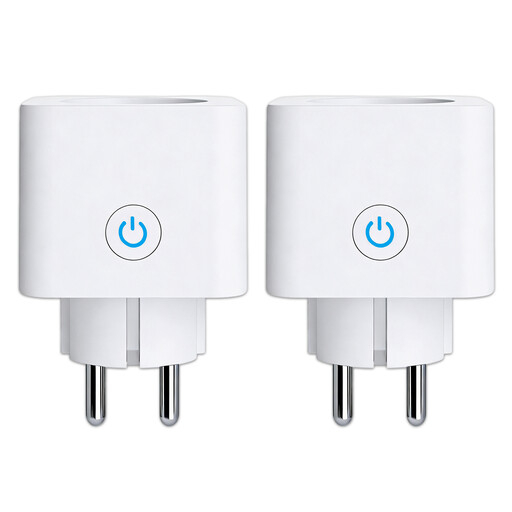
Why We Recommend It This model combines a high load capacity of 16A (3680W) with a precise power monitoring feature. Compatibility with Alexa and Google Home, along with control via the popular Smart Life/Tuya app, ensures seamless integration into existing smart home systems. The V0 flame-retardant polycarbonate housing underscores its focus on safety.
Pros:
Best For: Users looking for a fully-featured Alexa smart plug for intelligent control and detailed energy monitoring of household appliances. Ideal for tech-savvy users who want to optimise their energy consumption.
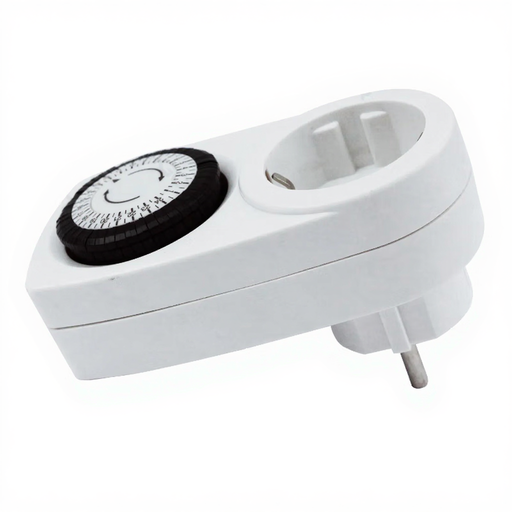
Why We Recommend It This mechanical timer offers a reliable and simple solution for timed switching operations without needing a Wi-Fi connection or app installation. Operation is handled directly on the device via a 24-hour dial. With a load capacity of 16A (3680W) and certifications (CE, RoHS, Intertek-GS), it is a robust alternative.
Pros:
Best For: Individuals who need a simple and reliable timer outlet for recurring tasks like controlling aquarium lighting, holiday lights, or charging devices at specific times, and who can do without smart features.
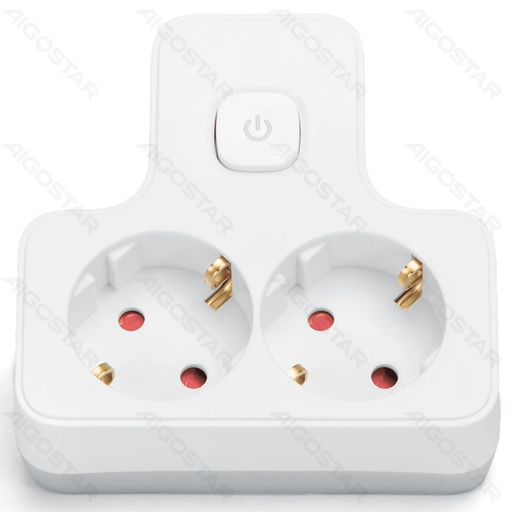
Why We Recommend It This socket adapter solves a fundamental problem: a shortage of outlets. It converts a single wall outlet into two and features a central switch to simultaneously disconnect both connected devices from power. The T-shape design is space-saving, and the maximum load of 3680W allows for the connection of high-power appliances.
Pros:
Best For: Users who need a pragmatic power distribution solution, for example, at a desk for a monitor and PC, or in the kitchen for multiple small appliances. This 2-way socket adapter is ideal for anyone who prefers manual control.
If the models presented here do not exactly meet your design or specific functional requirements, a wider selection of socket solutions is available. For alternative finishes or specialised configurations, you can find more products in the Gold Sockets category.
1. How do you set up a Wi-Fi smart plug? Setup is typically a three-step process: Plug the smart plug into a wall outlet. Put it into pairing mode by pressing a button. Use the companion smartphone app to connect the plug to your 2.4 GHz Wi-Fi network by following the on-screen instructions.
2. What safety aspects should be considered with a smart plug? Always observe the maximum load capacity (e.g., 16A / 3680W) and do not exceed it to prevent overheating. Use the devices only in dry, indoor locations. Look for recognised certification marks like CE. It is not recommended to plug multiple smart plugs into each other (daisy-chaining).
3. Can a Wi-Fi plug help reduce electricity costs? Yes, in two ways. First, a plug with power monitoring can help identify appliances with high standby power consumption. Second, programmed schedules can completely disconnect devices from the power grid instead of letting them consume power in standby mode, which can help lower energy costs.