
Lieferung heute & morgen

Qualitätsgarantie

Willkommens-Angebote freischalten: KOSTENLOSE Lieferung | Bis zu 80 % RABATT | Kostenlose 30-Tage-JoyPlus-Testphase
App herunterladen
As a Joybuy Product Recommendation Officer, I see the number of electronic devices in homes and offices increasing daily. This often leads to cluttered cable management and wasted energy from standby modes. A smart power strip offers a functional solution to manage devices centrally, optimise energy consumption, and increase convenience. This article will help you understand how they work and their key features, enabling you to make an informed purchasing decision.
Choosing the right model depends on your individual needs. Pay attention to the following three key aspects to find a power strip that fits your use case.
Remote control is a core feature. A Wi-Fi power strip connects directly to your home network (usually on the 2.4 GHz band) and can be controlled via a smartphone app. Check for compatibility with voice assistants if you're looking for an Alexa-compatible power strip or a solution for Google Home. This allows you to turn devices on and off with voice commands or create schedules without being physically present.
Consider how many devices you need to connect. Besides the number of standard AC outlets, integrated USB ports are becoming increasingly important. A power strip with USB-C is particularly relevant for fast charging modern smartphones, tablets, or laptops. The form factor also plays a role: while traditional strips offer plenty of space, a compact cube-shaped power strip is ideal for a desk or for travel.
A high-quality power strip with a switch—whether it's a master switch or individual switches—helps to reduce standby power consumption. For protecting sensitive electronics, a surge protector power strip is a wise choice. It shields connected devices from damage caused by voltage spikes in the power grid. Models with an energy monitoring function go a step further: they allow you to monitor the energy consumption of individual devices in real time, helping you identify power hogs.
Based on the criteria mentioned, we have compiled a selection of products that cover different needs.
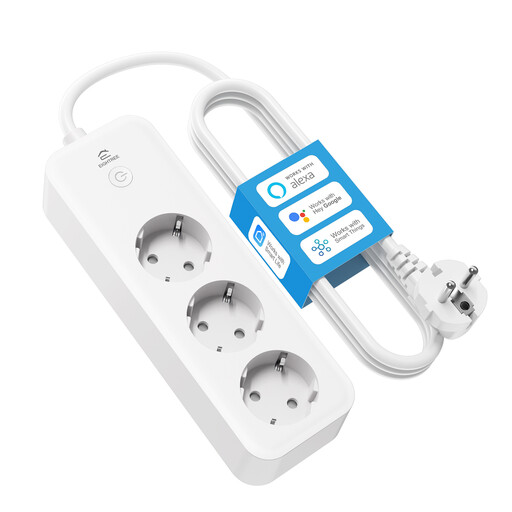
Why It Stands Out This model is distinguished by its advanced smart features. Each of the three AC outlets can be controlled individually via the app. The integrated, high-precision energy monitoring provides detailed daily, weekly, or monthly consumption graphs, enabling targeted optimisation of your energy usage.
Pros
Who It's For For tech-savvy users who want granular control over their devices and wish to precisely analyse and manage their power consumption. Ideal for integration into an existing smart home ecosystem.
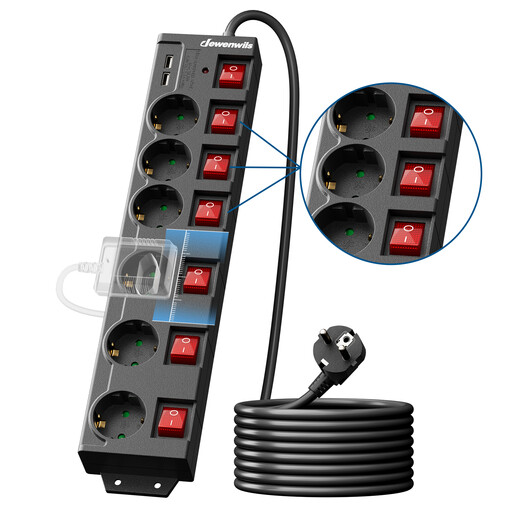
Why It Stands Out The strength of this power strip lies in its robust and practical design. Instead of relying on app control, it features physical, two-pole individual switches for each of the six outlets. This provides reliable, direct control over each connected device and a complete disconnection from the power grid to eliminate standby power draw.
Pros
Who It's For For users in offices, workshops, or home offices who prefer reliable, manual control over multiple devices and want to specifically save on standby power without relying on a Wi-Fi connection or an app.
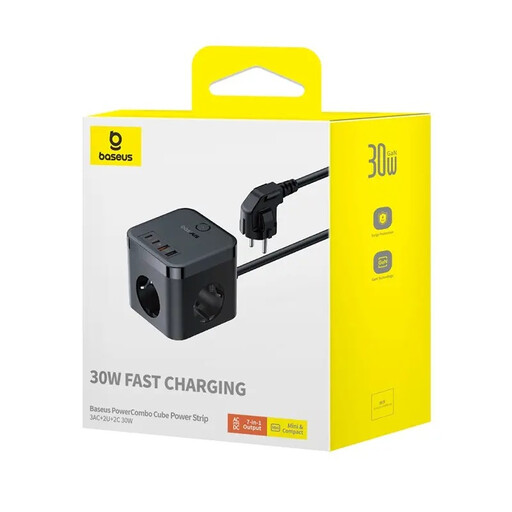
Why It Stands Out The Baseus PowerCombo combines functionality with an extremely compact design. As a cube-shaped power strip, it takes up minimal desk space while also serving as a powerful charging hub. With two USB-C and two USB-A ports, plus three AC outlets, it's an all-in-one solution for the modern workspace.
Pros
Who It's For Ideal for users looking for a clutter-free desk setup and needing to charge multiple mobile devices like smartphones, tablets, and accessories quickly and simultaneously. Also suitable as a practical travel companion.
Didn't find the right model for your specific needs here? There is a wide variety of other power strips with different features, lengths, and designs.
? Explore a wider selection in our Electrical Plugs, Sockets & Wire Connectors category.
Setup is usually straightforward. First, plug the power strip into a wall outlet. Then, download the manufacturer's designated app (e.g., Smart Life, Tuya, or a proprietary brand app) to your smartphone. Connect your phone to your 2.4 GHz Wi-Fi network and follow the in-app instructions to pair the power strip.
Most modern Wi-Fi power strips do not require an additional hub or bridge. They connect directly to your existing Wi-Fi router. This simplifies installation and reduces initial costs. However, models based on other wireless standards like Zigbee or Z-Wave do require a corresponding control centre (hub/bridge).
A surge protector power strip shields connected electronic devices from sudden voltage spikes on the power grid. Such spikes can be caused by nearby lightning strikes, as well as by switching operations within the power network. The protection mechanism diverts the excess voltage, preventing damage to sensitive components in devices like computers, TVs, or audio systems.