
Lieferung heute & morgen

Qualitätsgarantie

Willkommens-Angebote freischalten: KOSTENLOSE Lieferung | Bis zu 80 % RABATT | Kostenlose 30-Tage-JoyPlus-Testphase
App herunterladen
A smart projector combines the functionality of a classic projector with the capabilities of a modern smart TV. With an integrated operating system and direct connectivity options like Wi-Fi and Bluetooth, it eliminates the need for external source devices to access streaming services, apps, or media libraries. This allows for a flexible and minimalist setup for a big-screen experience at home or on the go.
Choosing the right model depends on a range of technical parameters that significantly influence its use case and image quality.
When evaluating a smart projector, objective specifications are crucial. The following criteria provide a basis for an informed decision.
The native resolution indicates the actual physical pixel count of the projection chip and is the decisive factor for image sharpness. A specification like Full HD (1920 x 1080p) means the image is composed of that number of pixels. The "supported" resolution (e.g., 4K or 8K) simply means the projector can receive higher-resolution signals and downscale them to its native resolution. For a clear and detailed picture, the focus should be on a high native resolution.
A projector's brightness is measured in ANSI lumens. This standardised value indicates how bright the image appears under controlled conditions. A higher ANSI lumen rating allows for better image quality in rooms that are not completely dark.
A key feature of a smart projector is its wireless connectivity.
An integrated operating system, often found in an Android projector or one with Google TV, provides direct access to apps like Netflix, YouTube, and Prime Video. This turns the projector into a standalone entertainment hub. The OS version (e.g., Android 14) can affect performance and app availability.
For ease of use, automatic image adjustment features are crucial.
The choice between a stationary home cinema projector and a portable projector depends on the intended use case. A mini projector is lightweight and compact, often with an integrated battery or a flexible stand, making it ideal for mobile use or moving between rooms. Larger models tend to offer higher brightness and more powerful audio output.
Based on the technical criteria above, here is a selection of models that cater to different user profiles.
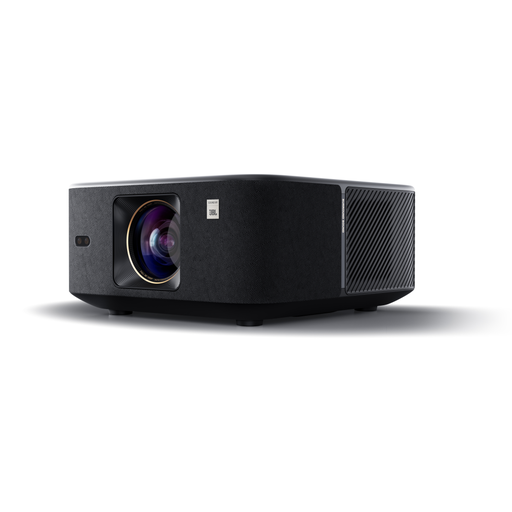
Why we recommend this product: The Yaber K3 is positioned as a high-performance, all-in-one solution for home cinema. Its combination of native 1080p resolution, high brightness, and an integrated JBL audio system with Dolby Audio support is aimed at users who value high audiovisual quality. The fully automatic setup features, including autofocus, keystone correction, and obstacle avoidance, reduce setup effort to a minimum.
Advantages:
Who it's for: Users looking for a stationary home cinema projector with high image and sound quality who prefer a hassle-free, plug-and-play solution without needing additional audio equipment.
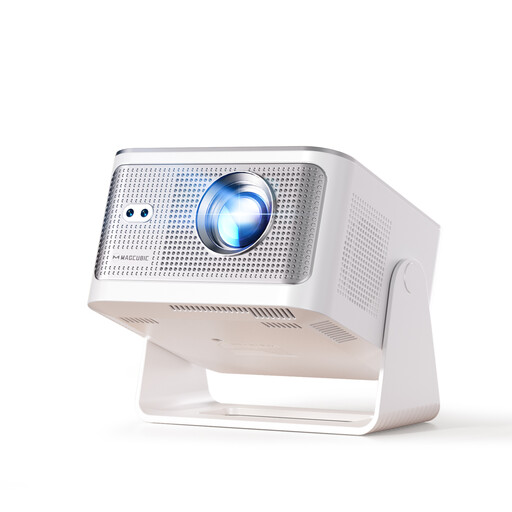
Why we recommend this product: The Magcubic HY350Max focuses on high performance density in a versatile form factor. With 900 ANSI lumens, it offers impressive brightness for its class. The latest Android 14 operating system, powered by the Allwinner H726 chip, promises a fluid user experience. The combination of fully automatic image adjustment and modern connectivity (Wi-Fi 6, BT 5.4) makes it a versatile device for streaming and gaming projector applications.
Advantages:
Who it's for: Tech-savvy users looking for a flexible solution with high brightness and the latest software for various use cases like movies, series, or gaming.
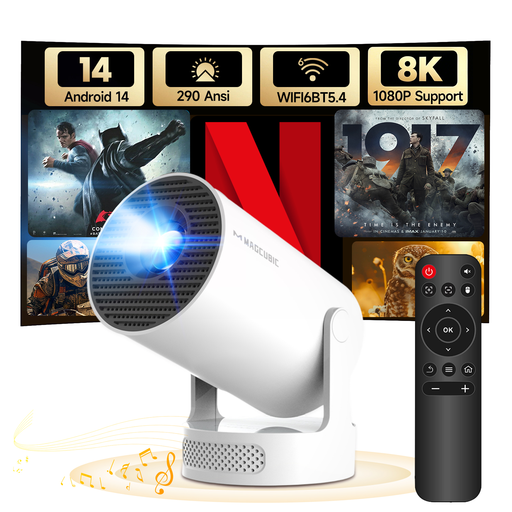
Why we recommend this product: The HY300Pro+ is designed as an ultra-portable mini projector. Its lightweight design and 180-degree rotating stand allow for extremely flexible positioning, including ceiling projection without an additional mount. Despite its compact size, it offers a complete smart platform with Android 14, Wi-Fi 6, and an integrated 5-watt speaker. The automatic vertical keystone correction simplifies quick setup in different locations.
Advantages:
Who it's for: Users who need maximum flexibility and portability. Ideal for use in different rooms, the garden, on holiday, or for on-the-go presentations.
If the featured models don't exactly meet your needs, or if you're looking for complementary components like soundbars or screens, you can find a wider selection of devices and accessories in our Home Audio Accessories category.
1. What is the difference between ANSI lumens and lumens? ANSI lumens is a standardised measurement from the American National Standards Institute that measures the average brightness across nine points on a projection surface. "Lumens" or "marketing lumens" are often non-standardised manufacturer specifications that measure brightness directly at the light source and tend to be higher. For an objective comparison, the ANSI lumen value is more reliable.
2. Can a smart projector completely replace a TV? Technically, yes. A bright smart projector (over 1000 ANSI lumens) can deliver a good picture even in daylight. However, you should consider the lifespan of the light source (modern LED or laser projectors last 20,000–30,000 hours) and the fact that image quality is more dependent on the room's ambient light conditions than a TV.
3. Do I need a separate streaming device for a projector with Wi-Fi? No. A projector with Wi-Fi and an integrated operating system like Android TV or Google TV works as a standalone device. You can install and use apps like Netflix, YouTube, or Disney+ directly on the projector without needing to connect an external Fire TV Stick, Apple TV, or Chromecast.