Joybuy Insights

Smart Projector Buyer’s Guide: Avoid Common Purchase Mistakes

A smart projector promises a large-screen experience for movies, gaming, or presentations, often more flexibly and affordably than a large TV. But the market is filled with technical jargon and marketing promises that can quickly lead to a regrettable purchase. As your Joybuy Product Recommendation Officer, I'll help you identify the crucial features and avoid common pitfalls.

Three common marketing traps in particular repeatedly lead to disappointment:

  1. Misleading Brightness Claims: Many manufacturers advertise with inflated figures like "9000 lumens." These numbers often have no standardised basis. The only reliable measure is ANSI lumens, which measures brightness under standardised conditions. A device with "8000 lumens" can, in practice, be dimmer than a model with 300 ANSI lumens.
  2. The '4K Supported' Trick: A 4K projector should have a native resolution of 3840 x 2160 pixels. However, many budget models advertise "4K support." This merely means the projector can process a 4K signal but can only display it at its lower native resolution (often just 1080p or even 720p). The result is not a true 4K image.
  3. Subpar 'Smart' Features: A projector with Wi-Fi and Bluetooth isn't automatically smart. Outdated operating systems, a lack of official licenses for streaming apps (like Netflix), and slow processors can make using them a test of patience. Choppy playback and the inability to stream content in HD quality are common consequences.

What Really Matters: The Decisive Technical Features

To avoid a bad purchase, you should focus on objective, verifiable criteria. These three parameters are crucial for the performance and usability of a smart projector.

Evaluating Brightness Correctly: ANSI Lumens as the Only Standard

Brightness determines how well the image is visible in different lighting conditions. Pay exclusive attention to the specification in ANSI lumens.

  • Under 300 ANSI Lumens: Suitable for completely dark rooms. Often found in very compact mini projectors.
  • 300–700 ANSI Lumens: A great choice for a home cinema projector experience in dimly lit living rooms or bedrooms. Sufficient for movie nights or casual gaming.
  • Over 700 ANSI Lumens: These devices deliver a clear and vibrant image even in daylight or in rooms that are not fully darkened. They are suitable as a TV replacement or for presentations.

Uncompromising Sharpness: Native Resolution, Not Marketing Gimmicks

The native resolution indicates how many physical pixels the projected image actually consists of.

  • Native 720p (1280x720): Sufficient for occasional use or as a portable projector for on-the-go. The sharpness is limited for a true home cinema feel.
  • Native 1080p (1920x1080 / Full HD): The current standard for a sharp and detailed image. Ideal for movies and gaming on large screens. Many models in this class can decode and downscale 4K content.
  • Native 4K (3840x2160): Offers four times the pixel count of 1080p, providing outstanding detail and image clarity. A worthwhile investment for discerning home cinema enthusiasts with the appropriate budget and source material.

Intelligence That Works: Modern Connectivity and Automation

The "smart" features make all the difference in daily use. A good smart projector should make setup as easy as possible.

  • Autofocus and Automatic Keystone Correction: These features are essential for hassle-free use. A projector with autofocus sharpens the image on its own, while keystone correction automatically straightens the image, even if the projector is at an angle to the wall. This saves tedious manual adjustments.
  • Wi-Fi and Bluetooth:WiFi 6 ensures a stable and fast connection, which is crucial for smooth 4K streaming. Bluetooth 5.0 or higher allows for the straightforward connection of external speakers, soundbars, or headphones.
  • Operating System and App Support: An up-to-date Android system (or a proprietary system like WhaleOS) with an official app store and licenses for services like Netflix ensures you can stream your favourite content directly and in high quality without needing an external stick. This is a key advantage if you want to use a projector for mobile content or streaming.

Our Selection: The Right Smart Projectors for Different Needs

Based on the criteria above, we have compiled a selection of models suitable for different user profiles.
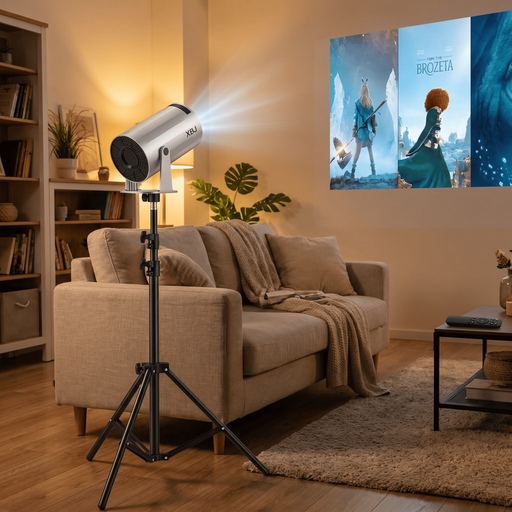
MATCH FOR: The Flexible Beginner
Projector with Stand Bundle-XBJ Portable Silver Projector+1.7m projector Bracket

Projector with Stand Bundle-XBJ Portable Silver Projector

Why This Fits Their Persona: Ideal for anyone looking for a simple and mobile solution. Thanks to the integrated Android TV 11, 220° rotation, and included tripod, this mini projector is ready to go right out of the box—in the bedroom, living room, or even the garden.

How It Avoids the Trap

The product states a clear brightness of 200 ANSI lumens and a native 720p resolution. It avoids the "fake 4K" trick and honestly positions itself as an entry-level model for dark environments.

Key Advantage & Pros

High flexibility thanks to 220° rotation and tripod. Integrated Android TV 11 for direct streaming without additional devices. Supports WiFi 6 for stable connections.
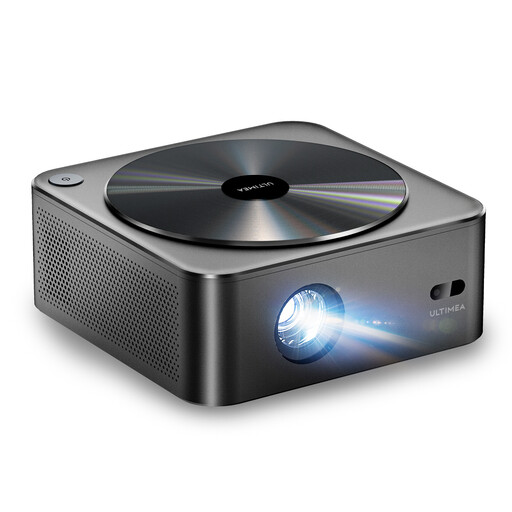
MATCH FOR: The Dedicated Home Cinema
Ultimea Apollo P40 Projector HDR10 1080p 700 ANSI Lumen WiFi Bluetooth 4K NEU,Auto-Focus

Ultimea Apollo P40 Projector

Why This Fits Their Persona: Perfect for users looking for a powerful TV replacement. With high brightness and native Full HD resolution, this projector delivers a compelling image even in living rooms that are not completely dark.

How It Avoids the Trap

This model offers a high, standardised brightness of 700 ANSI lumens and a true native 1080p resolution. It bypasses the pitfalls of misleading brightness and resolution claims, delivering solid, verifiable performance.

Key Advantage & Pros

Fully automatic image adjustment via autofocus and 6D keystone correction. The dust-proof, sealed optical system ensures a long lifespan without image degradation.
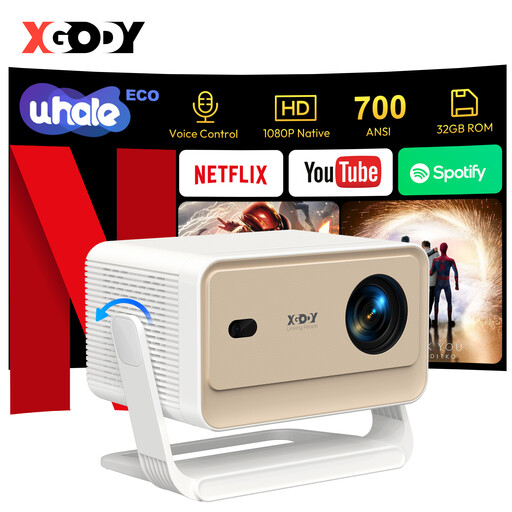
MATCH FOR: The Tech Enthusiast
XGODY Gimbal N6 Pro Portable Projector,4K Supported, Native 1080P&700ANSI, WhaleOS 3.0,Official Netflix Apps

XGODY Gimbal N6 Pro Portable Projector

Why This Fits Their Persona: For users who want a seamless and powerful smart experience without compromise. The official Netflix license, modern WhaleOS operating system, and voice control make operation extremely convenient.

How It Avoids the Trap

This model solves the software trap with an officially licensed operating system (WhaleOS 3.0) that guarantees smooth performance for apps like Netflix. With 700 ANSI lumens and a native 1080p resolution, the image specs are also transparent.

Key Advantage & Pros

Seamless smart features including voice control and fully automatic image adjustment. Three brightness levels to adapt to the environment and save energy.

Looking for more options?

We have compiled a complete, real-time updated list of products that fully meet these strict selection criteria and all relevant safety regulations.

Frequently Asked Questions (FAQ)

How many ANSI lumens does a smart projector need for my living room?

For a typical living room that cannot be completely darkened, at least 500 ANSI lumens are recommended to get a clear and colour-rich image. If you primarily use the projector in the evening or in a well-darkened room, models with 300 ANSI lumens may be sufficient. For use in daylight, you should consider devices with 700 ANSI lumens or more.

Can a projector with Wi-Fi and Bluetooth completely replace my TV?

Yes, a modern smart projector can replace a television, provided a few conditions are met. A model with high brightness (over 700 ANSI lumens), native 1080p or 4K resolution, and a responsive smart system with access to all major streaming apps offers a complete alternative. The main advantage is the flexible screen size, which can far exceed that of a TV. However, consider the lamp's lifespan and the need for a suitable projection surface (a screen or a smooth, white wall).

What is the difference between automatic and manual keystone correction?

Keystone correction fixes image distortions that occur when the projector is not perfectly centred and perpendicular to the screen.

  • Manual Correction: You have to adjust the corners of the image yourself via the menu or a dial until the image is rectangular. This can be time-consuming.
  • Automatic Correction: A built-in sensor detects the projector's position and adjusts the image automatically within seconds. This is especially convenient for a portable projector that is frequently set up in different locations. Advanced 4D or 6D correction even allows for adjustment from a side angle.