
Lieferung heute & morgen

Qualitätsgarantie

Willkommens-Angebote freischalten: KOSTENLOSE Lieferung | Bis zu 80 % RABATT | Kostenlose 30-Tage-JoyPlus-Testphase
App herunterladen
A smart robot for children can be remote-controlled, respond to gestures, play music or introduce children to simple programming tasks. However, it isn’t always immediately clear to parents, grandparents and other family members which features are genuinely useful in everyday play. Product descriptions often highlight a long list of features, while battery life, ease of use and safety information can be less prominent.
Before buying, look out for these three recurring pitfalls:
It’s also worth checking exactly what terms such as ‘programmable’ mean. For some models, this means creating simple sequences of actions; for others, it refers to an app with a visual path or programming feature. Both can be useful, but they’ll suit different expectations.
An interactive robot can be controlled using a standard remote control, gestures, a smartphone app or a combination of these. For children aged around 6 and over, a straightforward remote control is often the easiest way to get started. Gesture control is great for short movement games, while a robot construction set with app control offers more options for older children or those with a particular interest in technology.
Look for clear information about:
A remote-controlled robot isn’t necessarily programmable. Likewise, a programmable robot may be sold without a standard remote control.
Battery information is particularly important for electronic toys. Check whether the robot has a built-in battery, what capacity is specified and whether the remote control needs separate batteries. The HOGOKIDS set comes with a rechargeable 300 mAh lithium battery and is advertised as offering up to 15 minutes of playtime after a full charge. The remote control may need a separate power supply.
For everyday use, it’s also worth checking:
For a STEM set for children, the number of pieces should suit your child’s patience and fine motor skills. Lots of individual pieces offer more ways to build, but they also mean more sorting and tidying away. The HOGOKIDS set includes 604 pieces and five models, including a robot, a racing tank and tracked vehicles. The product information recommends adult supervision during building and play.
For ready-made robots, look for smooth edges, a sturdy casing and a suitable surface to play on. According to the product description, the Dreamora model is designed for flat, hard indoor surfaces. Avoid stairs, wet floors and raised edges. Keep electronic parts out of water and clean them with a dry cloth.
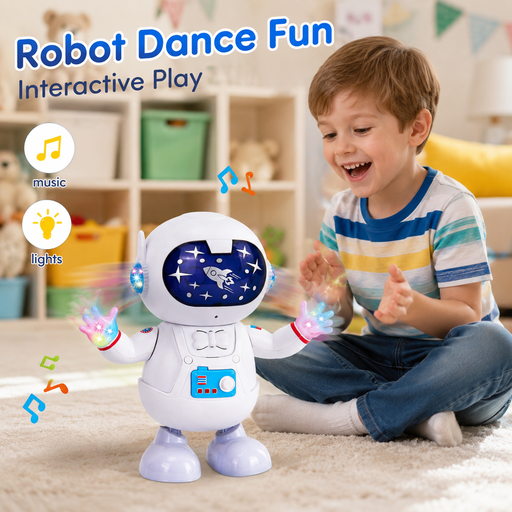
Why this product suits this profile: This model focuses on lights, music and dancing, making it a good choice for easy entertainment without any building involved.
The product description clearly sets out the features on offer: music, lights and dancing. That makes it easier to see that it doesn’t include building or app-based programming.
Lights and music; according to the product information, it’s suitable for creative activities, as a gift and for playing together.
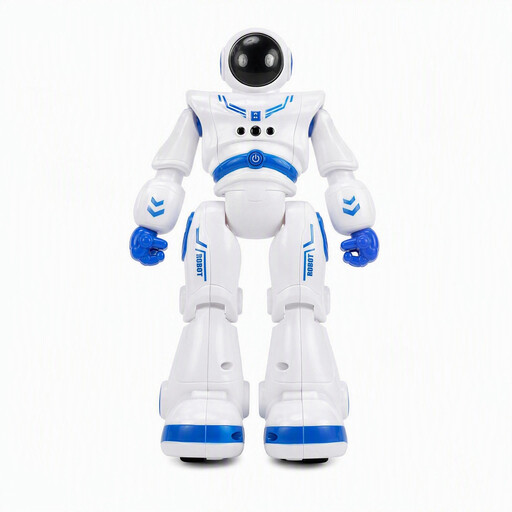
Why this product suits this profile: This robot combines remote and gesture control with lights, sounds, stories and programmable features for indoor use.
The product information specifies that it’s suitable for ages 6 and over, should be used on flat indoor floors, and includes guidance on the joints, heat and unusual noises.
Two control options; built-in stories and music; LED display; automatic sleep mode after a period of inactivity.

Why this product suits this profile: This building set is designed for children aged 6 and over who want to build and rebuild, then control their creations using a remote control or app.
The set’s 604 pieces, five model options and four app modes are clearly specified. This makes it easier to weigh up the building involved against the kind of play you’re looking for.
Five models; 2.4 GHz remote control and app control; driving, gravity sensor, path and programming modes; LED lights.
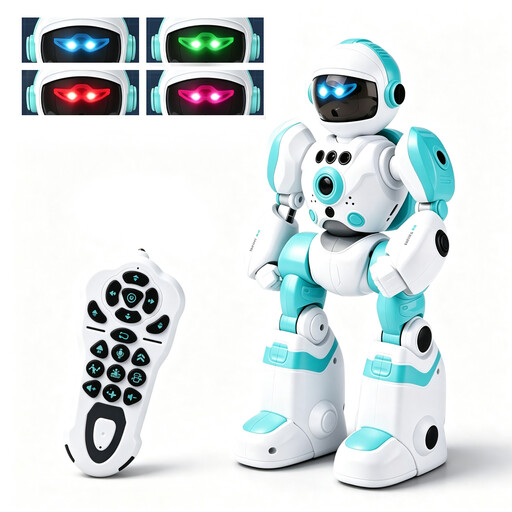
Why this product suits this profile: This model combines remote control, gesture control, voice recording, dancing and customisable action sequences.
The description distinguishes between gesture and remote control, and specifies a 3.7 V, 200 mAh battery. This makes it easier to assess how the robot is controlled and powered.
Voice recording and playback; four-colour LED eyes; obstacle detection; programmable movement sequences.
We’ve put together a complete, regularly updated list of products that meet these strict selection criteria and fully comply with the safety regulations in force in the EU.
It depends on the model. According to the manufacturers, several of the products mentioned are designed for children aged 6 and over. For building sets with small parts or electronic components, follow the age recommendation and make sure an adult supervises the building process, especially at first.
Battery life varies depending on the model, motor power and use of lights or music. The HOGOKIDS set is advertised as offering up to 15 minutes of playtime after a full charge. Before buying, you should also check the charging method, charging time and power requirements for the remote control.
Not every programmable robot needs an app. Some models let you save action sequences directly using buttons or a remote control. The HOGOKIDS set includes app modes for driving, gravity sensor, path and programming. So, if you’re looking for a gift for a child who’s interested in technology, check whether their smartphone’s operating system is compatible and whether the app is actually required.