Viewers sitting a long way from the screen
You want to make out dance formations from your usual seat and need to balance screen size with the space available.


There’s no one-size-fits-all screen size for watching recorded folk dances from a distance. Measure your viewing distance and the space available, then choose a suitable screen size. Check whether the specific model can play your recording via USB, an app or an HDMI device, and assess motion using similar video footage if possible. A high refresh rate alone doesn’t guarantee that the dance steps in your recording will look smooth.
You want to make out dance formations from your usual seat and need to balance screen size with the space available.
You want to play recordings you already have. The file system, video format and audio format need to be compatible with your TV or chosen playback device.
You care about the clarity of the steps and camera pans. If possible, assess motion using footage similar to your recording.
First, measure your viewing distance and the space available. Then check that your files will play, and finally assess motion using suitable video footage.
| What matters when buying | What to look for | Who should pay particular attention? |
|---|---|---|
| Screen size for a long viewing distance | Consider viewing distance and screen size together; check the TV and stand dimensions against the space available. | If I want to make out formations from my usual seat, the screen needs to suit both the viewing distance and the space available. Around 36% of consumers put choosing the right screen size first. |
| Playing your own recordings | Check the file system, video codec and audio codec against the specifications for the exact model; consider USB, an app and HDMI as different ways to play your files. | I want to play the dance videos I already have without any hassle, so I need to check that the specific file works with my chosen playback method. Around 29% of consumers prioritise playing their own recordings. |
| How dance moves are displayed | Test steps and pans using similar footage if possible; don’t judge motion settings by the refresh rate alone. | If I want to see fast steps clearly, what matters to me is how they look with comparable video footage. Around 21% of consumers prioritise motion performance. |
| Installation and energy use | Check the TV and stand dimensions, as well as the route it needs to take to reach its position; consider the energy labels for the models you’re actually comparing and how you plan to use the TV. | I want to be sure the TV will fit in the room and that its running costs suit how I plan to use it. Around 14% of consumers prioritise installation and running costs. |
The recording’s frame rate and the TV’s processing both affect how motion looks. RTINGS.com explains that lower-frame-rate content can look different; a gaming or VRR specification alone doesn’t tell you whether your file will play as you want.
If possible, test footage with a similar frame rate and camera movement, and compare the motion settings.
A feature for recording TV programmes doesn’t tell you whether the TV can play your own video files. This depends, among other things, on the file systems and codecs supported by the specific model.
Look up the playback formats supported for your file, and check whether a compatible HDMI device might be needed.
The examples below relate to specific model ranges and variants. They are not an overall assessment of the brands or a statement about their availability.
Sony lists the K-75XR95M2 as a 75-inch model in its BRAVIA range.
The Q7D-Pro range includes a 75-inch Mini LED variant.
According to the manufacturer, the 75E77Q PRO combines a 75-inch screen, 4K and VIDAA Smart OS.
The Philips 77OLED910/12 is a 77-inch OLED model with Ambilight.
The OLED-C6 range includes a 77-inch option, the OLED77C68LA.
This selection features large-screen smart TVs for watching dance recordings from a distance. Before choosing, check that the screen size and installation requirements suit your room, and that the specific model can play your recordings.
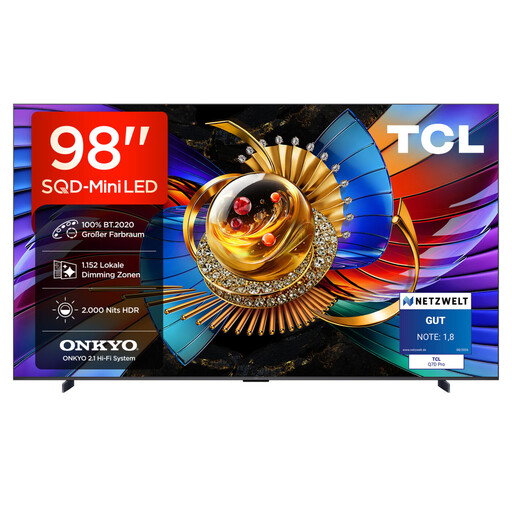 No image available
Could be worth considering if you’re looking for a very large screen and can safely install the TV with its stand.
98 inches, 4K, SQD Mini LED, 144 Hz and Google TV.
For wall mounting, the product description specifies a bracket rated for at least 54,3 kg.
 No image available
An option for a long viewing distance, provided the screen size and installation requirements suit your room.
85 inches, 4K, SQD Mini LED, 144 Hz and Google TV.
Given its size and weight, the product description recommends professional installation.
 No image available
Could be a good fit if you’re looking for a large screen and have checked the TV’s dimensions against your viewing distance and available space.
75 inches, 4K, SQD Mini LED, 144 Hz and Google TV.
The technical specifications alone don’t guarantee how the dance steps in your recording will look.
 No image available
A large-screen option if a 75-inch TV and its installation dimensions suit your room.
75 inches, 4K, Mini LED, QLED, 144 Hz and VIDAA OS.
The refresh rate and VRR specifications don’t replace checking your recording’s format and how its motion looks.
 No image available
Could be worth considering if you’re looking for a 77-inch OLED model and wall mounting suits your room.
77 inches, 4K, OLED evo and webOS 26.
According to the product description, a table stand isn’t included; the TV is designed for wall mounting with the bracket supplied. Your wall and installation setup need to be suitable.
Measure the distance from your usual seat to the screen and compare several screen sizes with the space available. The Verbraucherzentrale notes that the right screen size depends on several factors; there’s no single screen size that works for every room and seating position.
No, you can’t assume that from the term “smart TV”. Check the file system, video codec and audio codec of your recording against the specifications for the exact TV model. If direct playback isn’t supported, check whether a compatible HDMI device will work.
If possible, use a recording with a similar frame rate and camera movement to your file. RTINGS.com explains that footage with a low frame rate can look different depending on how it’s processed; a high refresh rate alone doesn’t tell you how your recording will look.
Check the TV and stand dimensions against your furniture and the route the TV will take to its final position. Leave room for your playback device’s connections, too. Dimensions vary by model; Sony, for example, publishes separate specifications for the K-75XR95M2.
The EU energy label for electronic displays shows details including the efficiency class and energy consumption in SDR and HDR. The European Commission describes these details as part of the labelling scheme. Compare specific models and take your usage into account.