A switch distributes an existing network connection to several devices; you don’t need one for a single smart TV connected to a spare LAN port. First, work out how the connection reaches your garden office and how it will be protected. Then count the ports you need, including the uplink, and choose PoE or management features only if your additional devices or network settings require them.
Who needs a switch in the garden office?
Connecting a TV when the network feed is not yet sorted
If you haven’t yet worked out how your home network will reach the garden office, sort out that connection before choosing a switch. A permanent metallic connection between buildings also needs a protection plan. The VDE stresses that this must be tailored to the specific buildings.
TV plus a wired office setup
With a usable network feed in place, you can connect your TV, computer and other devices via LAN. Remember to count the port used for the incoming connection: that takes up a port on the switch too.
Office with an access point or network separation
If you want to power an access point or camera over PoE, check the device’s requirements and the PoE budget of the specific model. If you plan to use VLANs or other network settings, make sure the switch has the management features you actually need.
What should you look for when buying a switch?
The right switch for a smart TV in your garden office depends on whether you already have a usable network feed and what other devices you want to connect to the LAN.
| What you need |
What to check before buying |
Who this matters most to |
| Sort out the network feed |
First, check whether you have a usable connection. For a permanent metallic connection between buildings, the protection plan should suit the buildings. With fibre, the connections and speeds of the components at both ends need to match, as TP-Link Deutschland explains. |
If I first need to work out how the home network will reach the garden office, I want to decide on the connection before buying a switch. Around 31 % of consumers say the network feed is their main concern. |
| Connect just one TV |
Check that there’s a spare, working LAN port in the garden office and that your TV has a compatible Ethernet port. An additional switch gives you more ports, but it can’t replace a missing network feed. |
If I only want to connect the TV to the existing LAN, I’d check whether I can connect it directly first. Around 25 % of consumers say a simple connection is their main concern. |
| Enough LAN ports |
Count your TV and any other wired devices, then add one port for the uplink. With a five-port model, you’ll have four ports for devices once the uplink is connected. |
If I want to connect a computer or other devices to the LAN as well as the TV, I need enough ports after allowing for the uplink. Around 19 % of consumers say this is their main concern. |
| PoE for additional devices |
Compare each device’s PoE standard and power requirements with the power available per port and the total budget of the specific switch. PoE for compatible additional devices doesn’t replace the TV’s separate power supply. |
If I want to power a compatible access point or camera over Ethernet, the PoE budget needs to be suitable. Around 13 % of consumers say powering an additional device via PoE is their main concern. |
| Management features or IPTV |
Check whether you actually need VLANs or IGMP snooping, and whether the specific model supports them. NETGEAR lists VLANs and IGMP snooping for the GS305E; D-Link Deutschland describes IGMP snooping for the DGS-105. |
If I want to separate network segments or support a specific multicast IPTV setup, I look for the right features. Around 12 % of consumers say this is their main concern. |
Avoid common buying mistakes
-
Buying a switch before sorting out the connection to your home network
A switch distributes an existing connection, but it can’t create a connection between your home and garden office if one doesn’t already exist.
First, work out the cable route and check which connections are available. Then choose your switch and compatible devices.
-
Counting all five ports as connections for devices
With an RJ45 connection, the network feed takes up one port on the switch. A five-port model therefore won’t give you five ports for additional devices.
Count all your devices and add one port for the uplink.
-
Assuming PoE will power your TV
PoE ports power compatible PoE devices. That doesn’t mean a smart TV can be powered over Ethernet.
For each PoE device, check its standard and power requirements, as well as the switch’s budget. Plan for the TV’s power supply separately.
-
Assuming a shielded cable provides complete protection between buildings
A cable or switch doesn’t replace a suitable protection plan for a metallic connection between buildings. The VDE highlights the importance of taking the specific buildings into account.
Ask a qualified professional to assess the permanent connection and the protection it requires.
Brands and model ranges to consider
TP-Link
The documented models range from basic Gigabit switches to Easy Smart and PoE options.
- TP-Link Deutschland describes the TL-SG1005D as ready to use without configuration. For the TL-SG105PE, the manufacturer lists VLAN features and a total PoE budget of up to 65 W.
- These features don’t apply to every model. The TL-SG1005D isn’t suitable if you need PoE.
NETGEAR
The range includes the basic GS305v3 and the GS305E with Easy Smart features.
- NETGEAR lists five Gigabit ports for the GS305v3. The GS305E includes features such as VLANs and IGMP snooping.
- According to the manufacturer, the GS305v3 has no PoE budget. Take care not to confuse the GS305v3 with the GS305E.
D-Link
The DGS-105 is a documented option if you’re looking for a compact five-port Gigabit switch.
- D-Link Deutschland lists plug-and-play operation and IGMP snooping for the DGS-105. The manufacturer also says the model is fanless.
- These features don’t prove better streaming performance or mean the switch is suitable for use outdoors without protection.
Zyxel Networks
The GS-100 series includes unmanaged models with five or eight ports; the GS1005HP belongs to a separate PoE product range.
- Zyxel Networks lists four PoE ports and a total budget of up to 60 W for the GS1005HP.
- The PoE specification doesn’t apply to the GS-105B V5, so check the full model name.
Joybuy products for connecting your garden office
The models below cover basic LAN distribution, as well as options with PoE, management features or an SFP uplink. A switch requires an existing network feed.
 No image available
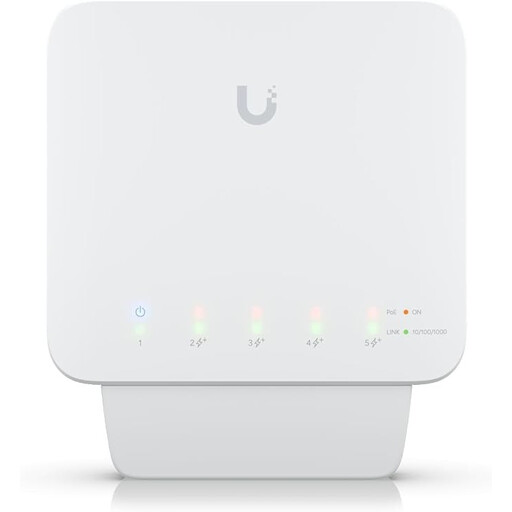
Ubiquiti UniFi Switch Flex (USW-Flex), 5-port Gigabit PoE+ outdoor managed switch, 46 W
Worth considering if you want to power compatible PoE devices or use management features.
The description lists five Gigabit RJ45 ports and four PoE+ outputs, with up to 46 W of PoE power when used with a compatible PoE++ source or a 60 W PoE adapter. A suitable PoE source is required; according to the description, a PoE adapter isn’t included.
Joybuy
 No image available
D-Link DGS-1210-10/E, 10-port Gigabit smart managed switch
A good fit if you want to connect more wired devices as well as your TV, or need to look into a compatible SFP uplink.
The description lists eight Gigabit RJ45 ports, two SFP slots, VLAN, IGMP snooping and web management. With fibre, the modules and connections at both ends need to match the network feed.
Joybuy
 No image available
TP-Link TL-SG1008P, 8-port unmanaged Gigabit switch with PoE
Suitable if you want to connect a compatible PoE device as well as your TV and office equipment.
The description lists eight Gigabit RJ45 ports and four PoE ports compliant with IEEE 802.3af, with a total budget of 55 W. PoE is designed for compatible network devices and doesn’t replace the TV’s separate power supply.
Joybuy
 No image available
TP-Link TL-SG1005D, 5-port Gigabit desktop switch
A good choice for simply distributing an existing network feed if you don’t need PoE or configurable management features.
TP-Link lists five Gigabit RJ45 ports with automatic speed adjustment and plug-and-play operation, with no additional configuration required.
Joybuy
 No image available
TP-Link TL-SG105PE, 5-port Gigabit Easy Smart switch with 4 PoE+ ports
Worth considering if you want to power a compatible PoE device as well as your TV, or use VLANs or IGMP snooping.
TP-Link lists four PoE+ ports with a total budget of up to 65 W, as well as VLAN, QoS and IGMP snooping. The PoE ports don’t replace the TV’s separate power supply.
Joybuy
Frequently asked questions
How do I connect my TV if there’s already a LAN connection?
Connect the network feed to one port on the switch and the TV to another, then plug in the switch’s power supply. If the TV is the only device using the existing LAN port, you can connect it directly instead.
Can I put a desktop switch outside or in a damp garden office?
The location must be suitable for the operating conditions specified for the particular model. For the TL-SG105, TP-Link gives an operating temperature of 0–40 °C and relative humidity of 10–90 %, non-condensing. These figures don’t mean the switch is weatherproof.
What should I look for when buying in Germany in terms of compliance and contacts?
Look for CE marking, clear product identification, manufacturer details, a German user manual with any required warnings, and a declaration of conformity. The Bundesnetzagentur lists these points as part of its market surveillance. According to the European Commission, the manufacturer is responsible for assessing conformity and drawing up the EU declaration of conformity. These checks don’t prove that an individual listing is compliant.


