Brands to consider
The information below relates to the specific model ranges mentioned. It doesn’t indicate availability at Joybuy or amount to a blanket recommendation for the brand as a whole.
TP-Link
The LS1005G is an unmanaged five-port option, while the TL-SG108 offers eight ports if you need more connections.
- TP-Link describes both models as fanless and unmanaged. IGMP snooping is also listed for the TL-SG108.
- These features don’t mean that a switch can handle registration with your halls of residence network.
D-Link
The DGS-105, Revision E1, is a five-port gigabit option for connecting several devices by cable.
- D-Link lists fanless operation, a metal casing and IGMP snooping for Revision E1.
- These are manufacturer claims about the model, not independent proof of a streaming benefit on every network.
NETGEAR
The GS305v3 is an unmanaged five-port option for desktop use or wall mounting.
- NETGEAR describes the model as quiet and lists a metal casing.
- According to the manufacturer, the model has no PoE budget and won’t replace any registration required by your halls of residence network.
Zyxel
The GS-100 series includes, among other models, the five-port GS-105B v5 and the eight-port GS-108B v5.
- For Version 5, Zyxel lists fanless operation, a metal casing and integrated QoS ports.
- The Version 5 specifications don’t necessarily apply to older GS-105B versions.
Joybuy products for LAN connections
The product options below include five- and eight-port gigabit switches for a TV and other wired devices. Before buying, check whether your halls of residence allows additional devices on the network connection.
 No product image available
D-Link DGS-1005P/E 5-Port Gigabit Switch, 4 PoE+ Ports, 60 W
For an existing Ethernet network where you want to connect your smart TV and other devices by cable.
Five gigabit RJ45 ports, four of which are PoE+ ports; the stated total PoE budget is 60 W. Described as fanless and plug-and-play. The switch won’t handle any registration required by your halls of residence.
View at Joybuy
 No product image available
D-Link DGS-1210-10/E 10-Port Smart Managed Gigabit Switch
For a set-up where you want to connect several other wired devices as well as your TV.
The product name lists eight gigabit RJ45 ports and two SFP slots. The model is described as smart managed, so check that its management features suit your needs. It won’t handle any registration required by your halls of residence.
View at Joybuy
 No product image available
TP-Link TL-SG1008P 8-Port Gigabit PoE Switch
An eight-port option if you want to connect your TV and several other devices by cable at the same time.
Described as an unmanaged gigabit Ethernet switch with eight ports and PoE. The product information lists four PoE ports with a total budget of 55 W, as well as a fanless design. The number of ports doesn’t tell you how many devices your halls of residence allows.
View at Joybuy
 No product image available
TP-Link TL-SG1005D 5-Port Gigabit Desktop Switch
For an existing Ethernet network if five ports are enough for the uplink and the devices you need to connect.
Five 10/100/1000 Mbit/s RJ45 ports with auto-negotiation and auto MDI/MDIX; the product is described as fanless and plug-and-play. The casing is listed as plastic. The switch won’t handle any registration required by your halls of residence.
View at Joybuy
 No product image available
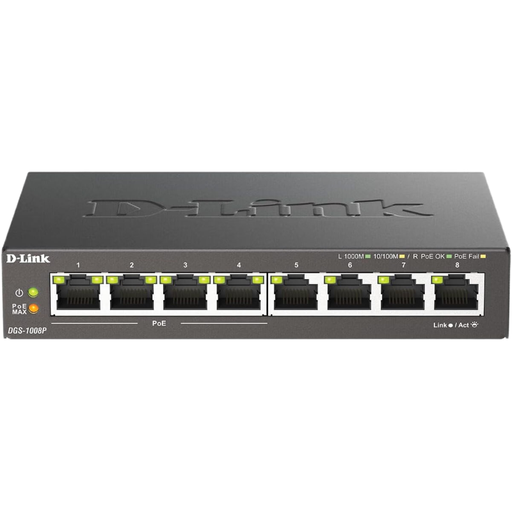
D-Link DGS-1008P/E 8-Port Gigabit PoE Switch
For several wired devices when you need to add an eight-port switch to your existing network.
Described as an unmanaged gigabit switch with eight RJ45 ports and PoE. The product name lists desktop use and a fanless design. Check the rules at your halls of residence and how to get your TV online before buying.
View at Joybuy
Frequently asked questions
Can I simply connect my smart TV to a switch plugged into the network socket in my halls of residence?
Not necessarily. A switch adds Ethernet ports, but it doesn’t automatically give you permission to access the network. The University of Leipzig student services guides explain that IP settings vary and that additional authentication may be required. Check with your halls of residence whether extra devices are allowed and how to register your TV.
How do I connect a switch to my existing router?
Connect one of the switch’s ports to a LAN port on your router, then connect your devices to the remaining ports. The manufacturers describe the unmanaged models covered here as plug-and-play, but your existing internet connection and any required registration still need to work.
Will a gigabit switch make 4K streaming faster?
Not just because it has a gigabit rating. Netflix recommends a stable internet speed of at least 15 Mbit/s for UHD playback and describes a network test you can run on your TV. You should check the speed of the connection provided separately.
How many ports do I need for my TV and other devices?
Count all the devices you want to connect by cable at the same time, then add a port for the connection to your existing network. With a five-port switch and one uplink, you have four ports left for devices; with eight ports, you have seven. The number of devices allowed in your halls of residence may be different.
Are statutory consumer rights and a manufacturer’s guarantee the same thing?
No. The Verbraucherzentrale distinguishes between your statutory rights against the seller and a voluntary guarantee from the manufacturer. If something is faulty, check which rights apply to your specific purchase.


