What should you look for when choosing one?
First, check whether a spare LAN port on your router is all you need. If you do need a switch, consider the number of devices you’ll connect, any IPTV requirements and whether you genuinely need management features.
| What you need |
What to look for |
Who is it important to? |
| Enough LAN ports |
Count your TV, work devices and the uplink to your router. With a five-port switch, four ports remain for devices after the uplink is connected. |
I want to use my TV and work devices over LAN at the same time, without swapping cables; around 36% of consumers prioritise having enough ports. |
| IPTV compatibility |
Check whether you’ll be using a media receiver from your internet provider. If so, check the provider’s guidance and the specific connection setup. |
If I use an IPTV media receiver rather than just a streaming app, I want to take multicast traffic requirements into account; around 29% of consumers prioritise IPTV compatibility. |
| Quiet operation at your desk |
Check the fan specifications, placement options and power requirements for the exact model version. |
If the switch is right by my workspace, I want a model without a noisy fan that’s easy to position; around 21% of consumers prioritise quiet, practical operation. |
| Network management |
Only look for management features and VLAN support if you want to configure them for your network. |
If I actually want to configure VLANs, I need management features, not just extra ports; around 14% of consumers prioritise specific network configuration options. |
Joybuy products for Smart TVs and work devices
The Joybuy models below offer different numbers of ports and management features for wired devices in your home office. Before choosing, check how many ports you’ll actually need once the switch is connected to your router, and whether you’ll use managed features.
 No image available
Ubiquiti UniFi Switch Flex Mini USW-FLEX-MINI-EU
A good fit if you want extra LAN ports and specific network management features.
Five Gigabit ports; VLAN support and management via UniFi Network are listed. It can be powered via USB-C or PoE.
View at Joybuy
 No image available
D-Link DGS-1005P/E 5-Port Gigabit Desktop Switch
An option if you need extra Gigabit ports and want to power compatible devices via PoE+.
Five Gigabit ports, including four PoE+ ports with a stated PoE budget of 60 W. The model is described as a fanless plug-and-play device with a metal casing. PoE+ powers compatible devices, not a standard Smart TV by default.
View at Joybuy
 No image available
D-Link DGS-1210-10/E 10-Port Gigabit Smart Managed Switch
A good fit if you want to connect several wired devices and manage specific network features.
Eight Gigabit RJ45 ports and two SFP slots. VLAN, IGMP snooping and web-based management are listed; the model is described as fanless.
View at Joybuy
 No image available
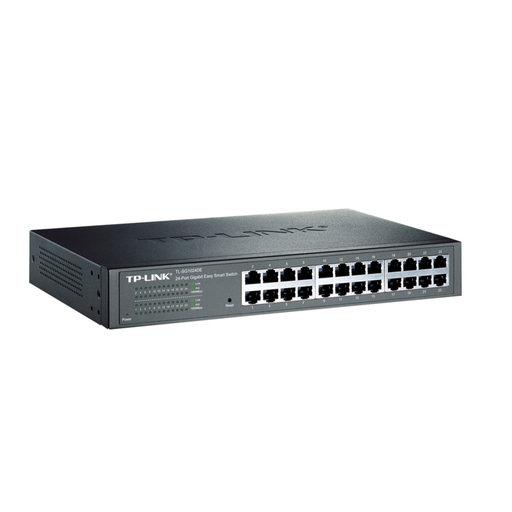
TP-Link TL-SG1024DE Managed L2 Gigabit Switch
An option if you want to connect lots of wired devices and use management features.
24 Gigabit RJ45 ports. VLAN configuration and port monitoring are listed; the model is designed for desktop or rack mounting.
View at Joybuy
 No image available
TP-Link TL-SG1005D 5-Port Gigabit Desktop Switch
A good fit if you want to connect several devices via Gigabit LAN and manage specific network features.
Five Gigabit Ethernet ports. VLAN, QoS, IGMP snooping and web-based management are listed. The model is described as fanless and designed for desktop or wall mounting.
View at Joybuy
Frequently asked questions
Do I need IGMP snooping for a streaming app on my Smart TV?
No. IGMP snooping isn’t a general requirement for connecting a Smart TV that uses streaming apps. If you’re using a media receiver from your internet provider instead, check its requirements and connection setup separately. FRITZ! describes possible interruptions with these receivers.
How do I connect a switch, and what should I check if I have connection problems?
Connect one of the switch’s ports to your home router, then connect your devices to the other ports. If you have problems, check the connection lights and network settings. For a FRITZ!Box, the manufacturer lists DHCP as the default setting for automatically assigning IP settings. Always follow the instructions for your specific router.
What ongoing costs and rights should I consider?
Factor in the switch’s power supply and energy consumption. The actual annual cost will also depend on how long you use it and your electricity tariff. The Verbraucherzentrale distinguishes the statutory warranty you have with the seller from a voluntary manufacturer’s guarantee. It states that, in general, goods must be free from defects at the time of delivery for two years from handover.
What product safety rules apply to a switch in Germany?
Products sold in the EU are covered by EU product safety regulations, as Your Europe explains. CE marking is required for products covered by harmonised EU rules that require it. It is a declaration by the manufacturer, not a general quality mark awarded by a government authority. Check the information for the specific switch and the power supply included with it.


