What should you look for when choosing?
Start with a typical original recording and work out how you’ll play it. Then you can decide whether the picture, sound and running costs are right for your group room.
| Criteria |
What to check when buying |
Who is it important to? |
| File compatibility |
Check the container, video and audio codecs, and file system against the documentation for the specific model. For subtitles, check the folder and file names too. |
If we want to play recordings directly from a USB drive, the picture, sound and any subtitles all need to work together. Around 36% of consumers prioritise reliable file playback. |
| Group viewing |
Take account of viewing distance, seats to the side, available space and room lighting; if possible, assess the picture from the intended seating positions. |
When discussing a scene together, I want to be able to make out movement and picture details from the seats at the side too. Around 29% of consumers prioritise visibility for the group. |
| Speech clarity |
Use a typical recording to check that the audio codec is supported and dialogue is clear from the intended seats. |
When we’re assessing dialogue and cues, the dialogue track needs to be clear from our seats. Around 21% of consumers put speech clarity first. |
| Total costs |
Compare the energy figures for the specific model, any additional devices you actually need, and the delivery or installation services on offer. |
If our ensemble needs to stick to a limited overall budget, we need to factor in electricity and any extra devices as well as the TV. Around 14% of consumers prioritise total costs. |
Product options at Joybuy
The product cards include a Philips Smart TV and a SUMTAB projector. The projector isn’t a Smart TV, so it’s only an option if you’re specifically looking for a projection setup rather than a television.
 No image available
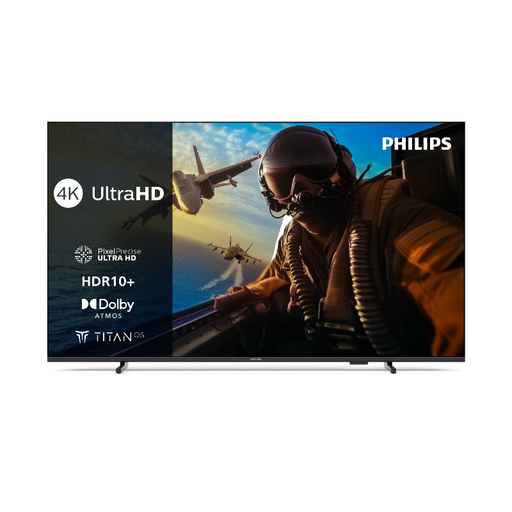
Philips 55PUS7000 4K LED Smart TV
Described as a Smart TV with UHD 4K and LED, this model could suit group viewing if it supports your files.
The product name lists Titan OS and energy class E. Check that the specific model can play your original recordings.
View at Joybuy
 No image available
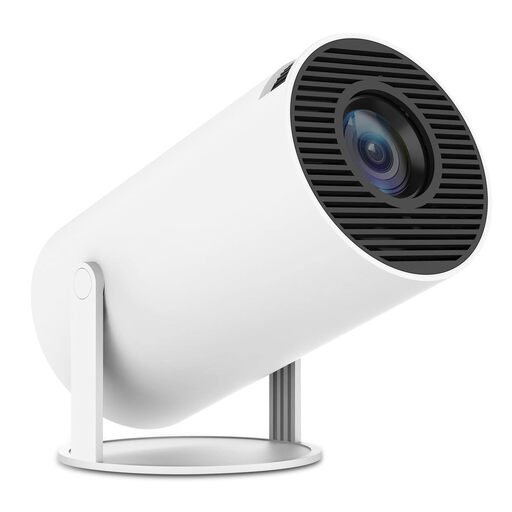
SUMTAB Mini Video Projector with WiFi 6 and BT 5.0
This is a projector, not a Smart TV, so it’s only suitable if you’re considering a projection setup instead of a television.
The product name lists WiFi 6, BT 5.0, built-in apps and 180° rotation. These details don’t confirm that it can play your local recordings.
View at Joybuy
Frequently asked questions
Can a TV play any MP4 or MKV file from a USB stick?
No, the file extension alone isn’t enough. Check the video and audio codecs, as well as the file system, against the specifications for the specific model. If possible, test a typical original recording too.
What can I do if external subtitles don’t appear?
First check whether the model supports the video file and can display external subtitles. For affected models, Sony Germany also recommends saving subtitles in the same folder and checking the file names and spelling of the file extension.
How do I compare electricity costs, and what are my rights if a TV is faulty?
Compare the energy figures on the EU labels for the exact models, and take your usage time and electricity tariff into account. In its guidance dated 28 September 2026, the consumer advice centre distinguishes statutory rights against the seller from a voluntary guarantee. For online purchases, consumers generally have a 14-day right of withdrawal, subject to the relevant conditions and exceptions.
Can the theatre group show recordings featuring identifiable people in public?
Owning a locally stored recording doesn’t give you permission to publish it. Under §§ 22 and 23 KunstUrhG, images of people may generally only be distributed or shown publicly with their consent; the Federal Ministry of Justice and the Federal Office of Justice also point out that exceptions depend on the circumstances of each case. Whether a specific recording or screening falls under an exception, and what other rights may be affected, can’t be determined in general without details of the plans. A private viewing isn’t the same as a public screening.


