
Lieferung heute & morgen

Qualitätsgarantie

Willkommens-Angebote freischalten: KOSTENLOSE Lieferung | Bis zu 80 % RABATT | Kostenlose 30-Tage-JoyPlus-Testphase
App herunterladen
A smart Wi-Fi watering computer can automatically water your lawn, flower beds or greenhouse on a schedule. However, it is essential that the connections, Wi-Fi and IP rating are suitable for where you plan to install it. Many poor purchases happen not because of a lack of features, but because of unclear specifications and unsuitable installation conditions.
The term “suitable for outdoor use” alone tells you very little about protection against water and dust. Look for a specific IP rating. An IP65 watering computer is protected against dust and water jets from various directions. However, this does not mean the device can be submerged in water or permanently mounted under a puddle.
A UV-resistant housing is also important. Plastic can become brittle with constant exposure to sunlight. Even for an outdoor watering timer, the installation location should still be as sheltered as possible from standing water and direct, intense sunlight.
Many smart devices only work on 2.4 GHz Wi-Fi. This is often practical in the garden because this frequency band can achieve greater range than 5 GHz. However, a router with an active 5 GHz network alone is not sufficient if the watering computer requires 2.4 GHz.
Manufacturer range claims usually refer to open outdoor areas. Walls, metal boxes, cellar walls and long distances all reduce signal strength. So check before you buy whether there is a stable 2.4 GHz signal at your outdoor tap. An additional hub is not always necessary, but if your Wi-Fi is weak, a suitable repeater may be required.
A claim like “up to two years” is only valid under certain conditions. It often depends on the number of switching operations, Wi-Fi communication and battery quality. Pay attention to the battery size used, a battery level indicator in the app, and whether schedules are stored locally. This way, watering can continue even during a temporary Wi-Fi interruption.
First, check the thread connection. For the WOOX R2603 and R2604, the water inlet and outlet are specified as G3/4 BSP. A G1/2 adapter is included in the box. Nevertheless, you should measure your existing outdoor tap before ordering. Seals and PTFE tape can help with installation, but they won’t make up for an incorrect connection.
Equally important is the permissible operating pressure. According to the product specifications, both models are designed for 0.03 to 0.9 MPa. At very low pressure, the water output from sprinklers or drip hoses may be limited. At high pressure, a pressure reducer may be useful, provided your irrigation system allows for it.
A watering computer with an app should offer more than just an on/off switch. Useful features include separate schedules, manual control, cycle and soak programmes, and a log of past watering sessions. This allows you to set different run times for different beds.
According to the manufacturer, the WOOX R2603 and R2604 can be set up with up to 20 independent watering schedules. Both devices store schedules locally and, according to the product description, can continue to operate even if the Wi-Fi connection is lost. Remote control via the app is naturally unavailable during an interruption.
A “watering timer with rain sensor function” label does not automatically mean it has a physical rain sensor. Check whether the device actually connects to a sensor or whether it uses weather data and a manual rain pause.
The WOOX models offer a Rain Delay function for a pause of one to 30 days, as well as a weather forecast in the app. This is not a guarantee of precise local rainfall measurement. In highly changeable weather, you should still keep an eye on your schedules.
For smart home users, a watering controller with Alexa and Google Assistant can be handy. Voice commands are best suited for manually starting or stopping watering. For regular routines, saved schedules remain the more reliable foundation.
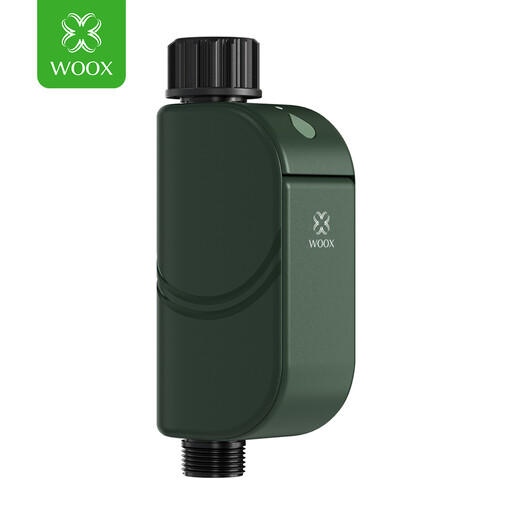
Why this product fits the profile: The direct 2.4 GHz Wi-Fi connection works without a hub, according to the product specifications. App control, schedules and manual operation cover the basic requirements for automatic garden watering.
The specifications mention IP65, local schedules and a battery warning. This makes the protection rating, offline behaviour and maintenance clear before purchase.
G3/4 connection with G1/2 adapter, four AA batteries and up to 20 watering schedules according to the product data.
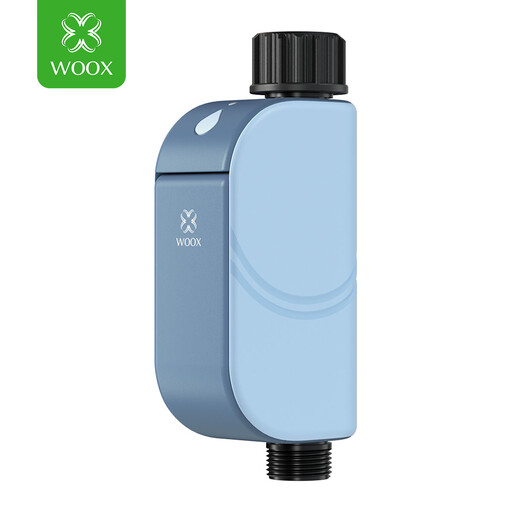
Why this product fits the profile: This model combines app access, Alexa and Google Assistant compatibility, watering logs and multiple operating modes. That suits users who want to manage their routines more precisely.
The specification clearly lists Wi-Fi 6 on the 2.4 GHz band, BLE 5.4, IP65 and an operating pressure of 0.03 to 0.9 MPa.
Cycle-and-Soak mode, Rain Delay up to 30 days, child lock and local schedules according to the product description.
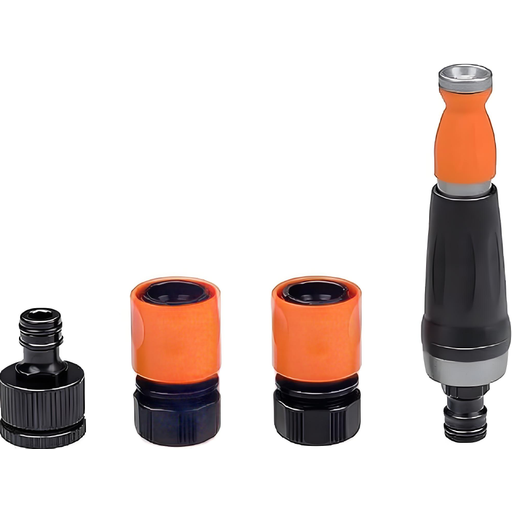
Why this product fits the profile: This four-piece set is designed as a manual supplement for beds, potted plants or caring for individual plants. It does not replace a Wi-Fi timer, but can be used for specific watering tasks.
The product description clearly indicates a manual set. Buyers therefore do not expect app, Wi-Fi or voice control, which the product does not offer.
Four aluminium parts, compact dimensions of 18.2 × 12.2 × 3.5 cm and a weight of 249 g according to the product specifications.
Mount the timer as vertically as possible and make sure the seals are seated correctly. After turning on the tap, check the connection for leaks first. For automatic garden watering on a schedule, you will also need suitable hoses, drippers or sprinklers. The watering computer typically controls the water flow but does not distribute the water to multiple outlets by itself.
With a battery-powered watering computer, there are ongoing costs for AA alkaline batteries in addition to the purchase price. The WOOX specifications state up to two years with ten switching operations per day; individual listing details mention 1.5 years. The actual battery life therefore depends on usage, signal quality and temperature. Before frost sets in, you should pay attention to the valve, pipes and the manufacturer’s instructions.
We have compiled a complete, regularly updated list of products that fully meet these strict selection criteria and the safety regulations in force in the EU.
Schedules can be stored locally on suitable models and will then continue to run. For remote access, status updates and weather functions, an active connection is usually required. Check this function explicitly in the product description.
This depends on switching operations, Wi-Fi signal, battery type and outdoor temperature. The WOOX models mentioned use four AA alkaline batteries. The stated battery life of up to two years is a manufacturer value under defined usage conditions and not a fixed guarantee for every garden.
Not necessarily. A device with app-based weather data and Rain Delay can pause watering schedules, but it does not always replace a local rainfall sensor. For sensitive plants, large areas or highly changeable weather conditions, a separate sensor can be worthwhile.