
Lieferung heute & morgen

Qualitätsgarantie

Willkommens-Angebote freischalten: KOSTENLOSE Lieferung | Bis zu 80 % RABATT | Kostenlose 30-Tage-JoyPlus-Testphase
App herunterladen
Smart Glasses with a display combine glasses, a digital display and mobile functions. Depending on the model, navigation, translations, notifications or a private screen can appear directly in your field of vision. However, product claims vary considerably: AI glasses with a camera are not automatically AR glasses for gaming, and display glasses for films may not be suitable for use on the road.
If you are looking to buy smart glasses in Germany, you should therefore consider more than voice control or display size. Three common purchasing misconceptions frequently lead to the wrong choice:
Camera-free Smart Glasses are particularly suitable for users who want visual prompts, translations and notifications without wearing a camera on their face. Models with a camera, on the other hand, may offer recording, image recognition or video functions. For films and games, resolution, refresh rate, field of view and the connection to the source device are more important than AI functions.
You should therefore decide on your primary use before buying:
With AR glasses featuring a display, the key question is how information is shown. A small Micro-LED display for brief prompts serves a different purpose from a Micro-OLED screen for films or games. Look out for:
For example, the XREAL One lists a resolution of 1,920 × 1,080 pixels, 120 Hz, a 50-degree field of view and native 3DoF spatial tracking. To use the glasses with a smartphone, computer or handheld, the relevant device must be compatible. A USB-C port alone does not guarantee video transmission.
Manufacturers’ battery-life figures usually refer to specific usage scenarios. A permanently bright display, audio, navigation or translation can reduce battery life. You should therefore check:
The Even G2 is advertised as offering up to two days of regular use and up to two weeks with the charging case. These are the manufacturer’s product specifications and do not represent a universally applicable battery life for every type of use.
AI glasses may contain microphones, speakers or a camera. Inform other people before making recordings and observe Germany’s right to one’s own image, as well as local rules in homes and businesses. Camera-free smart glasses reduce one particular privacy concern, but they do not remove the need to handle audio data or cloud functions carefully.
Display content must not distract you when driving, cycling, crossing roads or operating machinery. Hands-free navigation is no substitute for paying attention to your surroundings. IP ratings must also be read carefully: IP65 does not mean that a device is suitable for swimming or showering.
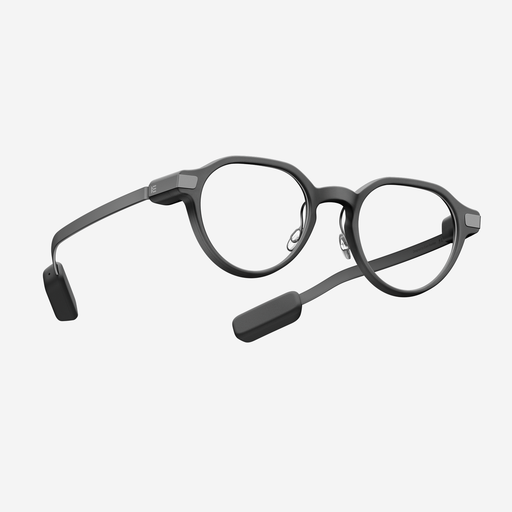
Why this product suits this profile: These camera-free display glasses combine a discreet glasses design with prompts for everyday use, calendar information, navigation and translation. They are ideal for users who initially want compact display functions rather than a large virtual screen.
The lack of a camera clearly distinguishes these glasses from AI glasses capable of recording. The stated weight of 36 g and the included charging case make it easier to plan for daily use.
Micro-LED display, real-time translation in more than 35 languages according to the product information, and up to two days of regular use according to the manufacturer.
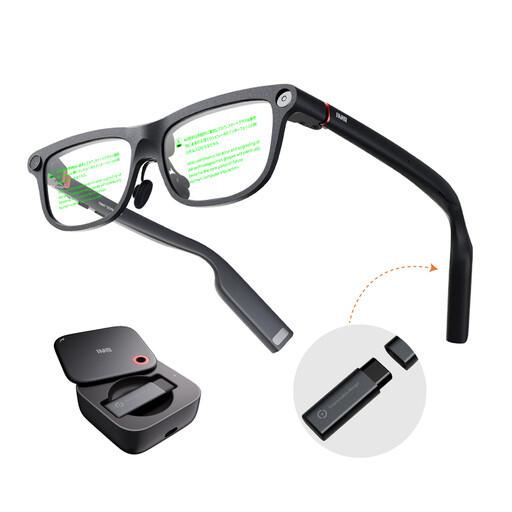
Why this product suits this profile: This model is designed for professionals and travellers looking for a bright display, AR navigation, meeting notes and translation functions in one device.
The stated brightness of 1,500 nits addresses the common uncertainty surrounding outdoor visibility. Nevertheless, you should check the actual visibility and the functions supported by the app before buying.
MicroLED waveguide display, stated weight of 58 g and real-time translation in more than 98 languages according to the product description.
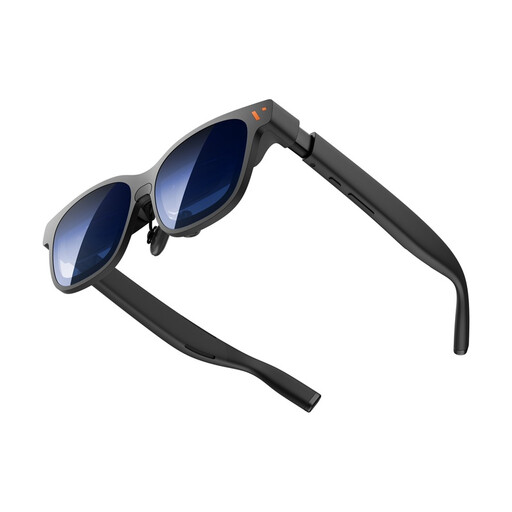
Why this product suits this profile: For gaming, travel and mobile work, the focus is on a large virtual screen. This model is intended for compatible USB-C devices with video output and supports up to 120 Hz according to the product information.
The product information lists compatible smartphones, computers and handhelds, as well as possible limitations with consoles. This allows you to check the connection requirements before placing your order.
Sony Micro-OLED display, stated 146-inch size, up to 120 Hz and integrated dioptre adjustment from 0 to -5.0 D according to the product description.
We have put together a complete, regularly updated list of products that fully meet these strict selection criteria and the safety regulations applicable in the EU.
No. Some models require USB-C with DisplayPort output, while others communicate mainly via Bluetooth and a manufacturer’s app. Before buying, check the operating system, connection type and the manufacturer’s compatibility list.
Battery life depends on display brightness, audio, navigation, translation and frequency of use. Figures such as “up to two days” refer to regular use. For long journeys, the charging case, cable standard and charging time are important selection criteria.
Display content can affect your concentration. Do not use these functions when driving, cycling, crossing roads or operating machinery. Smart Glasses are also no substitute for certified protective or sports glasses. For outdoor activities, UV protection, a secure fit and an unobstructed view should be assessed separately.