
Lieferung heute & morgen

Qualitätsgarantie

Willkommens-Angebote freischalten: KOSTENLOSE Lieferung | Bis zu 80 % RABATT | Kostenlose 30-Tage-JoyPlus-Testphase
App herunterladen
A smartphone gimbal can reduce camera shake and make footage look steadier when you’re walking, travelling or vlogging. But not every model will suit every smartphone or use. Many disappointing purchases aren’t down to missing features, but to unclear compatibility, short battery life or accessories that offer little practical value.
An AI tracking gimbal can automatically keep people, animals or faces in shot. However, it may require a specific app, a compatible operating system or an active Bluetooth connection. Some models track subjects using a built-in camera and gesture controls, while others rely on a smartphone app.
Before you buy, check:
A 3-axis gimbal compensates for movement across several axes. But how well it suits you also depends on your smartphone’s weight and size. A heavier phone with an extra lens, protective case or microphone can put more strain on the motors.
So it’s important to check the:
A foldable smartphone gimbal is easier to fit in a rucksack or bag. However, a short handle, small controls or limited extension can make it harder to use. A selfie stick with tripod is handy for group photos and fixed shots, but it isn’t necessarily a substitute for a stable surface.
Weather resistance is often overlooked, too: the electronic gimbals mentioned here aren’t automatically waterproof. In rain, high humidity or sandy conditions, follow the relevant safety guidance.
For vlogs, walks and dynamic footage, mechanical 3-axis stabilisation is an important consideration. It can compensate for tilting, panning and rotation. For stationary shots, however, a smartphone tripod or simple phone holder is often enough.
If you regularly switch between the selfie and rear cameras, look for an easy-to-reach control. Automatic subject tracking is especially useful if the person filming won’t be staying behind the smartphone.
Battery life should suit the length of your planned filming day. A gimbal with remote control makes it easier to take group photos and shoot from a distance. Also check whether the remote needs charging separately, what range is specified, and whether it only starts recording or can also control tracking and zoom.
USB-C is common on many current models. A built-in power bank can be handy, but it doesn’t necessarily remove the need for a separate way to charge your smartphone.
For a gimbal for iPhone and Android, the operating system, phone size and weight all matter. Magnetic mounts can make it quicker to attach and remove your phone, but they require a suitable magnetic surface or clamp. If you have an iPhone with MagSafe, check that the connection is secure enough for the way you plan to use it.
Content creators may value built-in lighting, an extendable arm, a teleprompter or an additional microphone thread. For travellers, packed size, weight and a protective case are often more important.
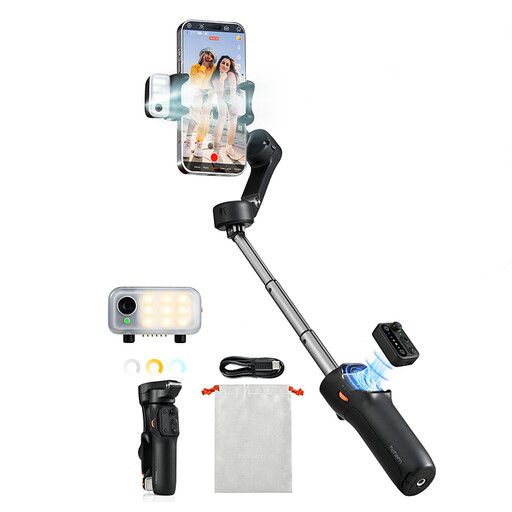
Why this product suits this type of user: With 3-axis stabilisation, a detachable remote, an extendable pole and a tripod, it covers several typical beginner scenarios.
The product details state that it’s compatible with many iPhone and Android smartphones, and that AI tracking can be controlled with gestures without requiring a Bluetooth connection.
Foldable design, built-in fill light, detachable remote and a stated battery life of up to 13 hours.
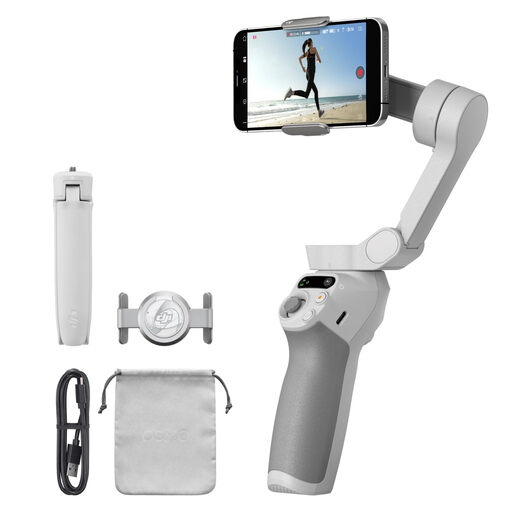
Why this product suits this type of user: If you value clearly defined shooting modes and a compact design, this model offers portrait and landscape orientations, as well as vlog recording.
Its listed modes—ActiveTrack, Tilt Lock and FPV—make it easier to understand what it can do than a general marketing claim with no specific shooting modes.
Foldable design, 3-axis stabilisation, ShotGuides, and support for both portrait and landscape orientations.
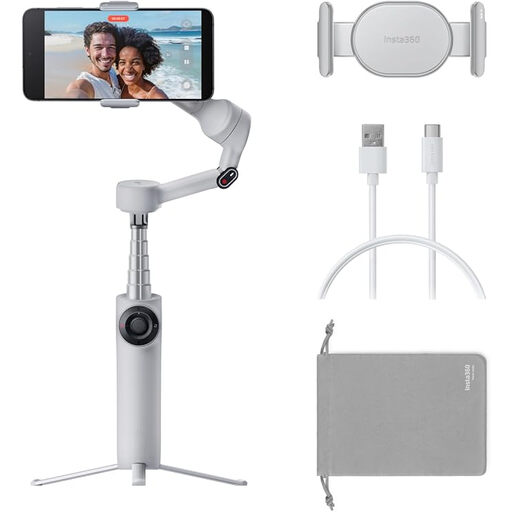
Why this product suits this type of user: Vloggers, families and travellers can make good use of the integrated tripod, selfie stick and remote, as well as multi-person tracking in a compact design.
The accessories are built into the design, so you don’t necessarily need to carry separate kit for basic selfie, tripod and tracking shots.
The stated features include up to 10 hours of battery life, 3-axis stabilisation, AI tracking for several people and a built-in selfie stick.
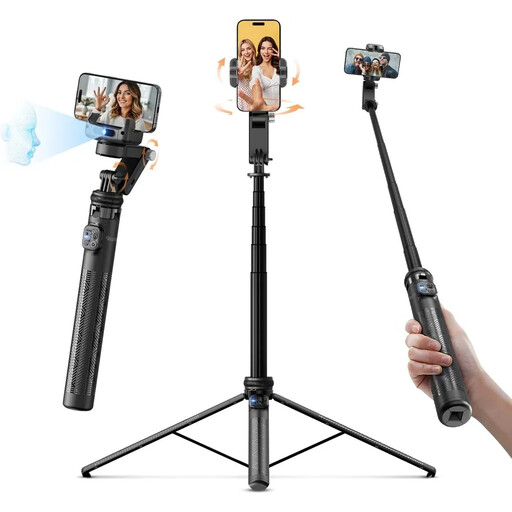
Why this product suits this type of user: This model combines a gimbal, selfie stick, tripod and gesture control, and is listed as extending to a height of 156 centimetres.
The technical limits are clearly stated: a clamp width of 6.5 to 9.5 centimetres, a tracking range of 0.5 to 5 metres and a maximum payload of 2.5 kilograms.
Adjustable height, a fill light with adjustable colour temperature, and a Bluetooth remote with a stated range of 10 metres.
We’ve put together a complete, regularly updated list of products that meet these strict selection criteria and fully comply with the safety regulations in force in the EU.
Before your first shot, make sure the smartphone is centred in the clamp. Remove a heavy case if necessary, then run an automatic calibration. If you have a gimbal for iPhone and Android, it’s also worth testing it with your preferred camera app.
While using it, make sure you have:
Keep magnetic accessories away from medical implants, bank cards and magnetically stored data media. Keep small parts and button batteries out of children’s reach.
Place the smartphone in the clamp, balance it, switch on the gimbal and, if needed, connect it via Bluetooth or an app. You can then switch between portrait and landscape, tracking and manual control.
It depends on motor load, tracking, lighting and battery capacity. Product specifications vary considerably: some models claim up to 10 or 13 hours, while a gimbal with the fill light on continuously may have a shorter runtime. For longer filming days, a power bank or a back-up charging plan is a good idea.
AI tracking can make things easier for vlogs, livestreams, family videos and presentations. If you mainly shoot static landscapes or product photos, a smartphone tripod or simple phone holder may be all you need. What matters is whether the tracking works with your smartphone and the app you want to use.