
Lieferung heute & morgen

Qualitätsgarantie

Willkommens-Angebote freischalten: KOSTENLOSE Lieferung | Bis zu 80 % RABATT | Kostenlose 30-Tage-JoyPlus-Testphase
App herunterladen
A smartphone gimbal can compensate for movement while you’re filming, helping your footage look smoother. But not every model is equally suited to vlogs, livestreams, travel or social media videos. The details that matter aren’t just terms such as ‘AI tracking’ or ‘3-axis stabilisation’, but the specific features, compatibility and ease of use.
If you’re looking to buy a phone gimbal, there are three common buying mistakes to avoid:
A 3-axis gimbal typically stabilises tilt, pan and roll. This can reduce noticeable jolts when you’re walking or making slow camera movements. However, stabilisation doesn’t replace a steady hand, and some movements are better suited to a gimbal than others.
Look out for:
A stabilised phone gimbal shouldn’t be switched on unless the smartphone is correctly fitted. Safety instructions for several models warn that running the motors without a phone in place may cause vibrations or damage.
An AI-tracking gimbal can be useful when you’re filming on your own. But check whether it works without an app or Bluetooth. According to the product description, the hohem model with its detachable control and magnetic AI tracking can also be used without Bluetooth or an app. You can activate it with a button or gesture controls.
Other devices may need an app to access additional modes. The DJI Osmo Mobile SE pairs features such as ActiveTrack 6.0, ShotGuides and LightCut with your smartphone. This gives you more options, but requires a suitable connection and, in some cases, compatible software.
A gimbal remote control is useful if you want to film yourself from further away. The hohem gimbal’s remote is listed as having a range of up to 10 metres. The Rollei Easy Creator is also listed with a Bluetooth remote control with a 10-metre range. Walls, other wireless devices and your surroundings can affect the range.
Battery life should suit the way you plan to use your gimbal. A compact model is often enough for short clips. For long days out, events or several livestreams, a model with longer battery life may be more practical.
Also check:
A foldable gimbal is easier to pack in a rucksack or hand luggage. Don’t assume it’s waterproof, though. According to the information provided for the models featured here, they aren’t suitable for heavy rain or immersion in water. Make sure you protect the device when filming outdoors.
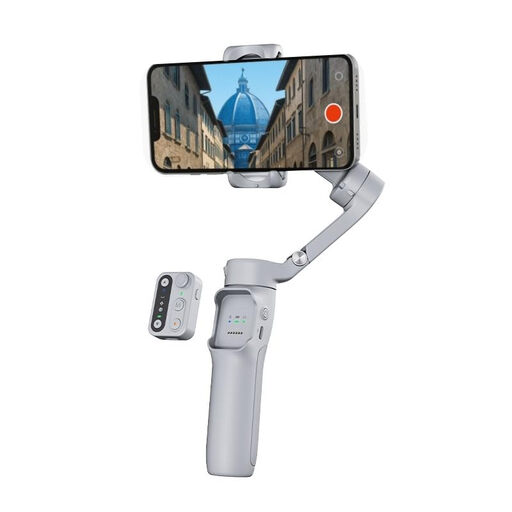
Why it suits this user: This foldable model is aimed at anyone looking for a portable smartphone stabiliser for everyday use, travel and their first vlogs. It supports portrait and landscape modes and is listed with a battery life of up to 11 hours.
The specifications state the payload limits and warn against switching it on without a smartphone in place. This makes it easier to check the setup before your first use.
3-axis stabilisation, detachable remote control with a listed range of 10 metres and a compact foldable design.
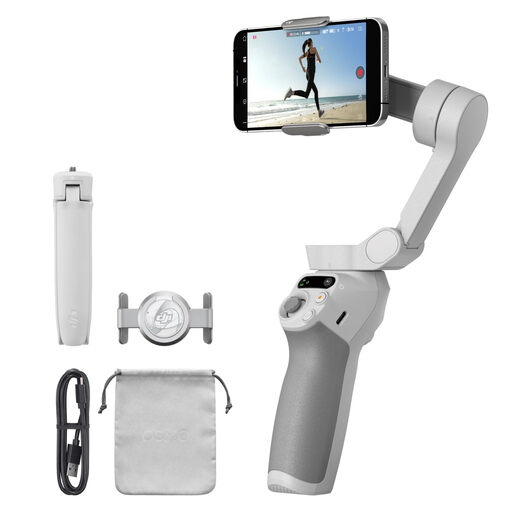
Why it suits this user: This foldable gimbal is designed for iPhone and Android users who want subject tracking and software-assisted filming tools as well as stabilisation.
The product description lists specific features such as ActiveTrack 6.0 and ShotGuides, as well as portrait and landscape modes, rather than simply referring to ‘smart’ features.
3-axis stabilisation, ActiveTrack 6.0 and listed DJI Mimo and LightCut features.
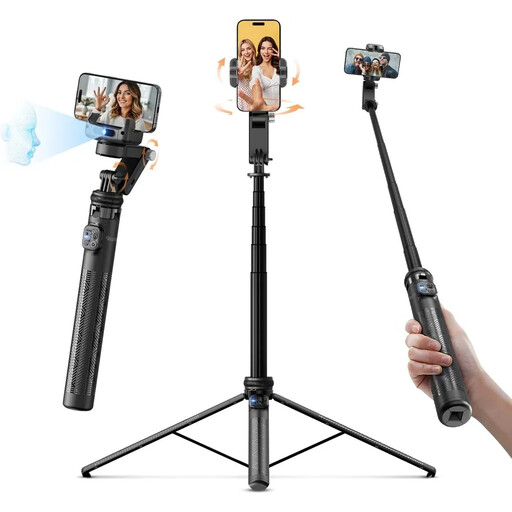
Why it suits this user: For solo creators, livestreams and presentations, this model combines several functions in one device: gimbal, selfie stick, tripod and gesture control.
The specifications state a clamp width of 6.5 to 9.5 cm, a maximum height of 156 cm, a payload of 2.5 kg and separate battery life figures for the gimbal and light.
AI face recognition, an integrated fill light with adjustable colour temperature and a tripod function that extends to the stated height.
We’ve put together a complete, regularly updated list of products that meet these strict selection criteria and the safety regulations in force across the EU.
Before filming for the first time, fit your smartphone fully into the clamp and position it as centrally as possible. Then follow these steps:
A gimbal isn’t waterproof unless this is explicitly stated. Lithium batteries should only be charged with suitable chargers. Don’t open them, and keep them away from excessive heat.
Many models are designed for both systems. Check the stated clamp width, smartphone weight and any app or Bluetooth compatibility requirements. If you have a larger phone with a case, compare its dimensions with the gimbal before you buy.
It depends on the model and how you use it. The hohem gimbal is listed with a battery life of up to 11 hours. The Rollei Easy Creator is listed with 80 minutes of battery life for the gimbal and 90 minutes for the separate fill light. Cold weather, frequent motor movements and using the light can all affect actual battery life.
Automatic subject or face tracking can make filming easier for solo creators, vlogs and livestreams. If you mainly film landscapes, architecture or short handheld clips, you may not need this feature. Check that the tracking range, gesture controls and app requirements suit the way you film.