
Lieferung heute & morgen

Qualitätsgarantie

Willkommens-Angebote freischalten: KOSTENLOSE Lieferung | Bis zu 80 % RABATT | Kostenlose 30-Tage-JoyPlus-Testphase
App herunterladen
A smartphone gimbal can produce significantly smoother footage when walking, vlogging or filming handheld. However, not every model is suitable for every smartphone or purpose. If you only focus on terms such as “AI tracking”, “3-axis stabilisation” or “long battery life”, you can easily overlook important details.
A gimbal with AI tracking or facial recognition can automatically keep people in the frame. However, it is important to consider how the function works. Some models require a specific app or a Bluetooth connection, while others use a separate tracking module.
Smartphone compatibility should also be checked. For example, the DJI Osmo Mobile 7P notes that the DJI Mimo app may not be available in the Google Play Store due to platform compatibility. Android users should check the intended download method and supported device version before buying.
Figures such as 10, 11 or 18 hours generally refer to using the gimbal under specific conditions. Tracking, the fill light, charging your smartphone and frequent motor movements can reduce battery life.
A smartphone gimbal with a power-bank function is useful when no charger is available while you are out and about. At the same time, you should consider the device’s own weight: a larger battery can make the grip heavier.
A gimbal with a selfie stick, tripod, fill light and remote control may seem versatile. Nevertheless, the maximum payload must be suitable for the smartphone together with its case, lens attachment or microphone. If the permitted load is exceeded, the motors may be put under greater strain or the stabilisation may stop working.
Before ordering, compare the smartphone width, total weight and mounting method.
A 3-axis gimbal typically compensates for movement across three motorised axes: tilt, roll and pan. This is particularly useful when walking, panning or recording dynamic vlogs. A smartphone video stabiliser without motorised axes may be lighter and more compact, but depending on its design, it offers less movement compensation.
For TikTok, YouTube and travel videos, it should also be possible to switch quickly between portrait and landscape format. Some models offer special modes or a mechanical rotation function for this purpose.
A gimbal for iPhone and Android should be compatible not only with the operating system, but also with the size of the specific device. Check the following:
According to the product details, the hohem Smartphone Gimbal Stabilizer with OLED Display is designed for a payload of up to 400 g and features four 1/4"-20-UNC threads. Its OLED display shows the battery level, Bluetooth connection and recording mode, among other information. The stated battery life is up to 18 hours.
A foldable smartphone gimbal is easier to fit into a small bag. An integrated selfie stick or a gimbal with a tripod can replace additional accessories, but it often increases the weight and packed size.
If you often film outdoors, you should also check the IP rating. IPX5 means protection against water jets, not submersion. Models without a specified IP rating should be protected from rain and splashes.
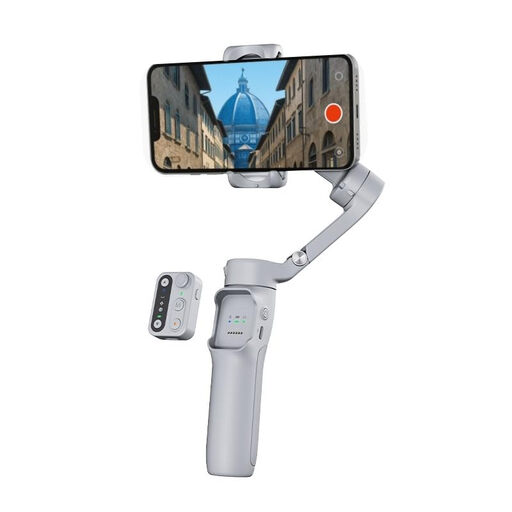
Why this product suits this profile: This foldable model is designed for users who create vlogs, travel videos or social media footage while out and about and value a compact format.
The specifications state 11 hours of battery life, a foldable body and support for portrait and landscape format. This makes it easier to assess portability and endurance before buying.
3-axis stabilisation, a net weight of 361 g according to the product details, and modes such as PF, PTF, POV and L.
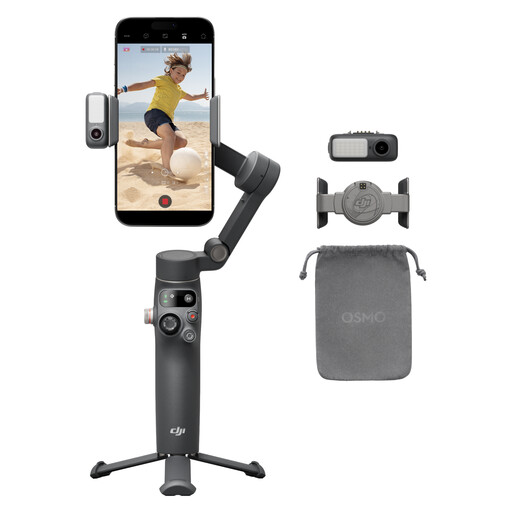
Why this product suits this profile: Content creators and livestreamers get a combination of a 3-axis gimbal, integrated extension pole, tripod and multifunctional module.
Tracking and app functions should not be considered in isolation: Android users should check whether DJI Mimo is available before planning to use the full range of functions.
Integrated extension pole and tripod, magnetic smartphone mount, multifunctional module and up to 10 hours of battery life according to the product details.
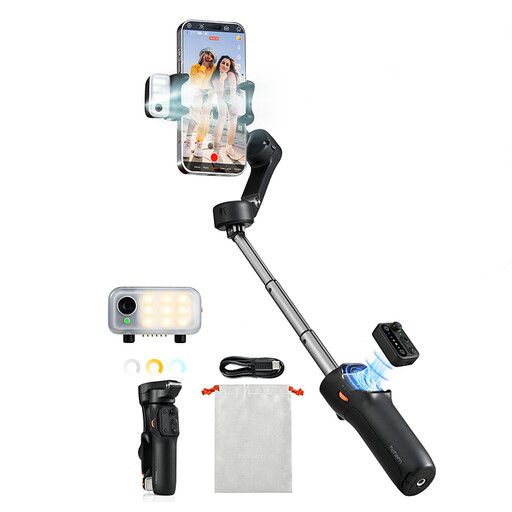
Why this product suits this profile: For solo creators, vloggers and travel videographers, AI tracking, fill light, remote control, tripod and extension pole are combined in one foldable device.
The features are accompanied by clear limitations: according to the specifications, the model is not waterproof and should only be operated with the smartphone correctly mounted.
iSteady-8.0 3-axis stabilisation, AI magnetic tracking without Bluetooth or an app according to the description, and up to 13 hours of battery life.
We have put together a complete, regularly updated list of products that fully meet these strict selection criteria and the safety regulations applicable in the EU.
A gimbal with facial recognition does not work equally reliably in every environment. Backlighting, obscured faces or large distances can affect recognition. For planned recordings, it is therefore worth carrying out a brief function test at the intended filming location.
For vlogging while walking, travel footage and dynamic social media videos, a 3-axis gimbal can mechanically compensate for movement. For purely indoor recordings from a fixed table, a tripod is often sufficient. The key factors are therefore the type of movement, how often you transport it and the additional functions you want.
Battery life depends on the model and how it is used. The product details for the devices featured range from around 10 to 18 hours; one Rollei model is specified as offering around 80 minutes of gimbal operation. AI tracking, the fill light and charging the smartphone can reduce the actual operating time.
Many models support both systems, but not necessarily all functions. Before buying, check the smartphone width, weight, operating system version and required app. Software compatibility can be particularly important for tracking, gesture control and one-tap editing.