
Lieferung heute & morgen

Qualitätsgarantie

Willkommens-Angebote freischalten: KOSTENLOSE Lieferung | Bis zu 80 % RABATT | Kostenlose 30-Tage-JoyPlus-Testphase
App herunterladen
A smartphone gimbal can reduce shaky footage, make different perspectives easier to capture and replace several accessories. At the same time, a phone gimbal, Bluetooth selfie stick and genuine smartphone stabiliser can differ considerably. If you only look for terms such as “AI tracking” or “3-axis gimbal”, you can quickly overlook important details.
Typical purchasing problems arise from three pitfalls:
A genuine 3-axis gimbal typically compensates for movement across three axes: tilt, roll and pan. This is particularly useful when walking, filming while travelling or recording longer vlog sequences. A simple smartphone stabiliser without motors, on the other hand, may only hold a fixed position.
Pay attention to the stated maximum payload. A smartphone with a protective case, additional lens or magnetic holder may be heavier than expected. If your phone is particularly heavy, the gimbal should not be operated continuously at its load limit.
Features such as a gimbal with tracking, gesture control or automatic subject tracking are often linked to a manufacturer’s app. Before buying, iPhone and Android users should check:
According to the product details, the DJI Mimo app is required for the DJI Osmo Mobile 7P. Due to a platform compatibility issue, it may not be available directly through the Google Play Store and may need to be downloaded from the official DJI website. This should be taken into account before buying.
A foldable gimbal is practical for travelling and spontaneous filming. The folded dimensions are not the only important factor; weight and extension length also matter. The Spigen S610W, for example, weighs 220 g, folds down to 16.70 cm and extends to 54 cm.
With magnetic systems, the mounting mechanism must be compatible with your smartphone. Products with MagSafe connectivity are primarily suitable for compatible iPhone models or suitable magnetic rings. A conventional clamp holder offers broader device compatibility, but may take longer to attach.
The following models meet different requirements, from a compact phone gimbal for beginners to a motorised smartphone gimbal with tracking for regular video recording.
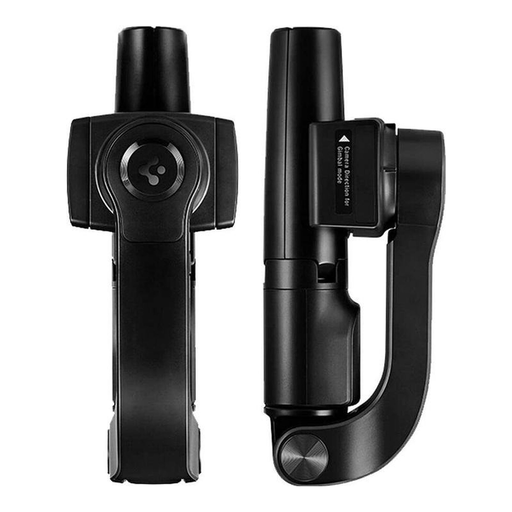
Why this product suits this profile: According to the product details, the S610W combines a gimbal, selfie stick and smartphone tripod. It is compatible with iOS and Android, making it suitable for users looking for versatile vlogging equipment without excessive weight.
The product data specifies a Bluetooth connection, tripod function and a length of 16.70 to 54 cm. This makes its key uses clearer than those of an accessory with no stated functions.
220 g weight, USB-C charging, wrist strap, plus iOS and Android compatibility according to the product description.
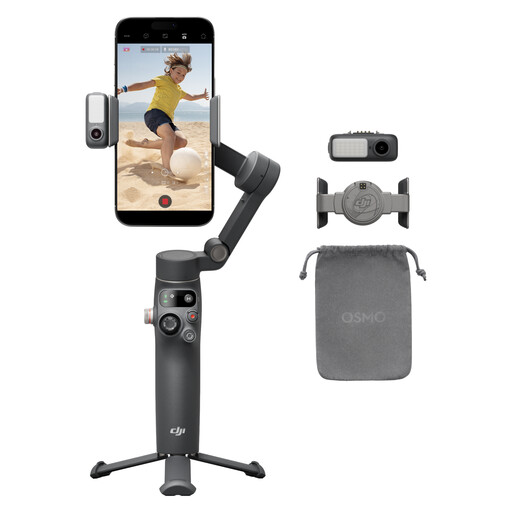
Why this product suits this profile: For regular vlogs, YouTube videos and moving subjects, this model offers 3-axis stabilisation, tracking features and integrated extensions, according to the manufacturer’s specifications.
The specifications distinguish between the gimbal body, multifunctional module, app and magnetic clamp. This allows you to check in advance which functions depend on the accessory and which rely on the app.
Integrated extension, tripod function, tracking and up to 10 hours of operating time according to the product details.
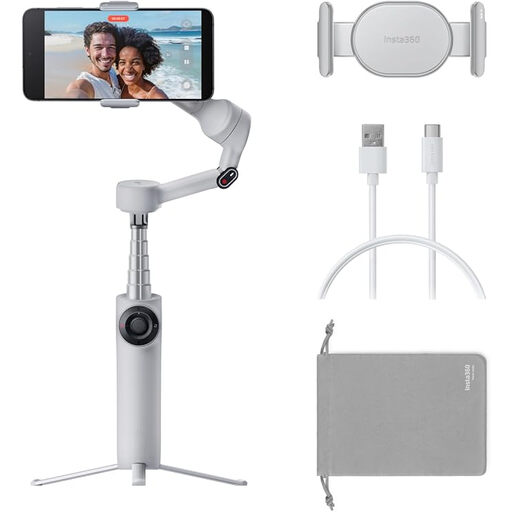
Why this product suits this profile: According to the product description, this foldable gimbal is aimed at travellers, vloggers and users who want to combine tracking, a selfie stick and a tripod in one compact device.
The product details list specific additional features such as an integrated tripod, teleprompter, power bank and app-based tracking. This makes it easier to assess before buying whether you really need the full range of functions.
3-axis stabilisation, multi-person and pet tracking, plus up to 10 hours of battery life according to the product details.
Before recording for the first time, the smartphone should be positioned centrally in the phone holder. With motorised models, it is also important to secure the clamp or magnetic connection fully. Check the following before letting go:
With a Bluetooth selfie stick, the remote control should be paired before recording. Depending on the model, the range is often around 10 metres. Obstacles, battery level and smartphone settings can affect actual use.
We have put together a complete, regularly updated list of products that fully meet these strict selection criteria and the safety regulations applicable in the EU.
That depends on the model. Some devices explicitly state that they are compatible with iOS and Android. For app-based functions, you should also check your specific smartphone model and the supported app version.
Usage time depends on the battery, motor load, storage conditions and frequency of use. The manufacturer’s specifications are the key factor when it comes to runtime. Models in this selection state up to 10 or 18 hours of operating time, for example. After use, the gimbal should be stored in a dry, dust-free place without putting unnecessary strain on the joints.
Tracking can be useful if you move around while filming or record yourself alone. For static product videos or simple group photos, a smartphone tripod with a Bluetooth remote shutter is often sufficient. So check whether you really need automatic subject tracking or whether a more affordable holder would meet your needs.