
Lieferung heute & morgen

Qualitätsgarantie

Willkommens-Angebote freischalten: KOSTENLOSE Lieferung | Bis zu 80 % RABATT | Kostenlose 30-Tage-JoyPlus-Testphase
App herunterladen
A smartphone gimbal can significantly reduce shaky footage when walking, travelling or filming with the front-facing camera. However, smartphone gimbals vary considerably in terms of stabilisation, app support, load capacity and accessories. A long list of features does not automatically mean that a model is suitable for your smartphone or the way you film day to day.
Before buying, therefore, you should look beyond terms such as “AI tracking” or “professional video quality”. Clear technical specifications, a suitable smartphone mount and controls that work reliably while you are out and about are what really matter.
A gimbal with AI tracking or gimbal with facial recognition may initially sound versatile. In practice, however, the feature may depend on a specific app, operating system or compatible applications. Check whether tracking works with your preferred camera app, TikTok, Instagram, YouTube or a livestreaming application.
For iPhones, support for Apple DockKit may be relevant, for example. Android smartphones, on the other hand, often require the manufacturer’s app. Gesture control and automatic recording functions are also not available across all systems on every model.
A gimbal with selfie stick, built-in tripod, fill light and remote control can replace several separate devices. However, this often increases the weight. A model weighing around 500 grams feels different during longer vlogs than a lightweight foldable gimbal.
Also check whether the stated battery life refers to gimbal operation alone. Tracking, the fill light, charging your smartphone and using the app can all increase energy consumption.
Not every iPhone or Android device will fit into every mount with a protective case, additional lens or external microphone attached. Alongside the width of the clamp mechanism, the maximum load capacity is crucial. If it is exceeded, the motors may be placed under greater strain and stabilisation may be affected.
Before buying, weigh your smartphone, case and accessories together. The hohem Smartphone Gimbal Stabilizer with OLED Display, for example, has a stated load capacity of up to 400 g. This provides a useful point of reference, but does not replace checking your actual combination of device and accessories.
A 3-axis gimbal typically compensates for movement by panning, tilting and rolling. This is particularly relevant when walking or moving the camera sideways. A smartphone stabiliser with fewer mechanical axes may be more compact, but may offer fewer compensation options.
You should also check the stated rotation range. The hohem smartphone gimbal, for example, specifies 335° of tilt or rotation and a roll motor offset by 30°. This design can be helpful for wide-angle shots, provided that the smartphone and mount are correctly balanced.
For travelling, livestreams and long filming days, battery capacity and charging options are practical selection criteria. The product specifications range from around 80 minutes for the Rollei model to 18 hours for the hohem model. These figures should be treated as manufacturer specifications; actual battery life depends on tracking, lighting, temperature and usage.
USB-C charging is convenient for everyday use. Reverse charging can be useful if the gimbal is used as a power source for your smartphone. Check that the cable and charging output are compatible with your device.
A foldable gimbal is easier to fit into a rucksack or bag. An integrated tripod is useful for stationary shots, while an extendable selfie stick lets you position the camera further away. For solo creators, a detachable remote control and gesture control can make setup easier.
Also consider protection against moisture. Some models are explicitly not waterproof, while the hohem smartphone gimbal is rated IPX5 for protection against water splashes. This does not mean that the device should be submerged in water or used in heavy rain.
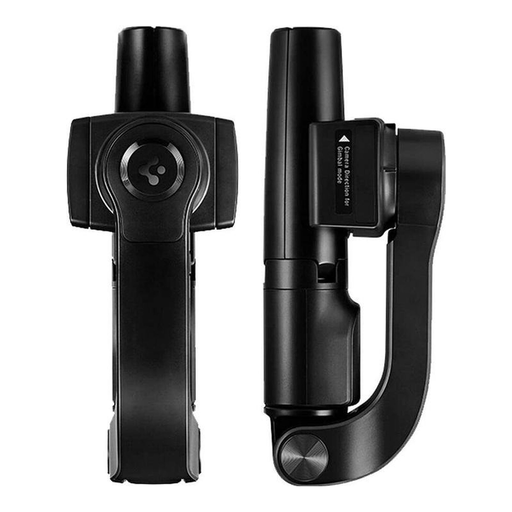
Why this product suits this profile: According to the product specifications, this model combines a gimbal, selfie stick and tripod function in one compact device and is compatible with iOS and Android.
The technical specifications state a weight of 220 g, a maximum length of 54 cm and a Bluetooth connection. This makes it easier to assess portability and functionality before buying.
Compact design, Bluetooth remote control and integrated tripod function.
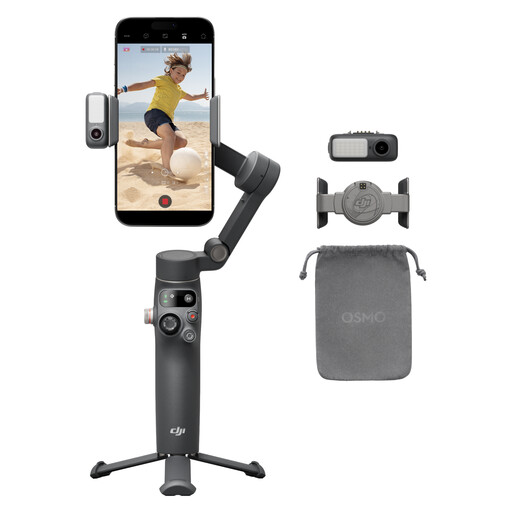
Why this product suits this profile: For regular vlogs and social media content, the integrated extension rod, tripod, multifunction module and 3-axis stabilisation are valuable features.
The equipment is clearly described: up to 10 hours of use, native subject tracking, lighting and a function for charging the smartphone.
3-axis system, integrated extension rod and multifunction module for tracking, lighting and audio accessories.
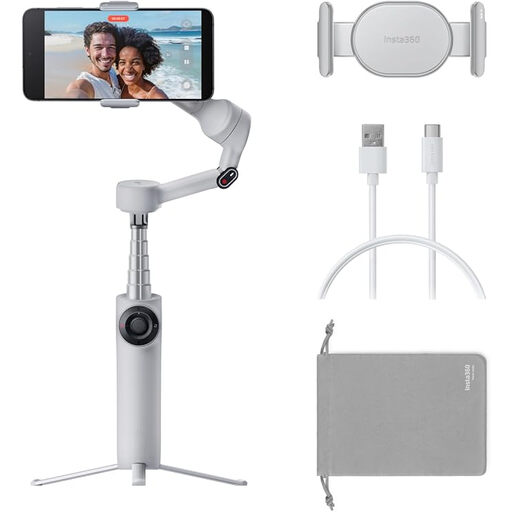
Why this product suits this profile: This model is designed for iPhone users who want to create livestreams, group videos or footage in compatible iOS apps with automatic tracking.
The specifications mention DockKit support for more than 200 compatible iOS apps, as well as multi-person tracking. You should still check your own iPhone model before buying.
360° pan tracking, integrated tripod and selfie stick, plus up to 10 hours of battery life according to the product specifications.
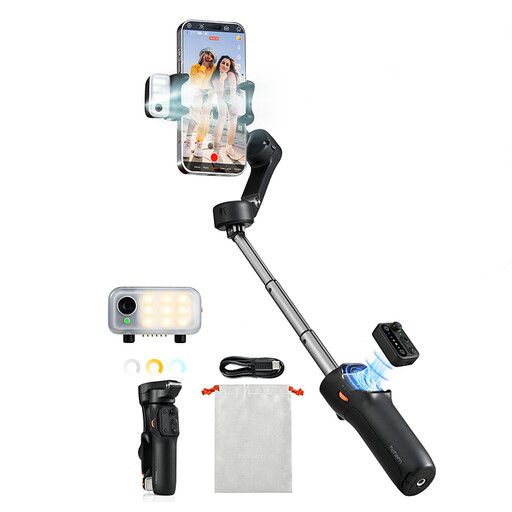
Why this product suits this profile: This foldable smartphone gimbal combines 3-axis stabilisation, a detachable remote control, a tripod and switchable portrait or landscape modes.
The manufacturer’s specifications state a battery life of up to 11 hours and expressly warn against overloading, moisture and operating the device without a correctly mounted smartphone.
Foldable design, 10-metre remote control and support for panoramic, time-lapse and slow-motion footage via the companion app.
We have put together a complete, regularly updated list of products that fully meet these strict selection criteria and the safety regulations applicable in the EU.
Mount the smartphone centrally in the clamp and, if you experience problems, first remove a heavy protective case or additional lens. Only switch on the gimbal once the device is secure. Next, pair it via Bluetooth, install the app if necessary and complete the automatic calibration. Before recording, check that the smartphone is balanced in portrait or landscape orientation.
Its service life depends on the battery, motors, folding mechanism and how it is transported. Lithium batteries lose capacity over time. Store the device in a dry place and do not leave it completely discharged for extended periods. Avoid overloading, drops and use in heavy rain. The actual battery life should be assessed based on the manufacturer’s specifications and the accessories you plan to use.
For vlogs, travel and social media videos, a 3-axis system can compensate for movement while walking and make it easier to record without a second person. If you mainly shoot static videos, you may only need a tripod with a remote control. The key question is therefore whether you often film while moving or regularly use a video stabiliser for vlogs when you are out and about.