
Lieferung heute & morgen

Qualitätsgarantie

Willkommens-Angebote freischalten: KOSTENLOSE Lieferung | Bis zu 80 % RABATT | Kostenlose 30-Tage-JoyPlus-Testphase
App herunterladen
The cameras in modern smartphones can capture stunning images, but an unsteady hand often limits their full potential. A smartphone tripod is a go-to solution for improving image quality. However, the market is flooded with products whose marketing promises often fall short in practice. Many buyers invest in accessories that prove to be unstable, impractical, or break after only a short time.
As your Joybuy Product Recommendation Officer, I'll help you identify the common pitfalls. Instead of falling for overhyped marketing, we'll focus on the key features that define a quality tripod. This guide will show you what to look for to make an informed decision.
Before we get to the solutions, it's important to understand the problems. Many products fail to meet basic requirements, leading to frustration and wasted money.
To avoid these pitfalls, you should base your selection on objective criteria. The following three points are crucial for the performance and longevity of a smartphone tripod.
Stability is paramount. A good tripod must hold your smartphone securely in position, whether on a desk or out in the field.
The connection between the tripod and your smartphone must be completely reliable.
Depending on your use case, advanced features can make all the difference.
Based on the criteria above, we have selected a few products from our range that represent a fitting solution for specific user groups.
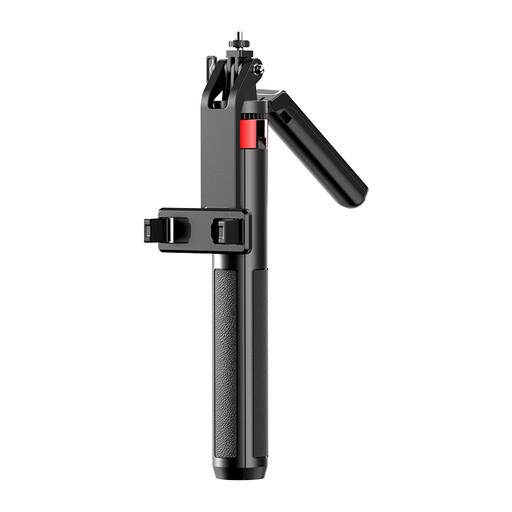
Why it's a great fit: This model combines an impressive 180 cm height with a thoughtful design. It's ideal for vloggers who need a flexible perspective and for travellers looking for a versatile tool for landscape and group shots. The rechargeable remote adds to the convenience.
The four-leg construction directly addresses the stability trap. It provides a wider, more secure base than conventional three-legged tripods, especially at maximum extension height.
The combination of a tall height (180 cm) and enhanced stability from the four-leg design makes it a highly flexible vlogging tripod.
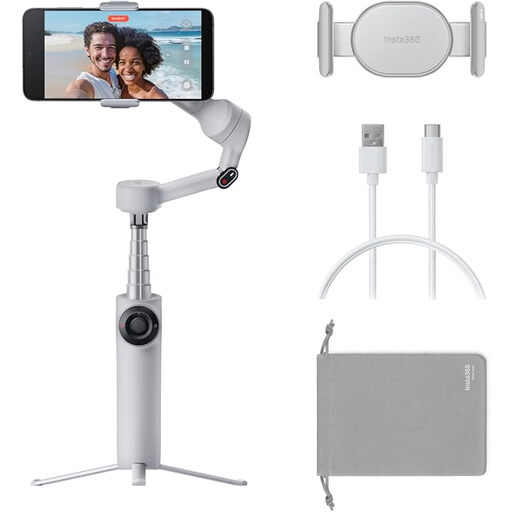
Why it's a great fit: For anyone who wants to create professional-looking, smooth videos for platforms like YouTube or TikTok. This device is more than just a mount; it's an active smartphone stabiliser with AI-powered tracking that smooths out movement and keeps the subject in focus.
It avoids the feature trap by offering genuine, technologically advanced capabilities. Instead of empty promises, the 3-axis gimbal delivers demonstrably better video stabilisation than any static tripod.
The AI-powered 3-axis stabilisation enables shake-free video footage while in motion, something that would be impossible to achieve with a conventional tripod.
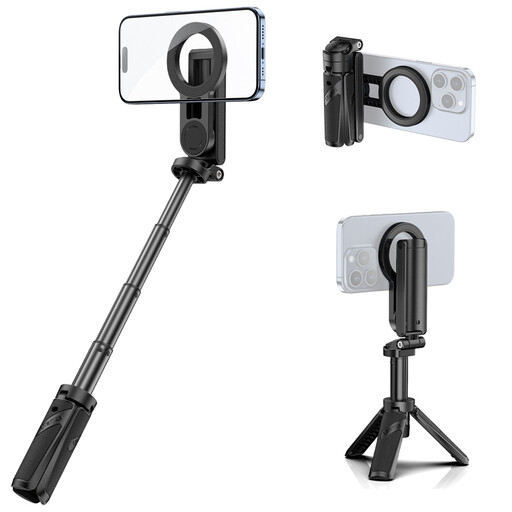
Why it's a great fit: This compact 3-in-1 device is perfect for everyday use, family outings, or spontaneous selfies. It combines a handgrip, selfie stick, and mini tripod into one lightweight, portable design. The magnetic mount makes it especially straightforward for iPhone owners.
It avoids the mount trap with a strong magnetic holder that eliminates the need to fiddle with clamps. Its solid build also avoids the instability found in cheap selfie sticks.
The compact 3-in-1 design and the fast, secure magnetic mount make it an extremely practical and hassle-free solution for everyday shooting.
We have compiled a complete, up-to-date list of products that fully meet these strict selection criteria and rigorous safety standards.
1. What is the difference between a smartphone tripod and a gimbal? A smartphone tripod provides a fixed, stationary base to prevent camera shake during static shots (e.g., photos, time-lapses, interviews). A smartphone gimbal is an active smartphone stabiliser. Its motors compensate for the user's movements in real time, which is essential for capturing smooth video footage while walking or during fast pans.
2. How stable is an extendable smartphone tripod really? Stability heavily depends on the construction. Pay attention to the diameter of the leg sections and the material (aluminium is often more stable than plastic). A tripod with a wider footprint will be more stable at full extension. Models with four legs can offer an advantage here. Read the product description carefully to understand the maximum load capacity and recommended use.
3. Does a tripod with a remote shutter work with any smartphone? Most remote shutters connect to the smartphone via Bluetooth and are compatible with both iOS and Android. Pairing is usually a straightforward process in your device's Bluetooth settings. However, it is always a good idea to check the product details for any limitations regarding specific operating system versions or smartphone models.