
Lieferung heute & morgen

Qualitätsgarantie

Willkommens-Angebote freischalten: KOSTENLOSE Lieferung | Bis zu 80 % RABATT | Kostenlose 30-Tage-JoyPlus-Testphase
App herunterladen
A smartphone gimbal with AI tracking is designed to follow you automatically while filming, compensate for movement, and double as a selfie stick or tripod. In practice, however, models differ considerably in app support, payload capacity, battery life, and tracking capabilities. Anyone who focuses only on terms such as “AI”, “Pro”, or “360°” may end up buying a device that does not suit their smartphone or filming workflow.
This buying guide from the Joybuy Product Recommendation Officer outlines the most important criteria and presents a selection for content creators, vloggers, families, travellers, and social media users in Germany.
Depending on the model, “AI tracking” may refer to integrated facial recognition, gesture control, or an app-based function. Some gimbals can track people without a Bluetooth connection or dedicated app. Others require the manufacturer’s app for tracking, gesture control, or automatic recording to work.
Before buying, check the following:
On iOS devices, for example, Apple DockKit can enable native tracking in compatible apps. However, specific app compatibility may change over time.
Figures such as 10, 11, or 13 hours generally refer to specific usage conditions. Continuous tracking, charging the smartphone, Bluetooth, lighting, and frequent motor movements can reduce battery life. An integrated battery also does not necessarily charge every smartphone at the same speed.
For longer trips, pay attention to:
A 3-axis gimbal typically compensates for rotational movement across the roll, tilt, and pan axes. With a compatible load, this produces smoother footage while walking. However, if the smartphone is too heavy, incorrectly clamped, or overloaded with accessories, the motors may run erratically or stabilisation may fail.
Not every product in this category is water-resistant. In rain, splash-prone conditions, or high humidity, follow the relevant manufacturer’s specifications. A smartphone stabiliser that is not explicitly rated as waterproof should not be used in the rain.
Check the supported smartphone width, weight, and camera-lens placement. Particularly large iPhone Pro models, Android devices with prominent camera bumps, and smartphones inside protective cases can affect balance. A gimbal for iPhone and Android is not automatically compatible with every model in every configuration.
For app-based functions, check the operating system, app version, and required permissions. For example, the DJI Osmo Mobile 7P states that the DJI Mimo app is not available in the Google Play Store due to a platform compatibility issue and should instead be obtained from the official DJI website.
For solo vlogging, face or body tracking is often sufficient. Families, pets, sports footage, and stage scenes place greater demands on the system. Claims such as “multi-person tracking” or tracking at up to 15x zoom should be understood as product-specific features—not as a guarantee for every distance, movement, or lighting condition.
A foldable gimbal fits more easily into a backpack or carry-on luggage. Integrated features that can prove especially useful include:
A selfie stick with gimbal is well suited to spontaneous filming. Anyone who regularly produces interviews, product videos, or livestreams should also look for a stable stand, microphone compatibility, and effortless switching to portrait orientation.
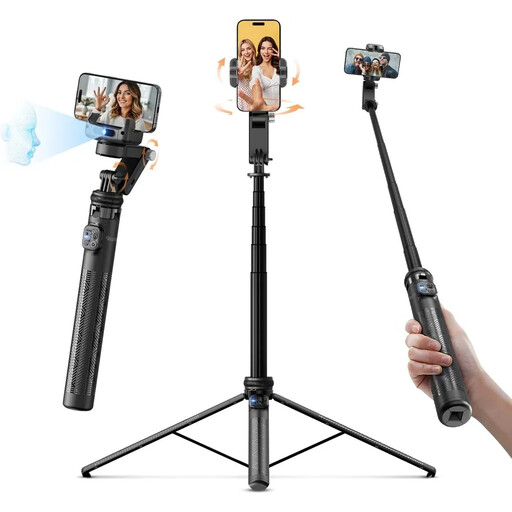
Why it stands out: Combining a gimbal, selfie stick, tripod, and gesture control, this model is well suited to first vlogs, family footage, and short social media videos.
The stated dimensions, smartphone clamp accommodating devices from 6.5 to 9.5 cm, and maximum payload of 2.5 kg make compatibility easier to verify.
Integrated fill light with a colour temperature of 3,000 to 6,500 K, Bluetooth remote control with a range of up to 10 m, and an extendable design.
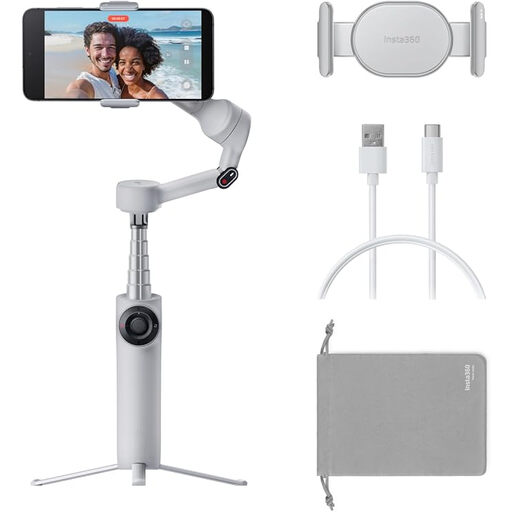
Why it stands out: For travellers and families, the compact all-in-one design with integrated tripod and selfie stick is highly practical.
AI tracking for multiple people and pets is designed for group scenes. Nevertheless, specific smartphone compatibility should be checked before purchase.
According to the manufacturer, it offers up to 10 hours of battery life, 3-axis stabilisation, gesture control, and app-based editing.
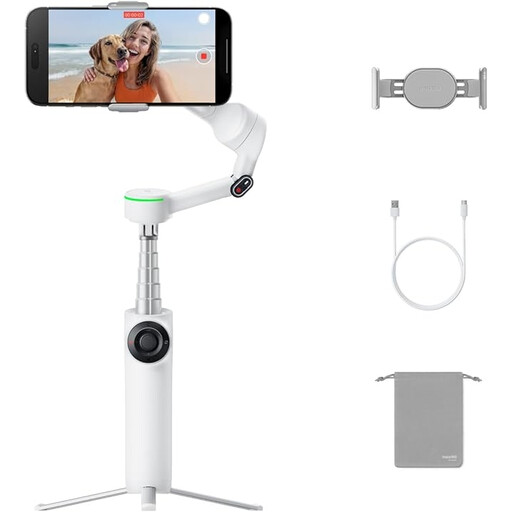
Why it stands out: iPhone users planning livestreams, video calls, or recordings in supported iOS apps benefit from additional DockKit integration.
Support for Apple DockKit across more than 200 compatible iOS apps reduces reliance on a single recording app. The list of compatible apps may change.
Listed features include 360° pan tracking, multi-person tracking, 3-axis stabilisation, and up to 10 hours of battery life.
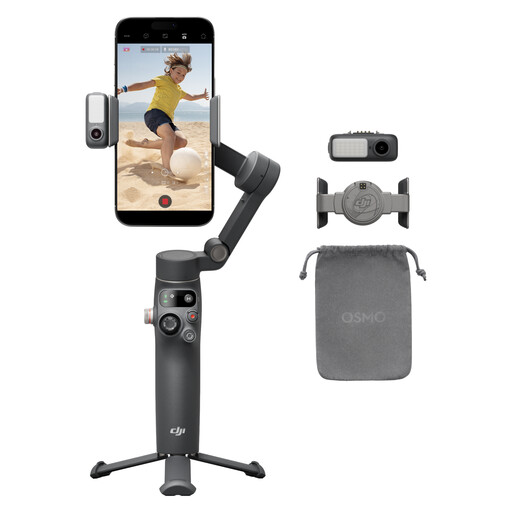
Why it stands out: For vloggers and creators with longer shooting days, this model combines tracking, an extendable arm, and an integrated tripod.
The Android app limitation is clearly stated. This allows buyers to determine in advance whether downloading the app from DJI’s official website is acceptable.
According to the product information, it offers up to 10 hours of use, 3-axis stabilisation, Quick Launch, and additional power delivery for the smartphone.
The full selection includes additional products for different smartphones, shooting scenarios, and accessory requirements.
The motors should not run continuously without a smartphone mounted. Keep fingers, hair, and loose clothing away from moving axes. On models with an integrated light, do not point the LED directly at the eyes of people or animals.
That depends on the model. Some systems use an integrated sensor or separate AI module and can perform basic tracking functions without an app. Advanced modes such as automatic editing, templates, or livestream integration often require the manufacturer’s app.
The manufacturer specifications for the models in this selection range from approximately 80 minutes to 13 hours, depending on the model and usage. Tracking, lighting, smartphone charging, and low temperatures can reduce actual runtime. For travel, a power bank or USB-C charger is a practical addition.
A gimbal for vlogging is worthwhile if you need smooth footage while walking, hands-free tracking, or an integrated tripod. For occasional selfies, a simple selfie stick with remote control may be sufficient. The key factors are therefore how frequently you record, the weight of your smartphone, app usage, and the level of portability you need.