
Lieferung heute & morgen

Qualitätsgarantie

Willkommens-Angebote freischalten: KOSTENLOSE Lieferung | Bis zu 80 % RABATT | Kostenlose 30-Tage-JoyPlus-Testphase
App herunterladen
A smartphone gimbal can reduce shaky footage and make filming easier. However, not every model is suitable for every use. Content creators, travellers and TikTok users often look for different features from people who mainly take group photos or short selfies.
Before buying, you should therefore look beyond terms such as “AI tracking” or “3-axis stabilisation”. Smartphone compatibility, maximum load capacity, battery life and the actual design are among the decisive factors.
A Bluetooth selfie stick with tripod functionality generally provides remote control and flexible shooting angles. However, it does not necessarily stabilise movement mechanically. A genuine 3-axis gimbal uses moving motorised axes to compensate for rotational movements while walking.
If you plan to film while walking, travelling or vlogging, check carefully whether the product description explicitly mentions 3-axis stabilisation.
An AI tracking gimbal detects faces or other subjects using a camera or an integrated tracking function. The range, lighting conditions and direction of movement all affect the results. Detection may be limited in low light, if the face is obscured or during very fast movements.
The smartphone app is also relevant. Some features, such as gesture control, panoramas and time-lapse recording, may only be available in the relevant manufacturer's app.
A smartphone with a case, additional lens or microphone may weigh more than the phone alone. If the stated load capacity is exceeded, the motors may be placed under greater strain. This can affect stabilisation.
For devices with an integrated battery, you should also compare charging time, connection type and operating time. A smartphone gimbal with an LED light may reduce battery life further if the light is left on continuously.
For moving footage, a three-axis smartphone stabiliser is a useful starting point. Also check whether the gimbal can switch between portrait and landscape orientation, and whether it offers modes such as PF, PTF, POV or a locking function.
For selfies only, a phone holder with remote control may be sufficient. For walking footage, vlogs and dynamic scenes, motorised stabilisation is the more practical choice.
Check the stated smartphone width and load capacity. “Gimbal for iPhone and Android” does not automatically mean that every combination of model, case and accessories will fit. With magnetic holders, you should also check whether your smartphone or case is compatible.
A secure clamp should hold the device firmly without continuously pressing any buttons. Before recording, place the phone centrally and balance it if necessary.
A gimbal with selfie stick, integrated smartphone tripod, remote control or LED light can replace several separate accessories. This is particularly useful for travellers and livestreamers. At the same time, additional joints, batteries and holders increase the weight and maintenance requirements.
For mobile use, folded dimensions and weight are crucial. A 361-gram model can be significantly easier to carry than a 535-gram device with an extendable stand.
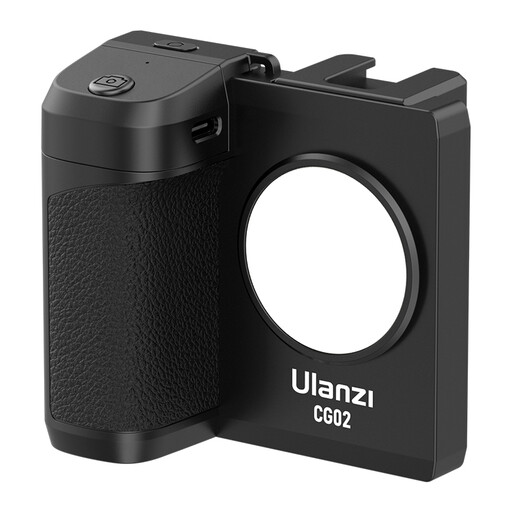
Why this product suits this profile: This grip is designed for users looking for more controlled smartphone handling for selfies, TikTok or vlogs, without immediately needing a motorised gimbal.
The product name indicates a grip with a fill light and remote control – not 3-axis stabilisation. This makes it easier to assess its capabilities realistically.
Three adjustable light levels, Bluetooth remote control and a cold shoe mount for compatible accessories.
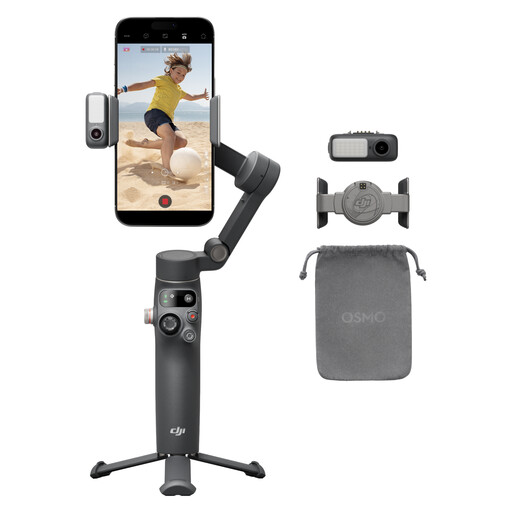
Why this product suits this profile: Content creators and vloggers get a combination of a 3-axis gimbal, integrated extension rod, tripod and multifunction module.
The listed features are clearly separated: 3-axis stabilisation, tracking, lighting and extension stick. This makes the range of functions easy to understand before buying.
A stated operating time of up to 10 hours, support for portrait and landscape orientation, and smartphone charging via the multifunction module.
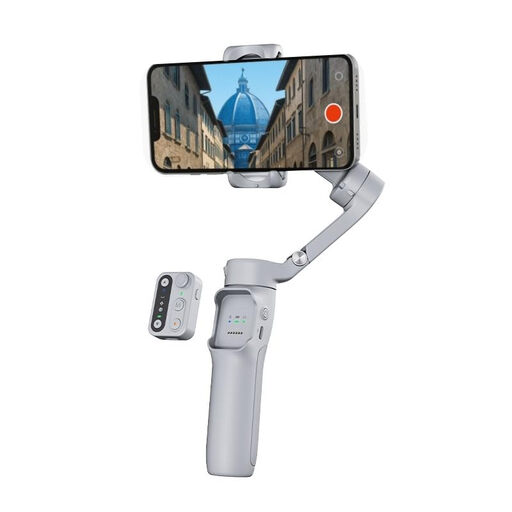
Why this product suits this profile: For travelling, livestreams and longer shooting days, folded dimensions, remote control and battery capacity are particularly important.
The product details state a maximum operating time of 11 hours, a detachable remote control with a range of up to 10 metres and a foldable design.
Stated iSteady-8.0 3-axis stabilisation, portrait and landscape support, plus several shooting modes via the hohem Joy app.
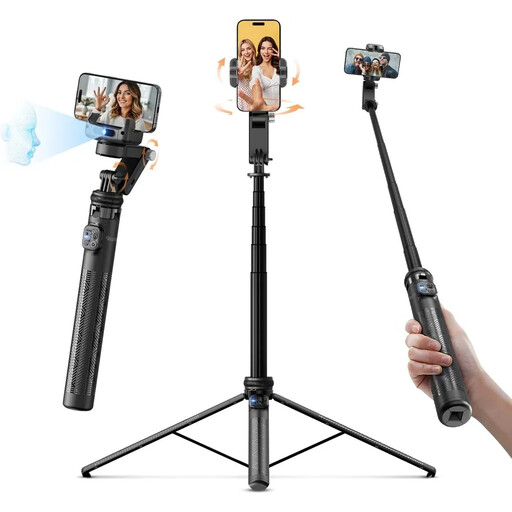
Why this product suits this profile: This model combines a gimbal, selfie stick, tripod and gesture control, making it ideal for solo shooting, livestreams and social media videos.
The technical details specify clear limits: a clamp width of 6.5 to 9.5 centimetres, a tracking range of 0.5 to 5 metres and a maximum load capacity of 2.5 kilograms.
Adjustable LED lighting from 3,000 to 6,500 Kelvin, Bluetooth remote control and extendable height of up to 156 centimetres.
We have put together a complete, regularly updated list of products that fully meet these strict selection criteria and the safety regulations applicable in the EU.
Before using the device for the first time, secure the smartphone firmly in the holder and observe the permitted load capacity. Motorised models must not be switched on without a phone inserted. Moving axes can catch fingers, hair or loose clothing.
Lithium batteries should be charged with a suitable, certified charger and protected from excessive heat, moisture and direct sunlight. Non-waterproof devices should not be used in heavy rain. Accessories such as CR2032 coin cells and small adapters should be kept out of the reach of children.
Charge the gimbal, place the smartphone centrally in the clamp and connect it via Bluetooth or the manufacturer's app if necessary. Then select portrait or landscape orientation and test your preferred shooting method. With motorised devices, the phone must not exceed the permitted load capacity.
Battery life depends on the model, motor load, app usage and LED lighting. The product details include examples such as 11 hours for the hohem model, up to 10 hours for the DJI Osmo Mobile 7P and around 80 minutes for the Rollei Easy Creator Gimbal. These are manufacturer specifications and may vary in actual use.
That depends on your shooting style. For stationary videos, a smartphone tripod with remote control may be sufficient. If you move while filming, want subjects to be tracked automatically or would like to switch between a selfie stick and tripod, a suitable gimbal with the required features is likely to be more useful.