
Lieferung heute & morgen

Qualitätsgarantie

Willkommens-Angebote freischalten: KOSTENLOSE Lieferung | Bis zu 80 % RABATT | Kostenlose 30-Tage-JoyPlus-Testphase
App herunterladen
A smartphone holder should secure your phone reliably, give you the viewing angle you want and take up no more space than necessary in everyday use. In practice, though, it’s easy to buy the wrong one because compatibility details are unclear, magnetic claims are overstated or the holder can’t support enough weight.
Whether you’re looking for a phone holder, smartphone gimbal, phone tripod or smartphone stand, the number of features isn’t what matters most. What matters is whether the model suits your phone, where you’ll use it and how you plan to use it.
A magnetic phone holder won’t automatically work with every device. MagSafe is built into certain iPhone generations and compatible cases. Other iPhones and Android smartphones may need a suitable metal ring. Check whether the ring affects charging, the phone’s case or the camera.
Magnets should also be kept away from credit cards with magnetic strips, medical devices and magnetic storage media. When using a holder in a car, make sure your phone doesn’t obstruct your view, controls or airbags.
A foldable phone holder is handy for travelling, but it still needs to stand firmly or clamp securely when unfolded. How well a suction-cup holder sticks depends largely on the surface. Glass, smooth plastic, metal and marble are more suitable than textured, dusty or greasy surfaces.
Before buying, check the mounting type, contact area and maximum load capacity. If the holder uses a clamp, make sure it fits the edge of your table, shelf or seat back.
A smartphone gimbal uses motors to stabilise footage and is designed for filming while moving. A Bluetooth selfie stick, on the other hand, mainly gives you extra reach and a remote shutter. A phone tripod provides a stable base, but won’t compensate for movement while you’re walking.
If you only need to make video calls or watch a series hands-free, you probably don’t need a motorised gimbal. For vlogs, travel videos and dynamic scenes, though, the extra technology can be useful.
First, compare the supported smartphone size with your device’s dimensions, including its case. Some models specify a range such as 4.7 to 7 inches, while others require a particular level of MagSafe compatibility.
For a gimbal, the maximum payload also matters. According to the product details, the hohem Smartphone Gimbal Stabilizer with OLED Display can support up to 400 g. This should be enough for your phone, case and any accessories attached to it. Don’t exceed the stated weight limit, as this can put extra strain on the motors.
For travelling, weight and packed size are important. According to the specifications, the Spigen S610W weighs 220 g, folds down to 16,7 cm and extends to 54 cm. A gimbal also needs to be considered in terms of its battery, charging time and operating time. According to the product description, the hohem model has a 2600-mAh battery with up to 18 hours of operating time, plus an OLED display for the battery level, Bluetooth connection and recording mode.
For longer recording sessions, check whether the accessory charges via USB-C and whether it can also charge your smartphone.
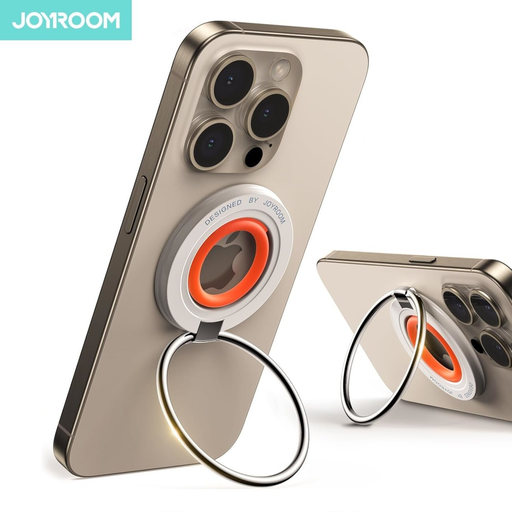
Why it’s a good fit: This compact magnetic holder is designed for iPhone models from iPhone 12 to iPhone 14, and is easy to use without complicated installation.
The stated iPhone compatibility reduces the risk of buying a holder with the wrong magnetic profile. Check that it supports your specific model before ordering.
Magnetic attachment and a compact design. The product details list plastic as the material and specify that it’s designed for Apple devices.
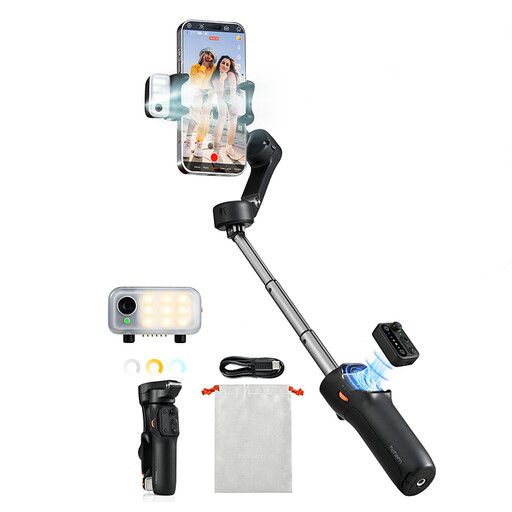
Why it’s a good fit: With three-axis stabilisation, a detachable remote, an extendable pole and a built-in tripod, this model is well suited to vloggers and travellers.
Several functions are combined in one device, so you won’t need to buy a separate selfie stick and mini tripod as well.
AI tracking, a fill light, 13 hours of battery life and support for iPhone and Android devices, according to the product details.
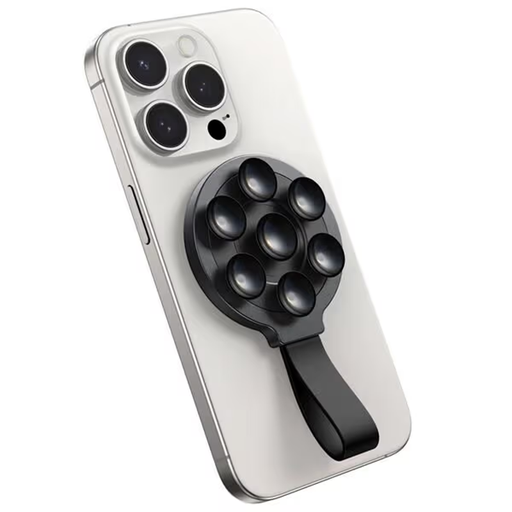
Why it’s a good fit: The combination of a magnetic holder and seven suction cups makes it suitable for video calls, recording and hands-free use on smooth surfaces.
The product details clearly state which surfaces are suitable: they should be clean and smooth. This makes it clear that the suction cups’ grip depends on the surface.
Compatible with MagSafe and smartphones from 4,7 to 7 inches. According to the product details, it weighs 75 g.
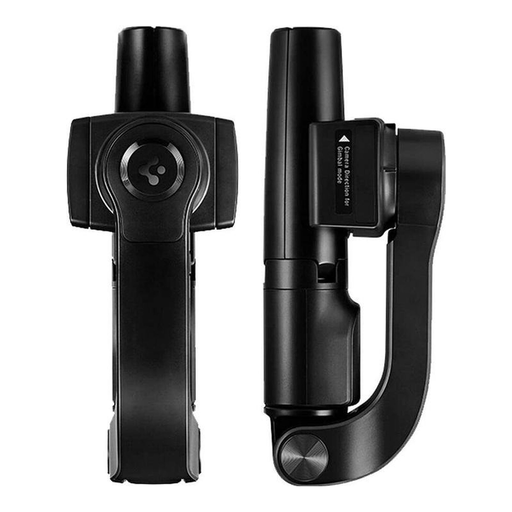
Why it’s a good fit: This all-in-one device combines Bluetooth remote shutter control, a selfie stick, gimbal functionality and a tripod in a portable design for iOS and Android.
Clearly listed features make it easier to compare this model with separate accessories. Set up the Bluetooth connection and check the holder before use.
Weighs 220 g, folds down to 16,7 cm and extends to 54 cm. The product details also list a tripod function and wrist strap.
We’ve put together a complete, regularly updated list of products that meet these strict selection criteria and fully comply with the safety regulations in force in the EU.
Keep contact surfaces free of dust and grease to help your smartphone holder stay in good working order. For suction cups, use a soft cloth and attach them only to suitable, dry surfaces. Check joints, clamps and magnets for visible damage.
For gimbals, don’t exceed the stated load capacity, keep moving joints clear and don’t open or puncture the battery or expose it to high temperatures. Models with an IPX5 rating are protected against water spray only and aren’t suitable for immersion.
It depends on the mounting type. Mechanical clamps and many tripods work with a wide range of Android devices. A magnetic phone holder, on the other hand, needs a compatible magnetic profile or a suitable metal ring. Also check your phone’s width, including its case.
There’s no set lifespan that applies to every holder. It depends on the load, temperature, mounting surface and how often you use it. Dust and moisture can affect the grip of suction cups. Check magnetic holders, clamps and joints regularly for signs of wear.
A gimbal needs power for its motors, Bluetooth and any extra features, such as tracking or lighting. Battery life varies by model. Figures such as 13 or 18 hours are product specifications based on certain operating conditions, so compare them with the way you plan to record.