Players with a dedicated console
If you already own a PlayStation, Xbox or Switch, your controller should work with both that specific console and your snowboard game.


First, choose a controller that’s supported by both your snowboard game and your gaming device – screen size alone doesn’t determine compatibility. If you’re playing from the sofa, a suitable wireless model can give you more freedom to move; a wired model is a practical alternative if the connection and cable reach your seat. Then check the additional features and power requirements for the specific model and game.
If you already own a PlayStation, Xbox or Switch, your controller should work with both that specific console and your snowboard game.
If you play a PC snowboard game on a big screen, consider gamepad support, the connection and the distance to your seat together.
If you want to use extra buttons or play together in front of a screen, check the features of the specific controller and the game’s multiplayer mode.
A good fit if: you play on PC and check the controller information for the specific game against the gamepad you’ve chosen. Steam describes Big Picture mode as a way to use Steam on a TV; according to Steam, not all games support gamepads.
Keep in mind: connectivity and features depend on the controller and game. Sony says that haptic feedback from a DualSense on PC requires a supported game and a USB connection.
A good fit if: you’ve already chosen your console. Check that compatibility is explicitly stated for that console and the specific game. For Riders Republic, Ubisoft lists DualShock 4 and DualSense for PlayStation, and the Xbox Wireless Controller for Xbox.
Keep in mind: a statement that a controller is compatible with Windows doesn’t automatically mean it’s supported on a console. Extra features may also depend on the game.
A good fit if: your snowboard game runs on a Switch with TV output and you choose a compatible controller. Nintendo also lists the Pro Controller for wireless use with Switch 2.
Keep in mind: according to Nintendo, the Switch Lite doesn’t support TV output, and using a different controller won’t change that. Also check whether the game offers the local multiplayer mode you want.
| What you need | What to look for when buying | Who is this especially important to? |
|---|---|---|
| Game and device compatibility | Check the console, generation, game version and explicitly supported input devices; for Switch, also check TV output. | If I’m looking for a controller for a specific game and a device I already own, I want to check that they work together before buying. Around 36% of consumers put compatibility first. |
| Connection from the sofa | Check the supported wireless connection and, where applicable, the receiver; for wired models, check the connection route and cable length to your seat. | If my gaming device is further away from where I sit, I need a suitable connection or a cable that’s long enough. Around 29% of consumers prioritise connectivity and freedom of movement. |
| Controls and playing together | Check the analogue sticks, assignable buttons and extra features supported by the game; for group play, check the game’s local multiplayer mode. | If I want to customise controls or play with others in front of one screen, the game also needs to support the feature I want. Around 21% of consumers prioritise controls or multiplayer. |
| Power and accessories | Check what’s included and the charging or battery setup for the specific model; if a fault develops later, distinguish between the seller’s legal obligations and a voluntary warranty. | If I want to know in advance which cables or batteries I’ll need and who to contact if there’s a fault, what’s included matters too. Around 14% of consumers prioritise power, accessories and potential additional costs. |
Models with similar names may be listed for different platforms. You should also check support for the specific game separately.
Before buying, compare the full model name, platform details and the game’s controller information.
According to Sony, haptic feedback from a DualSense on PC requires a supported game and a USB connection. The screen itself doesn’t provide that support.
Only factor in extra features if they’ll work with your game, device and connection method.
The 3-m cable listed for the specific PowerA model will only be long enough if it can reach from the connection point to where you usually sit.
Check the route from the connection point to your seat and the cable length of the exact model.
If the cable isn’t long enough, you may need a suitable longer cable or a different controller.
Nintendo says that the Switch Lite doesn’t support TV output. Adding another controller won’t remove this limitation.
Before buying, check whether your existing console can output a picture to a TV at all.
To play on a TV, you’ll need a device that supports TV output instead.
Xbox Wireless Controllers are one option for Xbox consoles and supported Windows games.
DualSense is designed for PS5 and, according to Sony, can also be used with compatible games on supported PCs.
The Switch Pro Controller is an option for Switch players; Nintendo also lists wireless use with Switch 2.
According to the manufacturer, the wired G7 SE is designed for Xbox and PC, provided the cable reaches your seat.
The platforms and connection methods listed for Ultimate models vary by version.
The Enhanced Wired Controller is another wired option for the Xbox consoles and Windows platforms listed by the manufacturer.
This selection includes wired Xbox and Windows controllers, as well as models for Xbox, Nintendo Switch and Switch 2. Before buying, check that the specific model works with your gaming device and snowboard game.
 No image available
A wired option for Xbox or Windows games, provided the connection reaches your seat.
Detachable 3-m USB-C cable; four paddles and six assignable buttons.
 No image available
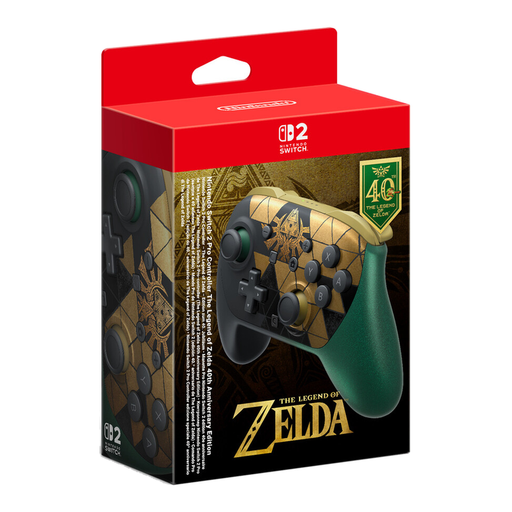
A wireless controller option for a Switch 2 gaming setup.
The product name lists HD Rumble 2, mouse controls, amiibo and GameChat.
 No image available
Listed for Xbox One, Xbox Series X|S and PC; check separately whether it’s supported in your specific snowboard game.
The product name lists Xbox One, Xbox Series X|S and PC. The description lists Xbox Wireless, Bluetooth and two AA batteries.
 No image available
A wired option for PC games, provided the connection reaches your seat; the product name also lists Nintendo Switch.
The description lists a 6-axis gyroscope, customisable buttons, macro functions and turbo functions.
 No image available
A wireless option for Switch games in docked mode; according to Nintendo, the Switch Lite doesn’t support TV output.
The description lists HD Rumble and motion controls.
No. It depends on the device running the game, whether the game supports gamepads and whether you’re using a suitable connection. Steam notes that not all games support gamepads; according to Steam, Shredders requires a controller.
Connect your PC to the screen and, if needed, use Steam’s Big Picture mode. Then choose a controller that works with both your PC and the game. For the Xbox Wireless Controller on a Windows PC, Microsoft lists USB, Bluetooth or an Xbox Wireless Adapter as possible connections.
According to Sony, haptic feedback on PC requires a supported game and a USB connection. So, a successful connection alone doesn’t mean the game supports the feature.
For faulty goods, the seller is generally responsible under the statutory consumer rights; the standard period is two years. For sales contracts entered into from 31 July 2026, the Verbraucherzentrale says that choosing a repair can, under the stated conditions, extend this period once by twelve months. This is separate from a voluntary manufacturer’s warranty. For a standard online purchase, you generally also have a 14-day right to cancel; exceptions and the circumstances of the contract should be considered.
Radio equipment placed on the market in the EU is covered by the legal framework of the Radio Equipment Directive. The European Commission describes requirements under this framework, including those relating to safety and the use of radio frequencies. The CE mark is a declaration by the manufacturer, not an independent quality mark. In Germany, end-of-life electrical equipment must not go in household waste; it should be taken to the designated return or collection points.