First, check which controls your particular snowboarding game supports on your platform. Shredders requires a controller on PC, while Riders Republic also supports keyboard and mouse. Then choose between wired and wireless models, and consider whether customisable buttons or extra features matter to you. For wireless models, make sure the connection and accessories are compatible with your PC.
Who might benefit from a gamepad?
Check game compatibility first
If you want to play Shredders or several snowboarding games, check the input requirements for each game and platform. Shredders’ Steam page lists a controller as required; Ubisoft also lists keyboard and mouse, as well as certain controllers, for Riders Republic on PC.
Take control of your tricks
If you want to tailor the controls to the way you play, check the options in the game. For Riders Republic, Ubisoft lists the “Racer”, “Steep” and “Trickster” controller presets, as well as customisable button mapping.
Keep your desk tidy
If you work and play in the same spot, cable routing may be a factor. Compare it with the wireless options available on the specific controller and the ports on your PC.
What should you look for when buying?
First, check that the game and platform are compatible. Then decide which control options and connection best suit your workspace.
| Factor |
What to check |
Who should pay particular attention? |
| Game and platform compatibility |
Check which inputs are supported by the specific game on the platform you use. |
If I play several snowboarding games, I want to know which inputs work for each one. Compatibility is the top priority for around 36% of consumers. |
| Stick and trick controls |
Check the presets and custom button mapping in the game; only choose extra buttons if you intend to use them. |
If I want to control tricks with a layout that suits me, customisation options matter. Around 29% of consumers prioritise customisable controls. |
| Connection and space |
Check the cable route, USB ports, Bluetooth support and, if needed, receiver or adapter requirements. |
If a cable gets in the way at my desk, I need a wireless connection that my PC actually supports. Around 21% of consumers prioritise a connection that works for their desk setup. |
| Upfront and ongoing costs |
Check what’s included and how the controller is powered; for Riders Republic on PC, also consider its supported keyboard controls. |
If I only want to buy the features I need for my game, I factor in any essential accessories and whether I can keep using input devices I already own. Around 14% of consumers mainly look to avoid unnecessary extra costs. |
Avoid common buying mistakes
-
Assuming “PC-compatible” means “right for my game”
Input requirements vary by game: according to Steam, Shredders requires a controller on PC, while Ubisoft also lists keyboard and mouse for Riders Republic on PC.
Before choosing a model, check the input options for the specific game and platform you use.
-
Assuming every wireless model uses Windows Bluetooth
For the Ultimate 2C Wireless on Windows, 8BitDo lists 2.4 GHz with a USB receiver or a wired connection; according to the manufacturer, Bluetooth is for Android. Microsoft describes different connection options for the Xbox Wireless Controller, and an adapter may be needed for Xbox Wireless.
Check the wireless mode listed for the full model name against the ports on your PC.
-
Expecting extra haptics just from the controller’s name
Sony says adaptive triggers depend on support from the game. Haptic feedback also requires a USB connection on PC; this doesn’t mean that the specific snowboarding game will support it.
Check whether the game supports the feature. Otherwise, choose a controller based on its standard controls.
-
Confusing similarly named controller variants
A product range can include models for different platforms. The name PowerA Enhanced Wired alone doesn’t tell you whether it’s the Xbox or Switch variant.
Check the full model name and the platform it’s specifically listed for.
Key brands to consider
Microsoft Xbox
An option for supported Windows games and Xbox consoles if you want a choice of connection methods.
- Microsoft lists USB, Bluetooth and Xbox Wireless for connecting to Windows.
- An additional adapter may be needed for Xbox Wireless on PC. Also check that the specific game and accessories suit your needs.
Sony PlayStation
The DualSense is an option for PS5 players who also want to use it with compatible Windows games.
- Sony lists USB and Bluetooth for supported Windows PCs.
- Adaptive triggers require support from the game. Haptic feedback also requires USB on PC; there’s no guarantee of a special effect in a snowboarding game.
GameSir
The G7 HE is a wired option for Windows and Xbox, with additional controls.
- GameSir lists Hall Effect sticks and triggers, plus two rear buttons.
- The model needs a USB-C cable connection. These components alone don’t guarantee a particular lifespan or an advantage in a specific game.
8BitDo
The Ultimate 2C Wireless is an option for Windows if you want to choose between the included 2.4 GHz receiver and a wired connection.
- 8BitDo lists Hall Effect sticks and triggers, as well as mappable extra bumpers.
- According to the manufacturer, Bluetooth on the Ultimate 2C Wireless is for Android, not for connecting to Windows. Other 8BitDo variants don’t necessarily have the same features.
PowerA
The Enhanced Wired Controller for Xbox Series X|S is a wired option for supported Xbox and Windows games.
- PowerA lists a detachable 3-m USB cable and two mappable extra buttons.
- Check whether you can route the cable neatly across your desk and whether you’ve selected the Xbox/Windows variant.
Gamepads at Joybuy
This selection features wireless PC controllers. Before buying, check that the specific connection, accessories and game support are compatible with your PC.
 No image available
EasySMX D10 PC Controller
The product title describes this as a wireless PC gamepad; check that its connection works with your PC and game.
The title lists a TMR joystick, dual-mode triggers, fully mechanical buttons, a 1,000 Hz polling rate and RGB lighting. Compatible systems listed are PC, Switch, Android and iOS.
View at Joybuy
 No image available
VIELLAN Wireless Gaming Controller
The title lists PC compatibility and a PlayStation 5 button layout; check that it’s supported by your specific game and operating system.
Features listed include Hall Effect joysticks, 255-level Hall Effect triggers, programmable rear buttons, RGB lighting, a 1,000-mAh battery and USB-C.
View at Joybuy
 No image available
CHENGDAO Wireless Controller
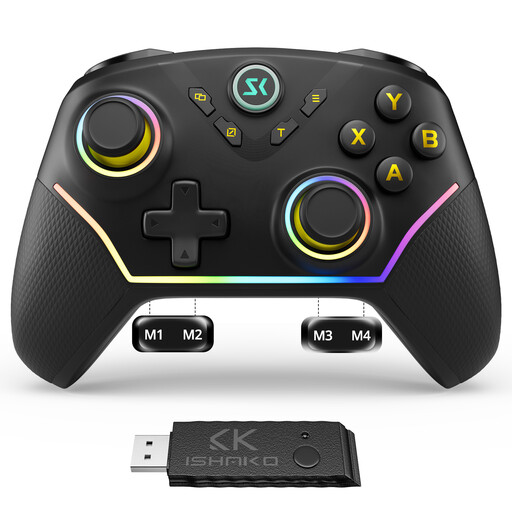
The title lists compatibility with PC Windows; check that it works with your game and the connection you intend to use.
Features listed include Hall Effect joysticks and triggers, four rear buttons and RGB lighting. The title lists PC Windows and Nintendo Switch as compatible systems; this variant is black.
View at Joybuy
 No image available
Microsoft Xbox Series X/S Wireless Controller – Deep Pink
The product description lists PC compatibility and Bluetooth; check that your PC supports this connection.
Compatible systems listed are Xbox One, Xbox Series X/S and PC. According to the product description, the controller requires two AA batteries.
View at Joybuy
 No image available
BIGBIG WON BLITZ2 Wireless Controller
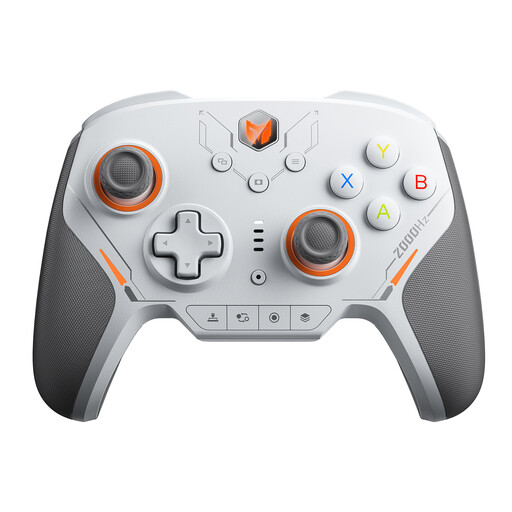
The product title describes this as a wireless PC controller; check that the connection and game input work with your setup.
Features listed include TMR electromagnetic joysticks, 16 fully mechanical microswitches and a 2,000 Hz polling rate. The title lists PC, Switch, iOS and Android as compatible systems.
View at Joybuy
Frequently asked questions
Do I need a controller for every snowboarding game on PC?
No, requirements vary by game. According to Steam, Shredders requires a controller and doesn’t support keyboard and mouse controls; Ubisoft also lists keyboard and mouse as an input option for Riders Republic on PC.
How do I customise the controls in Riders Republic?
According to Ubisoft, you can change the button mapping in the “Controller” section of the “Options” menu, and choose between the “Racer”, “Steep” and “Trickster” presets.
Can I use an Xbox Wireless Controller on a Windows PC without an extra wireless adapter?
According to Microsoft, a USB connection is possible; Bluetooth requires the relevant support on your PC. A separate adapter may be needed for Xbox Wireless.
Do DualSense haptics and adaptive triggers work automatically in snowboarding games on PC?
No, Sony says adaptive triggers depend on support from the game. Haptic feedback also requires USB on PC, so check whether the specific game supports each feature.
What are my rights when buying a controller online in Germany?
For a standard online purchase of goods from a business seller, the EU consumer portal generally explains that you have a 14-day cancellation period from delivery and at least two years of statutory legal guarantee from receipt. This is separate from any voluntary manufacturer’s guarantee.


