First, check which input devices your specific snowboarding game supports on your platform: according to Steam / FoamPunch, Shredders requires a controller on PC, while Ubisoft also lists keyboard and mouse support for Riders Republic on PC. Then choose a connection type and controls to suit your game. RGB lighting alone doesn’t tell you whether the button labels are easy to see in the dark.
Who this guide is for
Players checking game and platform compatibility
If you play on PC or console, first check whether your specific snowboarding game supports the controller. Steam / FoamPunch lists a controller as a requirement for Shredders; Ubisoft lists the supported input methods for Riders Republic by platform.
Players in a dark room
If you want to find the controls more easily in low light, check which parts of the specific controller light up. Illuminated areas of the casing or an RGB ring don’t automatically mean the button labels are backlit; PowerA and 8BitDo each describe the lighting on their models.
Players who want customisable controls
If stick and button controls or extra inputs matter to you, check the model’s features against the options available in your game. GameSir lists Hall Effect sticks and two lockable rear buttons for the G7 HE; Nintendo describes motion controls for the Switch Pro Controller.
What to look for when buying
Start by checking your game and platform. Then decide which lighting and control features matter to you, and whether a wired or wireless connection and the power requirements suit your setup.
| What matters when buying |
What to check |
Who it matters most to |
| Game and platform compatibility |
Check the input requirements for your specific game version and platform. Steam / FoamPunch requires a controller for Shredders on PC; Ubisoft also lists keyboard and mouse support for Riders Republic on PC. |
If I play on a specific device, I want to know whether my snowboarding game actually supports the controller. Around 33% of consumers put game and platform compatibility first. |
| Finding controls in low light |
Check whether the lights illuminate the buttons, parts of the casing or a ring; if necessary, also check the lighting settings for the specific model. |
If I want to find the controls more easily in a dark room, what actually lights up on the controller matters to me. Around 27% of consumers prioritise being able to see the controls in low light. |
| Control feel and customisation |
Check that the sticks, extra buttons and mapping options you need work with the game’s inputs. Nintendo lists motion controls for the Switch Pro Controller; GameSir lists two lockable rear buttons for the G7 HE. |
If I prefer particular buttons or a specific control feel, I check whether the game supports those inputs. Around 20% of consumers prioritise control feel and customisable inputs. |
| Connection and power |
Check your distance from the screen, the connection, cable length, and the batteries, battery and charging accessories supplied with the exact model. The GameSir G7 HE is wired; Microsoft describes the Xbox Wireless Controller as using batteries. |
If I need to sit far enough from the screen or don’t want a wired connection, the connection type needs to suit my setup. Around 20% of consumers pay particular attention to connection and power. |
Common misconceptions
-
Assuming RGB lighting means the buttons are illuminated
An RGB ring or illuminated areas of the casing don’t prove that the button labels are backlit. PowerA describes four lighting zones on its Lumectra model; 8BitDo lists an RGB ring on the Ultimate 2 Bluetooth Controller.
Check the product description for the exact model to see which parts are illuminated and whether that lighting will help you find the controls.
If only a ring or parts of the casing light up, that may not make the buttons any easier to find.
-
Assuming platform compatibility guarantees game compatibility
A controller may be listed for a platform without every snowboarding game supporting the same inputs. Steam / FoamPunch lists a controller as a requirement for Shredders; Ubisoft lists several input options for Riders Republic, depending on the platform.
Before buying, check the details for your specific game and platform version.
-
Leaving connection and power until later
A wired controller needs a suitable port and enough cable length; with a wireless controller, power is part of the setup.
Check the connection, cable length, what’s included and the power requirements for the exact model. Microsoft’s guide explains how to use batteries with the Xbox Wireless Controller; GameSir lists a USB-C wired connection for the G7 HE.
Key brands at a glance
Xbox / Microsoft
A good option to check for Xbox and Windows PCs: Microsoft lists the Xbox Wireless Controller for these devices, and Ubisoft also lists it as a supported input for Riders Republic.
- Microsoft lists Bluetooth and button mapping among its features.
- This doesn’t mean the button labels are illuminated or that every game supports the controller. Check the power requirements and any accessories you may need.
PlayStation / Sony
The DualSense is an option designed for PS5; Ubisoft also lists it as a supported input for Riders Republic on PC and PS5.
- Sony lists haptic feedback and adaptive triggers among its features.
- Check separately whether your specific snowboarding game uses these features; they don’t mean the buttons are illuminated.
Nintendo
The original Switch Pro Controller is an option for Switch users. Nintendo confirms that it connects wirelessly to Switch 2.
- Nintendo lists motion controls as a feature of the Pro Controller.
- Check whether the specific game uses this input and whether the model is compatible with your console.
PowerA
According to PowerA, the Advantage Wired Controller for Xbox Series X|S with Lumectra is licensed for Xbox Series X|S and also works with Xbox One and Windows 10/11.
- PowerA describes four RGB lighting zones and two mappable buttons on this model.
- The lighting zones don’t prove that the button labels are backlit. The cable limits how far away you can sit, and some features may depend on the game.
8BitDo
8BitDo lists the Ultimate 2 Bluetooth Controller for Switch and Windows.
- For this model, 8BitDo lists an RGB ring, TMR sticks and button mapping options.
- The RGB ring doesn’t mean the buttons are backlit. If you’re comparing similarly named versions, check the platform details for each one.
GameSir
According to GameSir, the G7 HE is a wired option for the Xbox and Windows platforms listed.
- GameSir lists Hall Effect sticks and two lockable rear buttons.
- It connects via USB-C cable; the listed features don’t mean it has RGB lighting or illuminated buttons.
Joybuy product selection
This Joybuy selection includes controllers with RGB lighting or extra input options for the platforms listed. Before buying, check that your specific snowboarding game supports the controller.
 No image available
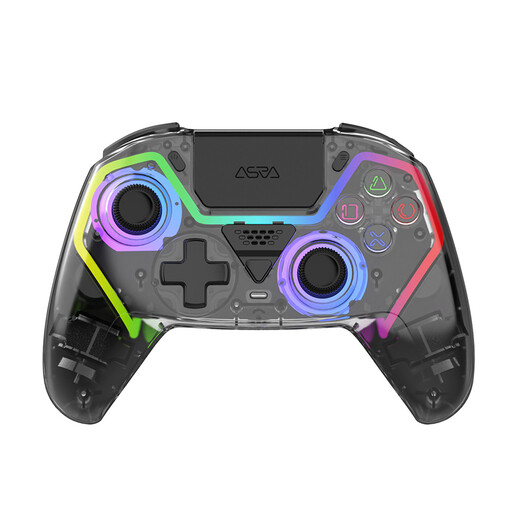
NAXSIR Wireless PS5 Controller with Hall Effect Joysticks, Programmable Buttons and RGB Lighting
If you’re looking for a wireless PS5 controller with RGB lighting effects and extra programmable buttons, check that your game supports these inputs.
The product title lists Hall Effect joysticks and a 1000 mAh battery.
View at Joybuy
 No image available
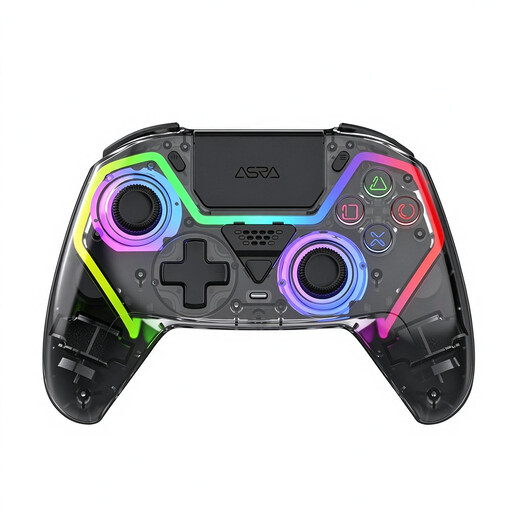
VIELLAN Wireless Controller for PC with PS5 Button Layout
If you’re looking for a wireless model with extra inputs for PC, check first that the game’s controls work with the buttons you want to use.
The product title lists Hall Effect joysticks, 255-step Hall triggers, programmable rear buttons, RGB lighting, a 1000 mAh battery and USB-C. The PS5 button layout doesn’t mean it’s compatible with a PS5 console.
View at Joybuy
 No image available
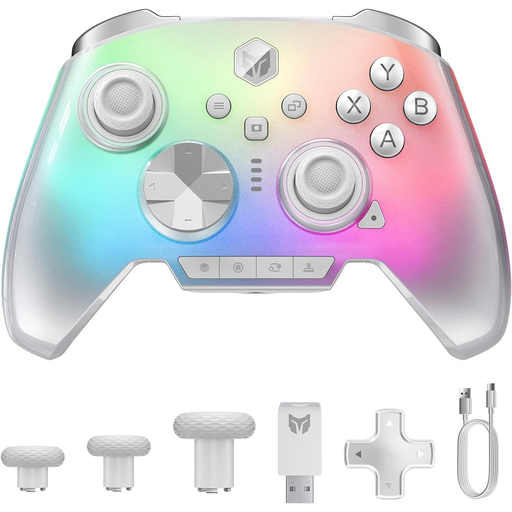
BIGBIG WON Rainbow 3 Wireless Controller for PC/Switch 2
If you’re looking for a wireless controller with RGB lighting effects and extra control features, check that the listed platform is compatible with your device and game.
The product title lists capacitive joysticks, 16 mechanical buttons, 14 customisable RGB lights and a 6-axis gyroscope.
View at Joybuy
 No image available
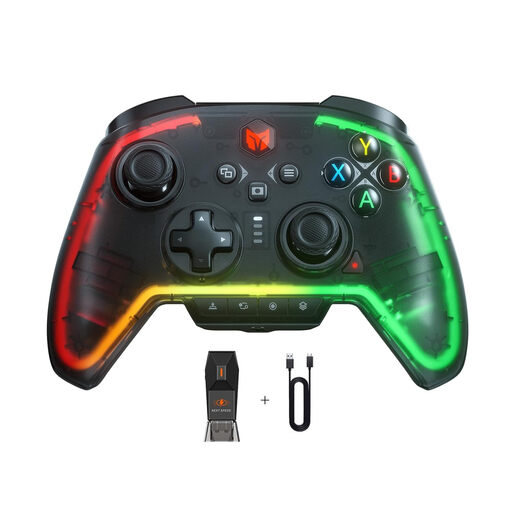
BIGBIG WON Rainbow 2 Pro Wired Controller for PC/Switch Lite/PS4
If you prefer a wired connection and customisable inputs, check that the listed platform is compatible with your device.
The product title lists a 6-axis gyroscope, macro function, customisable buttons and RGB lighting. This is a wired model.
View at Joybuy
 No image available
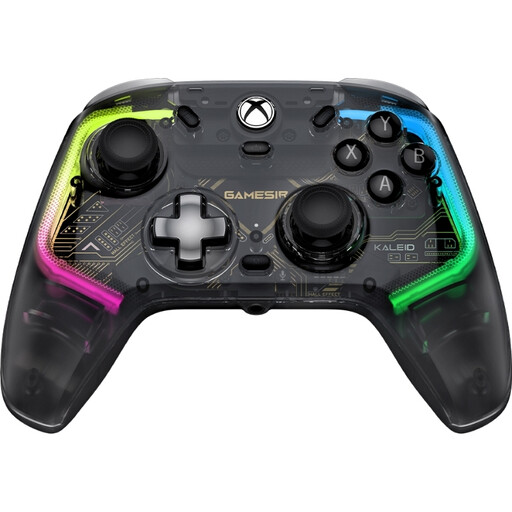
GameSir Kaleid Smoke Transparent RGB Wired Controller for Xbox Series X/S, Xbox One and Windows 10/11
If you play on a supported Xbox or Windows platform and want lighting on the controls themselves, check that this wired model suits your distance from the screen.
The product description lists RGB lighting on the face buttons and analogue sticks. The detachable USB-C cable is 3 m long; the connection is wired.
View at Joybuy
Frequently asked questions
Do I need a controller to play snowboarding games on PC?
It depends on the game: Steam / FoamPunch requires a controller for Shredders and states that keyboard and mouse are not supported. Ubisoft also lists keyboard and mouse support for Riders Republic on PC.
Do RGB controllers automatically make the buttons easy to see in the dark?
No. PowerA describes four lighting zones on its Lumectra model; 8BitDo lists an RGB ring on the Ultimate 2 Bluetooth Controller. Check whether the specific model lights up the controls you want to see.
Can I connect an original Nintendo Switch Pro Controller to Switch 2?
Yes. Nintendo confirms that the original Switch Pro Controller can connect wirelessly to Switch 2. Also check whether your snowboarding game supports its inputs.
How do I connect the GameSir G7 HE?
GameSir describes a wired connection: connect the USB-C cable to the controller and a supported Xbox or PC, then press the Home button. Check that the cable is long enough for where you sit.


