Who is this guide for?

Co-op session with an existing Switch

You want to find out whether your existing Joy-Con will do the job or whether a separate controller would be a better choice. Nintendo notes that how you can use the Joy-Con depends on the game and its multiplayer options.

Sofa gamers with a PC or Xbox

You’re looking for an extra controller and need to check whether a cable, Bluetooth or a USB receiver will work with your device and the distance from your sofa.

Gamers in a dimly lit room

You want to find the controls more easily, so you’re checking which parts of the controller actually light up. Lighting alone doesn’t tell you whether it’s compatible with your platform or game.

What should you look for when buying?

Buying criteria What to check Who will find this most important?
Platform and game Check the platform version, local multiplayer mode, player count and the controller configurations supported by the specific game. If your main concern is making sure both people can play your existing game, compatibility comes first. Around 33% of consumers say it’s their top priority.
D-pad and button layout Compare the D-pad, button spacing and grip, ideally with both players in mind. If you need easy-to-reach buttons and a familiar layout for quick changes of direction, how the controller feels in your hands is key. Around 27% of consumers say it’s their top priority.
Connection and power Measure the cable route to the sofa, or check the wireless mode, an available USB port and charging options. If you don’t want a cable getting in the way by the sofa, or need to plan for power, choosing the right connection is especially important. Around 20% of consumers prioritise freedom of movement and power.
Ease of use in the dark Check which parts light up and whether the lighting can be adjusted. Case lighting doesn’t automatically mean the buttons are illuminated. If you want to see status indicators or controls more clearly in a dimly lit room, the exact position of the lighting matters. Around 20% of consumers prioritise being able to find their way around in the dark.

Common buying mistakes

  • Two existing Joy-Con don’t automatically make a suitable pair of controllers for two players

    Whether one Joy-Con is enough for one person depends on the multiplayer options and supported controller configuration for the specific game.

    Try the co-op mode with your existing Joy-Con before choosing an extra controller.

    If that doesn’t support the number of players you want, you may need an extra controller.

  • “Wireless” doesn’t automatically mean Bluetooth for every device

    The 8BitDo Ultimate 2C models list different platforms and connection types. The connection details for the GameSir G7 Pro also vary depending on the full model name.

    Check the exact model name, your device and the connection mode it’s designed to use.

    Depending on the model and device, you may need a USB receiver or a different version.

  • Colourful case lighting doesn’t mean the buttons are illuminated

    PowerA describes LED colours and a lighting effect on the case of the Spectra Enhanced Wired, but doesn’t mention illuminated button labels.

    Check exactly which parts light up on the specific model before choosing it for its lighting.

  • A wired controller won’t necessarily reach the sofa

    PowerA lists a 3-m cable for the Spectra Enhanced Wired and says it can be used with a docked Switch.

    Measure the cable route from the dock to your seat and plan a safe route away from walkways.

    If the cable won’t reach the sofa or gets in the way, you’ll need a different seating arrangement or connection option.

Key brands at a glance

Nintendo

A good option for Joy-Con and separate controllers for Nintendo Switch.

  • Nintendo explains how to use a single Joy-Con and notes that the right controller configuration depends on the game. The Switch Pro Controller has a single plus-shaped D-pad.
  • Nintendo quotes around 40 hours of battery life for the Switch Pro Controller on a full charge. Actual battery life depends on how you use it and which features are enabled.

8BitDo

The Ultimate 2C models are designed for different platforms, depending on the version.

  • 8BitDo lists Switch compatibility for the Bluetooth version, and connections to Windows and Android for the wireless version.
  • The model name alone isn’t enough to make the right choice. Check the version, platform and required firmware.

PowerA

The Spectra Enhanced Wired is a lit-up wired controller for a docked Switch.

  • PowerA lists eight LED colours and a 3-m cable for this model.
  • According to PowerA, it doesn’t have HD Rumble, motion controls, IR or amiibo NFC. The listed LEDs don’t mean the button labels are illuminated. It’s also not suitable for games that require Joy-Con only.

Microsoft Xbox

The Xbox Wireless Controller is designed for Xbox consoles and Windows PCs.

  • Microsoft lists Bluetooth and a hybrid D-pad as features of this model.
  • Support for a platform doesn’t guarantee that a particular game supports local multiplayer.

Sony PlayStation

The DualSense is the dedicated controller for PS5; PC use depends on the game and device.

  • Sony lists USB-C and Bluetooth for connecting to a PC.
  • According to Sony, haptic feedback on PC requires a supported game and a USB connection. Special features may vary depending on the game, device and connection.

GameSir

The G7 Pro is a configurable option for Xbox and Windows, but the exact edition matters.

  • GameSir lists a wireless receiver connection to Windows for the standard G7 Pro.
  • For the standard G7 Pro, GameSir lists a wired connection to Xbox. Editions specifically called G7 Pro Wireless have different connection details, which shouldn’t be assumed to apply to the standard model.

Controllers at Joybuy

Here you’ll find extra controllers for Switch, PC and Xbox. Before choosing one, check that your specific game and device support the number of players and connection you want, and find out which controls are actually illuminated in the dark.

Nintendo Switch Pro Controller in black

Nintendo Switch Pro Controller – Black

A separate wireless controller for Nintendo Switch, with a single plus-shaped D-pad.

View at Joybuy

EasySMX D10 PC controller with TMR joystick and RGB backlighting

EasySMX D10 PC Controller

For PC or Switch gamers considering a wireless controller with Bluetooth.

The product name lists PC, Switch, Android and iOS, a TMR joystick, dual-mode triggers and mechanical buttons. RGB backlighting doesn’t mean the button labels will be easy to read in the dark.

View at Joybuy
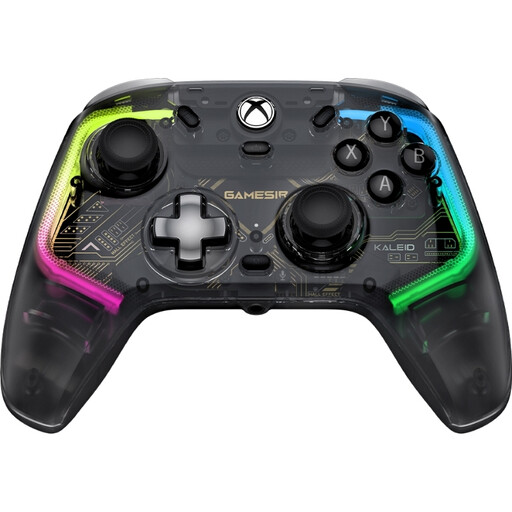
GameSir Kaleid Smoke Transparent RGB Wired controller for Xbox and Windows

GameSir Kaleid Smoke Transparent RGB Wired

For Xbox or Windows gamers looking for a wired controller with illuminated controls.

The product details list RGB lighting on the action buttons and analogue sticks, plus a detachable 3-m USB-C cable. Make sure you plan the cable route to your sofa.

View at Joybuy
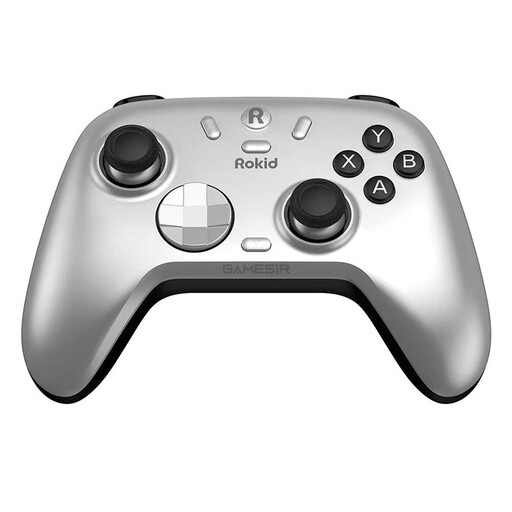
Rokid and GameSir controller

Rokid × GameSir Controller

For Switch or PC gamers considering a controller with a mechanical, circular D-pad, as described.

Before buying, check which of the connection options listed for your device will work with your set-up.

View at Joybuy

BIGBIG WON Rainbow 3 Wireless Controller with customisable RGB lights

BIGBIG WON Rainbow 3 Wireless Controller

For gamers considering a wireless controller for the platforms listed in the product name.

The product name lists 16 mechanical buttons and 14 customisable RGB lights. If you want to find specific buttons in the dark, check which parts are illuminated.

View at Joybuy

Frequently asked questions

Do two people playing on a Switch always need two extra controllers?

No. Nintendo explains that each Joy-Con can be used on its own when held horizontally. Whether that works for your game depends on its supported play style and multiplayer mode.

How do I set up individual Joy-Con for two players?

Open “Controllers” from the HOME Menu and select “Change Grip/Order”. For individual Joy-Con held horizontally, Nintendo specifies the SL and SR buttons. Then check in the game that both players are recognised.

Should I charge a Switch Pro Controller before a co-op night?

Make sure you leave time to charge it. Nintendo quotes around six hours for a full charge and around 40 hours of battery life when fully charged. Actual battery life depends on the software and features used.

Do LEDs mean the action buttons are illuminated?

No. PowerA describes LED colours and a lighting effect on the case of the Spectra Enhanced Wired, but doesn’t mention illuminated button labels. Check exactly which parts light up on the specific model.

What rights do you have when buying a controller online in Germany?

For eligible online purchases from a business seller, you generally have a 14-day cancellation period starting from delivery. Exceptions may apply, and return postage may be payable. For faulty goods bought from a business seller, you’re generally entitled to a minimum two-year statutory warranty from the date you receive them. These statutory rights are separate from any voluntary manufacturer’s guarantee.